Photoshop Crop

Messages
3,210
Name
Wayne
Edit My Images
No
I have cropped a photo that I wish to export at the cropped size (pixels).

I have just spent half an hour googling and either its me being thick or this info is not readily available in my 2025 version.

All advice on google I have tried and on each occasion the sub menu I am looking for is not listed in my toolbar.

What am I doing wrong?
 
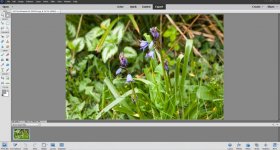
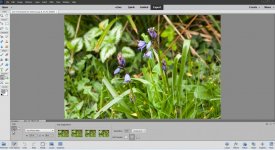
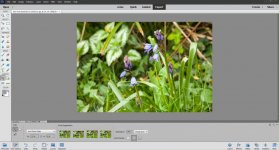
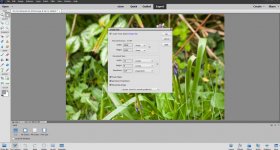
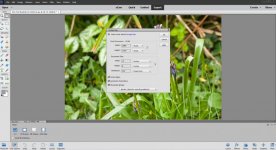
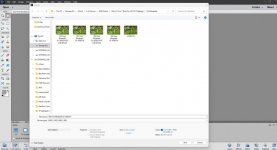
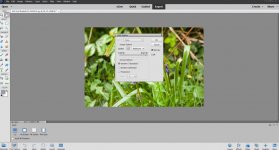
Hi Wayne, I only have Photoshop Elements 15 but here's what I do usually in my PP workflow. I import all my photos into LrC (up to date version) then once I am happy with them I export them to a folder. Then in PSE I open each file individually do any crops I want then go File, Save as give it a new name and a screen opens for file size, I select whay I want it to be then save it.

I've tried to give you a screenshot for every stage below, hope it helps.

Screenshot 2026-04-07 174356.jpgScreenshot 2026-04-07 174603.jpgScreenshot 2026-04-07 174714.jpgScreenshot 2026-04-07 174815.jpgScreenshot 2026-04-07 174840.jpgScreenshot 2026-04-07 174917.jpgScreenshot 2026-04-07 175001.jpg
 
I have cropped a photo that I wish to export at the cropped size (pixels).

I have just spent half an hour googling and either its me being thick or this info is not readily available in my 2025 version.

All advice on google I have tried and on each occasion the sub menu I am looking for is not listed in my toolbar.

What am I doing wrong?
Just for future reference, you may get more of response to this type of question in the processing and editing forum

 
Just for future reference, you may get more of response to this type of question in the processing and editing forum

Agreed, moved
 
Thanks All for advice now sorted.

Sorry to trouble you Garry and Graham, not seen that part of the forum before. Noted for future reference!
 
Hi Wayne, I only have Photoshop Elements 15 but here's what I do usually in my PP workflow. I import all my photos into LrC (up to date version) then once I am happy with them I export them to a folder. Then in PSE I open each file individually do any crops I want then go File, Save as give it a new name and a screen opens for file size, I select whay I want it to be then save it.

I've tried to give you a screenshot for every stage below, hope it helps.

View attachment 478622View attachment 478623View attachment 478624View attachment 478625View attachment 478626View attachment 478627View attachment 478628
Thanks Paul for the detailed solution ! (y)
 
Back
Top