- Messages
- 3,297
- Name
- Graham
- Edit My Images
- Yes
Hi Folks.
I had a hard drive fail with all my photo's on (3.5TB worth.) and my computer was so out of date that I couldn't update my Adobe App's
Any way, I now have a shiney new computer with up to date Lightroom Classic and have imported all my peviously backed up photo's.
I have the original pics along with the saved jpegs but not the edited RAWs I'm assuming this is the bit where I have to "Re-Link" to the catalogue?
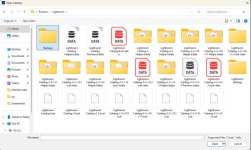
How do I do that and which file? Here's a screen shot of the folder with the saved catalogue files. There's folders of "lrdata", various lrcat-data files (In red and in black) and the folder marked "Backups" contains a zipped file from 4.10.25...probably the last time a backup was taken...so which file should I use and how do I link to it?
I hate computers!
I had a hard drive fail with all my photo's on (3.5TB worth.) and my computer was so out of date that I couldn't update my Adobe App's
Any way, I now have a shiney new computer with up to date Lightroom Classic and have imported all my peviously backed up photo's.
I have the original pics along with the saved jpegs but not the edited RAWs I'm assuming this is the bit where I have to "Re-Link" to the catalogue?
How do I do that and which file? Here's a screen shot of the folder with the saved catalogue files. There's folders of "lrdata", various lrcat-data files (In red and in black) and the folder marked "Backups" contains a zipped file from 4.10.25...probably the last time a backup was taken...so which file should I use and how do I link to it?
I hate computers!