- Messages
- 9
- Name
- paul
- Edit My Images
- Yes
Hi all,
This is my first proper post on the forum, I hope I've posted in the most appropriate place, apologies if I haven't.
I thought it would be nice to write a bit of a blog about a timelapse camera I'm in the middle of making.
This is not going to be a commercial project, I'm not trying to sell anything to anyone, I simply have a want to write down my progress and give details about the project.
It might prove useful to anyone who decides to tread the same path I'm on.
A few weeks ago I was trawling through Ebay and I saw 6 enlaps tikee pro 2 timelapse cameras for sale, listed as faulty/parts only.
Seeing as I'm in possession of an oscilloscope, soldering iron and an enquiring mind I took the plunge and bought them.
2 of them turned out to be account locked, one of the acount locked ones has a beyond repair damaged case but I have used the battery out of it to replace one of the weaker batteries and also one of the camera modules.
I'm intending to contact enlaps to provide proof of purchase of the remaining locked device and see if they will help me unlock it. I don't think they will be willing but I can ask for nothing.
The other 4 were not account locked so I set about testing what I presumed was the best one according to age, battery life, currently installed firmware to try to gage last use time in field, how bad the batteries could be and other stuff I thought about which, as it turned out didn't matter. (the only way to tell is to test).
I set one of them up on my roof and started a capture. Battery life was good and so was image quality (mostly) but there were a few clear problems.
1) The camera needs to deployed at a high level. The tikee cameras have 2 lenses and produce 2 separate images for each capture.
The point at which they converge seems to depend on the closest object to each lens. Laid on my single floor chalet roof (I live on a holiday camp where I work and have to be careful I'm not filming people), the first test session was 30% roof, 70% sky.
I wrote a script in python as I have done many times before to stitch 2 images together but the algorithm I used failed or skewed the images so I had to stitch them by experimenting with pixel geometry,
Basically I shifted the right image across, fading it into the left image until the horizon looked right and ignored the fact that the foreground looks terrible.
It was the best compromise I could think of at the time.
2) The mobile phone app is a nightmare to use. It's intuitive in many ways but utterly featureless.
I eventually got it to connect to my 2.4ghz WIFI network after many hours and buying a router to expose the options I needed to change to get it to work.
Getting preview images out in the field is impossible without fitting a sim card and even then you can't do it if the camera is running a capture session.
3) One of the camera modules is not working correctly.
According to the firmware when I decompiled it (enquiring mind again) at low light levels the camera modules go low signal high gain. In the left module this resulted in horizontal banding which further tainted the final images.
I swapped it out for the left hand lens from the smashed case camera and all is good now.
A good friend who owns the Viking pub in Flamborough let me put it on the roof of one of his holiday let cottages he has there and we did a 22hr capture. again, clearing the roofline was a problem and on the final video the roof line and some of the mid ground is skewed.
There are also artifacts on the horizon which I could possibly fix by changing my little python script that stitches the images together but I don't really want to do that.
It's bad enough experimenting with pixel geometry every time I want to turn the images the camera produces into a video without having to remove artifacting etc.
These cameras are not Prêt-à-porter. They take a lot of consideration before you deploy them.
They fit one purpose only, are of a design I can respect but not worship.
They are professional devices and do a very good job in a range of conditions which is too finite for me.
The final video can be viewed here:
youtube link to video
I'm fairly happy with the footage but it could only realistically be improved by mounting the camera higher which I'm not really in a position to do.
Instead of fighting the deployment needs and poor app I decided to make my own camera.
Ladies and Gentlemen, let me introduce to you the Coffee Cam.
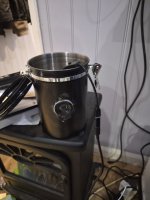
Not the worlds best camera in a tin but it's good enough for the girls I go out with.
It's a raspberry pi zero 2w in a coffee tin with a camera module.
yes, I slipped with the hole saw, yes, it's questionable electronics in a coffee tin but it does a good job and in many ways outperforms the tikee cameras.
It's more user friendly, has more features and if it breaks I can replace/fix it cheaply.
Total Hardware breakdown:
1 questionable enclosure with an unknown ingress protection rating.
1 ras pi zero 2w
1 camera module
1 60000amh power bank of unknown quality.
RTC module
Some generic current monitoring module to crudely estimate remaining battery life.
lens protector gouged from the smashed tikee camera and siliconed into a hole butchered into the side of the tin.
Silica gel bags.
Hopes and dreams.
One advantage of making my own rather than buying an off the shelf camera is that I'm in control. I can expose all of the available settings of the camera and change them as I see fit.
I didn't have a camera module when I first started the project and I had to wait for it to be delivered. Being a strike while the iron is hot kind of guy, I got the pi to produce dummy images each time it would have been taking a picture to make sure the pi zero is robust enough to handle writing to the sd card and not fall over.
I then thought about what could interrupt a capture and end it prematurely.
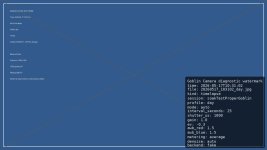
The first thought was available space on the memory card.
I toyed with the idea of adding an external hdd but decided against it due to space constraints in the coffee tin and the fact that it would hurt battery life.
I added a rule to stop the current capture/block a capture from starting if the available space was < 2gb. any less than that would possibly lead to file system problems. I feel like 2gb is a safe, tolerant hard limit.
The dummy images the it produced were tiny so to try to simulate a more real world test I added dummy padding to the fake images so I could see how quickly I could write to the memory card between captures.
I can do it a lot quicker than I'll ever need to so that's all good. I added 4mb of padding which is probably more than a real camera module will add... time will tell and I will look..
I then thought about the design flow of someone connecting to the camera, starting a capture and how they would retrieve the photos from the camera and if needed, delete the ones on it to free up space without having to climb to where it's deployed and remove the memory card.
One hassle is letting the memory card fill up till there is only 2gb of space left then trying to zip 43gb of photos into that tiny space. a compromise has to be put into effect. Probably more storage space in the form of a bigger card.
I came up with the following:
The pi accepts a Bluetooth connection if it's appropriate to do so.
Under normal circumstances, for security reasons, you can't walk up to it and pair to it. Under deployment conditions, Bluetooth is turned on and will take a connection from a currently paired device.
It won't advertise itself or pair with a new device unless someone configures it to from the interface the user (me) interacts with to control it, I didn't just want it sat up a tree shouting its name. That would increase an attack surface for an intruder.
The first version of this used a Bluetooth serial connection to send text based commands such as PING, STATUS, WIFI ON etc to control the camera.
I've since wrote an app for android that does exactly the same thing.
This was the hardest part of writing the software and many hours of reading and failing later, I finally got it to work,
Connect to the camera, turn on the cameras WIFI hotspot and connect to it.
The camera runs a small flask web server which serves an interface to configure the camera, start/stop capture, preview images, zip the images on the camera and download them, set profiles, calculate astronomical dusk/dawn and other sun related events such as civilian dusk and dawn etc. This drives the profile settings of the camera.
Profiles have different camera settings such as exposure length and the software interpolates between then as they change according to sun events so the output video doesn't have harsh changes.
I started to think about what the tikee cameras could probably do if the settings were exposed.
There are far too many settings to document here but a condensed version is:
Configurable profile settings.
These include capture rate, awb, exposure etc.
Capture window so for example I can say the camera can only run between 23:00 and 08:00 outside of this the camera stops capturing and resumes again at the start time.
Image preview with overlays:
Shiftable horizon rule, crosshair for center alignment, rule of thirds grid etc.
Watchdog code so if the camera should be taking images but isn't, the camera reboots and starts again.
Logging levels. debug, field deployed and silent.
It's nice. Useful in fact.
The camera module arrived, changed the back end to use that instead of creating dummy images and it just worked.
Beautiful.
Then the power bank arrived in the post and it wouldn't fit in the tin.
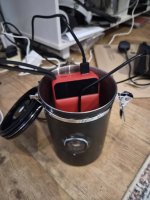
It did power the pi though. The pi has a very low current draw and some power banks turn off under these conditions.
This one seems quite well behaved and the camera hasn't rebooted yet or been throttled due to low power.
Another inappropriate enclosure was required.
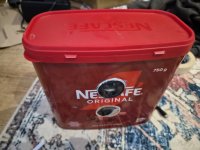
It's cheap. OK?
It also houses the power bank so until I decide to buy a proper IP rated enclosure it will do.
By this point, I was ready for a proper outdoor test instead of the camera being in the living room taking pictures of me walking about in my pants, drinking Guinness and looking confused.
I improved the tins IP rating by about 3000% by sealing the lid with Self-amalgamating tape, chucked it up on the roof and hoped for the best.
I connected, started the hotspot, checked previews, started a capture session and hoped for the best.
It rained. I tried to remain stoic but I bottled it, scampered up the ladders to save it.
I could have left it, no water ingress.
I put it back, started the capture again.
It's up there now, gazing into the nights sky and I can't wait to see the results.
It consumes around 1gb of memory card space every 3 hours during the day. This will drop over night as the profiles change the capture rate due to holding the shutter open longer.
I calculate that the battery will last around 4 days if I turn off the WIFI off after I've set it up for deployment.
I know this intended blog post probably reads more like an unguided ramble but I'm excited. When I'm excited I get giddy.
I also acknowledge that I said I didn't want to sell anything but if anyone is in the market for a lightly used coffee tin with a 37mm hole drilled in the side of it, pop me a message.....
If anyone wants me to go into further details about the software side of things or anything else, please let me know.
I'd me more than happy to provide.
Paul.
This is my first proper post on the forum, I hope I've posted in the most appropriate place, apologies if I haven't.
I thought it would be nice to write a bit of a blog about a timelapse camera I'm in the middle of making.
This is not going to be a commercial project, I'm not trying to sell anything to anyone, I simply have a want to write down my progress and give details about the project.
It might prove useful to anyone who decides to tread the same path I'm on.
A few weeks ago I was trawling through Ebay and I saw 6 enlaps tikee pro 2 timelapse cameras for sale, listed as faulty/parts only.
Seeing as I'm in possession of an oscilloscope, soldering iron and an enquiring mind I took the plunge and bought them.
2 of them turned out to be account locked, one of the acount locked ones has a beyond repair damaged case but I have used the battery out of it to replace one of the weaker batteries and also one of the camera modules.
I'm intending to contact enlaps to provide proof of purchase of the remaining locked device and see if they will help me unlock it. I don't think they will be willing but I can ask for nothing.
The other 4 were not account locked so I set about testing what I presumed was the best one according to age, battery life, currently installed firmware to try to gage last use time in field, how bad the batteries could be and other stuff I thought about which, as it turned out didn't matter. (the only way to tell is to test).
I set one of them up on my roof and started a capture. Battery life was good and so was image quality (mostly) but there were a few clear problems.
1) The camera needs to deployed at a high level. The tikee cameras have 2 lenses and produce 2 separate images for each capture.
The point at which they converge seems to depend on the closest object to each lens. Laid on my single floor chalet roof (I live on a holiday camp where I work and have to be careful I'm not filming people), the first test session was 30% roof, 70% sky.
I wrote a script in python as I have done many times before to stitch 2 images together but the algorithm I used failed or skewed the images so I had to stitch them by experimenting with pixel geometry,
Basically I shifted the right image across, fading it into the left image until the horizon looked right and ignored the fact that the foreground looks terrible.
It was the best compromise I could think of at the time.
2) The mobile phone app is a nightmare to use. It's intuitive in many ways but utterly featureless.
I eventually got it to connect to my 2.4ghz WIFI network after many hours and buying a router to expose the options I needed to change to get it to work.
Getting preview images out in the field is impossible without fitting a sim card and even then you can't do it if the camera is running a capture session.
3) One of the camera modules is not working correctly.
According to the firmware when I decompiled it (enquiring mind again) at low light levels the camera modules go low signal high gain. In the left module this resulted in horizontal banding which further tainted the final images.
I swapped it out for the left hand lens from the smashed case camera and all is good now.
A good friend who owns the Viking pub in Flamborough let me put it on the roof of one of his holiday let cottages he has there and we did a 22hr capture. again, clearing the roofline was a problem and on the final video the roof line and some of the mid ground is skewed.
There are also artifacts on the horizon which I could possibly fix by changing my little python script that stitches the images together but I don't really want to do that.
It's bad enough experimenting with pixel geometry every time I want to turn the images the camera produces into a video without having to remove artifacting etc.
These cameras are not Prêt-à-porter. They take a lot of consideration before you deploy them.
They fit one purpose only, are of a design I can respect but not worship.
They are professional devices and do a very good job in a range of conditions which is too finite for me.
The final video can be viewed here:
youtube link to video
I'm fairly happy with the footage but it could only realistically be improved by mounting the camera higher which I'm not really in a position to do.
Instead of fighting the deployment needs and poor app I decided to make my own camera.
Ladies and Gentlemen, let me introduce to you the Coffee Cam.
Not the worlds best camera in a tin but it's good enough for the girls I go out with.
It's a raspberry pi zero 2w in a coffee tin with a camera module.
yes, I slipped with the hole saw, yes, it's questionable electronics in a coffee tin but it does a good job and in many ways outperforms the tikee cameras.
It's more user friendly, has more features and if it breaks I can replace/fix it cheaply.
Total Hardware breakdown:
1 questionable enclosure with an unknown ingress protection rating.
1 ras pi zero 2w
1 camera module
1 60000amh power bank of unknown quality.
RTC module
Some generic current monitoring module to crudely estimate remaining battery life.
lens protector gouged from the smashed tikee camera and siliconed into a hole butchered into the side of the tin.
Silica gel bags.
Hopes and dreams.
One advantage of making my own rather than buying an off the shelf camera is that I'm in control. I can expose all of the available settings of the camera and change them as I see fit.
I didn't have a camera module when I first started the project and I had to wait for it to be delivered. Being a strike while the iron is hot kind of guy, I got the pi to produce dummy images each time it would have been taking a picture to make sure the pi zero is robust enough to handle writing to the sd card and not fall over.
I then thought about what could interrupt a capture and end it prematurely.
The first thought was available space on the memory card.
I toyed with the idea of adding an external hdd but decided against it due to space constraints in the coffee tin and the fact that it would hurt battery life.
I added a rule to stop the current capture/block a capture from starting if the available space was < 2gb. any less than that would possibly lead to file system problems. I feel like 2gb is a safe, tolerant hard limit.
The dummy images the it produced were tiny so to try to simulate a more real world test I added dummy padding to the fake images so I could see how quickly I could write to the memory card between captures.
I can do it a lot quicker than I'll ever need to so that's all good. I added 4mb of padding which is probably more than a real camera module will add... time will tell and I will look..
I then thought about the design flow of someone connecting to the camera, starting a capture and how they would retrieve the photos from the camera and if needed, delete the ones on it to free up space without having to climb to where it's deployed and remove the memory card.
One hassle is letting the memory card fill up till there is only 2gb of space left then trying to zip 43gb of photos into that tiny space. a compromise has to be put into effect. Probably more storage space in the form of a bigger card.
I came up with the following:
The pi accepts a Bluetooth connection if it's appropriate to do so.
Under normal circumstances, for security reasons, you can't walk up to it and pair to it. Under deployment conditions, Bluetooth is turned on and will take a connection from a currently paired device.
It won't advertise itself or pair with a new device unless someone configures it to from the interface the user (me) interacts with to control it, I didn't just want it sat up a tree shouting its name. That would increase an attack surface for an intruder.
The first version of this used a Bluetooth serial connection to send text based commands such as PING, STATUS, WIFI ON etc to control the camera.
I've since wrote an app for android that does exactly the same thing.
This was the hardest part of writing the software and many hours of reading and failing later, I finally got it to work,
Connect to the camera, turn on the cameras WIFI hotspot and connect to it.
The camera runs a small flask web server which serves an interface to configure the camera, start/stop capture, preview images, zip the images on the camera and download them, set profiles, calculate astronomical dusk/dawn and other sun related events such as civilian dusk and dawn etc. This drives the profile settings of the camera.
Profiles have different camera settings such as exposure length and the software interpolates between then as they change according to sun events so the output video doesn't have harsh changes.
I started to think about what the tikee cameras could probably do if the settings were exposed.
There are far too many settings to document here but a condensed version is:
Configurable profile settings.
These include capture rate, awb, exposure etc.
Capture window so for example I can say the camera can only run between 23:00 and 08:00 outside of this the camera stops capturing and resumes again at the start time.
Image preview with overlays:
Shiftable horizon rule, crosshair for center alignment, rule of thirds grid etc.
Watchdog code so if the camera should be taking images but isn't, the camera reboots and starts again.
Logging levels. debug, field deployed and silent.
It's nice. Useful in fact.
The camera module arrived, changed the back end to use that instead of creating dummy images and it just worked.
Beautiful.
Then the power bank arrived in the post and it wouldn't fit in the tin.
It did power the pi though. The pi has a very low current draw and some power banks turn off under these conditions.
This one seems quite well behaved and the camera hasn't rebooted yet or been throttled due to low power.
Another inappropriate enclosure was required.
It's cheap. OK?
It also houses the power bank so until I decide to buy a proper IP rated enclosure it will do.
By this point, I was ready for a proper outdoor test instead of the camera being in the living room taking pictures of me walking about in my pants, drinking Guinness and looking confused.
I improved the tins IP rating by about 3000% by sealing the lid with Self-amalgamating tape, chucked it up on the roof and hoped for the best.
I connected, started the hotspot, checked previews, started a capture session and hoped for the best.
It rained. I tried to remain stoic but I bottled it, scampered up the ladders to save it.
I could have left it, no water ingress.
I put it back, started the capture again.
It's up there now, gazing into the nights sky and I can't wait to see the results.
It consumes around 1gb of memory card space every 3 hours during the day. This will drop over night as the profiles change the capture rate due to holding the shutter open longer.
I calculate that the battery will last around 4 days if I turn off the WIFI off after I've set it up for deployment.
I know this intended blog post probably reads more like an unguided ramble but I'm excited. When I'm excited I get giddy.
I also acknowledge that I said I didn't want to sell anything but if anyone is in the market for a lightly used coffee tin with a 37mm hole drilled in the side of it, pop me a message.....
If anyone wants me to go into further details about the software side of things or anything else, please let me know.
I'd me more than happy to provide.
Paul.
Last edited: