
You are using an out of date browser. It may not display this or other websites correctly.
You should upgrade or use an alternative browser.
You should upgrade or use an alternative browser.
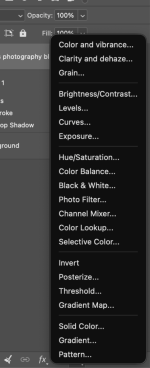
Is there a way to change this order
- Thread starter ndwgolf
- Start date



- Messages
- 4,757
- Name
- Graham
- Edit My Images
- No
You could create an action to open a solid colour layer and assign it to a keyboard shortcut.I use solid color in Photoshop all the time and would like to move it to the top of the adjustment layers menu............is that possible and if so how do I do it?
Thanks
View attachment 487680
I did this years ago to open a new curves layer. I couldn't remember how, but it was simple, and a Google search provided instructions

- Messages
- 9,986
- Name
- Rob Telford
- Edit My Images
- No
This is the wayYou could create an action to open a solid colour layer and assign it to a keyboard shortcut.
I did this years ago to open a new curves layer. I couldn't remember how, but it was simple, and a Google search provided instructions
I’m not sure you even need to create an action, you can just assign a new shortcut directly to the Layer > New Fill Layer > Solid Colour... menu item
Last edited:
- Messages
- 4,757
- Name
- Graham
- Edit My Images
- No
That could well be what I did, but googling today gave me instructions for recording an action.This is the way
I’m not sure you even need to create an action, you can just assign a new shortcut directly to the Layer > New Fill Layer > Solid Colour... menu item
Mind you, that was the Google AI summary, and my experience with these AI summaries is that they are seldom correct, so I should have looked deeper.