

You are using an out of date browser. It may not display this or other websites correctly.
You should upgrade or use an alternative browser.
You should upgrade or use an alternative browser.
Perspective control
- Thread starter Barney
- Start date


ancient_mariner
Moderator
- Messages
- 28,633
- Name
- Toni
- Edit My Images
- No
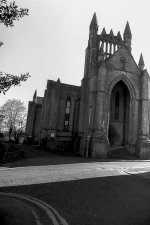
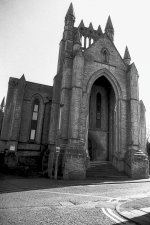
If you were printing this at home, you would alter the angle of the print on the baseboard to correct perspective. Lenses are also available with perspective correction adjustments.

excalibur2
My F4's Broken...
- Messages
- 12,371
- Name
- Brian
- Edit My Images
- Yes
As Toni said, just to add you could try e.g. 17mm lens and correct verticals etc using a program?

- Messages
- 9,148
- Name
- Nige
- Edit My Images
- No
I always try to align verticals in the centre of the image. In your shot it looks like you've aligned the right hand verticals with the edge of the frame, meaning the rest of the structure is now leaning to the right in the picture.
e.g. In the below shot the left and right verticals are converging because the camera was tilted up slightly, but the structure still looks level because the central verticals are perpendicular to the ground.

Beside the cathedral by fishyfish_arcade, on Flickr
e.g. In the below shot the left and right verticals are converging because the camera was tilted up slightly, but the structure still looks level because the central verticals are perpendicular to the ground.
Beside the cathedral by fishyfish_arcade, on Flickr
Last edited:

StephenM
I know a Blithering Idiot
- Messages
- 5,756
- Name
- Stephen
- Edit My Images
- Yes
If you want to make the building "square up", then (assuming it is possible - sometimes it isn't for more than one reason), then you have only two options.
1. Do it in camera, which may require a tilt/shift lens or a camera with movements.
2. Do it afterwards, in darkroom or Photoshop. In this case, arrange as much in camera as possible beforehand. Leave plenty of space around the building, hold the camera so as to produce the least possible distortion (in this case, get the most central part vertical, not slanting) and if necessary use a shorter focal length.
Bear I mind for reasons I won't explain that the further away from the axis a three dimensional object is, the more it will have its shape changed. This is down to simple geometry, NOT lens aberrations.
1. Do it in camera, which may require a tilt/shift lens or a camera with movements.
2. Do it afterwards, in darkroom or Photoshop. In this case, arrange as much in camera as possible beforehand. Leave plenty of space around the building, hold the camera so as to produce the least possible distortion (in this case, get the most central part vertical, not slanting) and if necessary use a shorter focal length.
Bear I mind for reasons I won't explain that the further away from the axis a three dimensional object is, the more it will have its shape changed. This is down to simple geometry, NOT lens aberrations.

- Messages
- 3,388
- Name
- Graham
- Edit My Images
- Yes
Forgot I used to do that!If you were printing this at home, you would alter the angle of the print on the baseboard to correct perspective. Lenses are also available with perspective correction adjustments.
I love the smell of stop bath in the morning!
