Why are my photo's under exposed

Messages
790
Name
Sarah
Edit My Images
Yes
I have a Canon EOS 400D.

I have noticed that when I veiw my photo's on my computer they are under exposed.

When I am taking photo's the exposure metre has the arrow on the 0 and when I veiw the photos on the cameras LCD screen they look correctly exposed. But as I say when putting them on to the computer they are under exposed. Then when I edit the exposure in RAW image task the quality of the photo is lost.

I could always over expose the photo's on purpose and hope that they come out ok on the computer but thats no good to me when I want to use the shutter or aparature priority setting.

Any help with this would be much appreciated as I am finding this very frustrating!!!
 
Hi Sarah

I'm not sure but if you upload an original file unedited from the camera (you may need to link to it) someone should be able to advise. How does the histogram look?

Al
 
The best way to go about it is to show us whats going wrong! Resize one to less than 800px wide/tall or link us to a full size image and it'll be a lot easier to help you.
 
IMG_4681.jpg


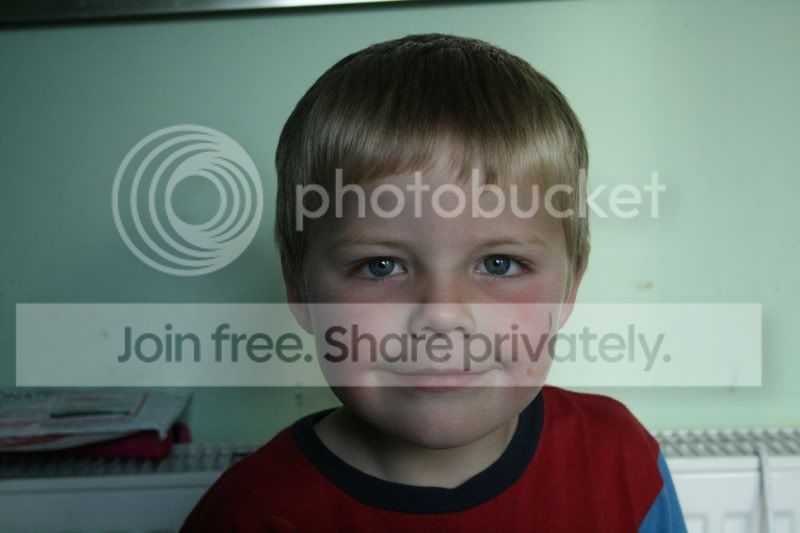
I just took this photo of my son, this is taken with bright sunlight coming through the window behind me. Sorry about his dirty face!
 
That shot is manual exposure.

What did you have your metering mode set to? Whatever the metering mode is set to will be the result you see on the exposure meter.

Of course, metering can be wrong - it can be fooled by the scene and/or you can have chosen the wrong mode for it to try and guess it right.

If you must shoot in manual, shoot then review the pic on the back of the camera and check the exposure graph. You can pretty much ignore the image for an accurate indicator of exposure, but the graph won't lie.
 
As desantnik has said, check that graph, the photo you posted would not peak but is most likely pushed waaaaay over to the left.
 
Hi thanks for you replies.

I had the camera set on center-weighted average metering.

I don't really understand what any of these metering settings mean though. Was that the wrong setting to use? Would it be possible for someone to explain what each setting means? I have evaluative metering, partial metering and center-weighted average metering on my camera.

Thanks
 
The trick really is to look at the graph and adjust rather than using the metering - if you are using the metering to judge it by (getting the little arrow on the 0) then you might as well shoot in aperture or shutter priority :D
 
You will find that evaluative is more reliable in most situations. I would use that, and one of the auto modes - there is no point in using manual if all you are doing is zeroing the scale in the viewfinder by hand. Any of the auto modes will do that for you. Manual is best when you need to lock the settings for a particular reason.

With the auto modes, use Av if you want to use a certain f/number - for a depth of field effect perhaps. Or Tv if it's important that you have a particular shutter speed. If it's not that important either way, use P which will set both for you and will always give you usable settings, or as best you can get for the light conditions.

The LCD image is a good quick guide to what you will get, but the histogram is the ultimate decider, so always check that if there is any doubt. If it's too light or dark, use the +/- compensation.

While you're still learning, I would use P with the ISO at 400, and see how you get on. Compare your results against the settings the camera has selected and when you've got a good handle on what the different settings do, try the other modes.
 
Yes I do like using the av and tv modes as for me it is much quicker to just point and shoot when you see that shot you really want to get, which is usually of one of my children who are likely to move before I can capture it!!

The only reason I was using manual was because unless I was using the flash my shots were coming out under exposed when using the av and tv modes, so I was having to deliberately over expose and hope for the best. Hopefully though, by having the metering mode set correctly that should have solved it's self!

Thank you all for your help and advise, it's been really useful.:)
 
my advice is to buy this book:
http://www.amazon.co.uk/Canon-Digit...=sr_1_1?ie=UTF8&s=books&qid=1273839192&sr=8-1

it will give you in depth information about all the settings on your camera, what they all do, and how to use them.

I assume when you shoot in full auto mode your shots are coming out ok?
then when you are moving to the program modes they are coming out under exposed?
When shooting pictures like these i have found the wide metering to be the best as it reads from all around the frame... if you use spot metering (centre) then it will only read from the very middle of your shot and hence your exposure problems.

If you read that book it will give you some good advice on how to set the camera up. It helped me learn the functions on the camera very quickly. Get an object, put it on a table, and then photograph it at different settings from the book and you will start to understand how it all works together...

:)
 
If your shots are coming out underexposed consistently - check if you have accidentally left an exposure compensation dialled in. Otherwise, Av and Tv (and P) are normally pretty close to correct for 90% or more of the shots taken on evaluative metering.

Also, check where you have the AF point(s) set as this gives the meter a clue to the important part of he shot and hence will give better exposure as well.

As everyone else has said - use the histogram - preferably the 3 colour histogram as this will show under/over exposure more accurately than the averaged white histogram.

Check for blinkies (have them turned on) so that under/over exposure is immediately flagged on the lcd image.

Lastly do not judge the exposure by the IMAGE on the lcd screeen as that depends on how much ambient light there is and how bright you have the screen set - you must use the histograms for exposure. On a computer monitor you have a little more control but the only true guide is when it is printed unless you have a claibrated monitor in a constant ambient light (not many people have the last part).
 
Thanks evilonion will be adding the book to my list of things to get at the end of the month when I have money!!

As for checking the histogram I have no idea what I am doing there! Will look it up in google though to try and get a good explaination.

I looked at the LCD contrast setting which was on the brightest setting so no wonder I couldn't see the problem when checking the photo on the screen.

Hopefully I will be able to get a good explaination on the net for histograms, if not, evilonion, does it give ant explaination in the book you recommended?

Thank you everyone who has replied to me with their advise. :)
 
Thanks evilonion will be adding the book to my list of things to get at the end of the month when I have money!!

As for checking the histogram I have no idea what I am doing there! Will look it up in google though to try and get a good explaination.

I looked at the LCD contrast setting which was on the brightest setting so no wonder I couldn't see the problem when checking the photo on the screen.

Hopefully I will be able to get a good explaination on the net for histograms, if not, evilonion, does it give ant explaination in the book you recommended?

Thank you everyone who has replied to me with their advise. :)

Good link for histograms here http://www.sekonic.com/images/files/HistogramsLightmetersWorkTogether.pdf
Also, blinkies are very helpful, as metioned above, This is the over exposure warning that causes bleached highlights to flash black and white on the LCD. Switch them on in the menu. Don't necessarily worry if they flash, as they quite probably will in extremely bright areas like very shiny reflections even when the exposure is optimum. Just make sure they don't flash on any important areas like faces etc.

In addition to the comments made about the brightness setting of the LCD, bear in mind that what the LCD shows, including the histogram, is representative of the JPEG file, which is in turn generated off the original Raw file. So it is not only affected by the exposure setting, but also by everything else including picture styles and white balance. The one to watch out for is the contrast setting in picture styles which can shift the histogram right/left quite a bit, so best to keep that around zero.

Lastly, the Raw file is always recorded just as it comes through the lens, without any camera settings applied. In addition, it tends to record a slightly wider range of brightness than is shown in the JPEG. As a result, and you can play around with the Raw in post processing and not only extract a little more image information, but also correct any of the JPEG settings that might not have been optimum on the in-camera JPEG conversion. In other words, if you shoot both Raw and JPEG, you can go back to the Raw at any time and tweak it quite a lot. It's a handy fall back, and the only disadvanatge is that Raw takes a lot for memory, but memory cards are cheap ;)
 
Back
Top