Windows 7 - wireless router issue

Messages
1,517
Edit My Images
No
Help!

New PC with Windows 7 on it, can see the wireless router, can connect to other wireless routers in the area (with no security on them) can not connect to ours!

Laptop & Other PCs connect ok (all Vista), have tried resetting the router back to no security, still no joy.

Have set back now to using WPA personal security with Encryption type TKIP

Using Belkin wireless stick in the PC and Netgear WGR614v9 wireless router.
Have checked using latest firmware on router
Have done the usual if in doubt switch it all off and on again trick....still no joy.

About to fling it out of the window

Any advise gratefully received


Edited to say the first bit of advice I've been given is that the router is old and that we should upgrade to one with wireless N. Guy said he had seen the issue before and this resolved it???
 
Is PC using Windows own wi-fi connection software or the Belkin one?
 
I had issue with the Belkin software on an old laptop that didn't have a wireless card (so had to use the Belkin USB). Switched to the Windows one and it worked right away.
 
Not sure ref the software, but come to think of it we have tried plugging direct from the virgin box straight into the computer, still no good. So I assume that takes the router out of the equasion anyway?
 
Sounds more like something is blocking any network connection. What Anti Virus/Firewall do you have?
 
ah try disabling ipv6 in windows.. might be your older router is playing silly buggers if windows is trying to use it.

go into network and sharing center -> change adapter settings -> right click wireless network connection and do properties.

untick "internet protocol version 6" click OK.

repeat for local area connection.

reboot and retry.
 
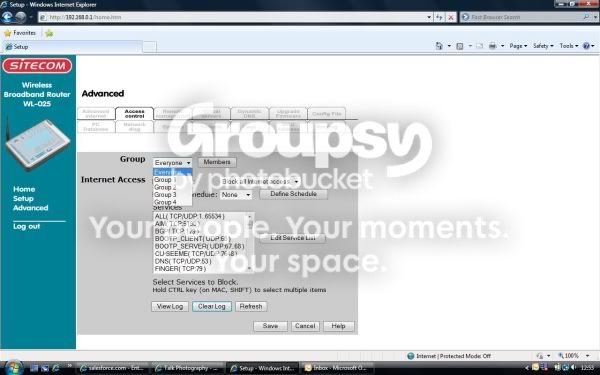
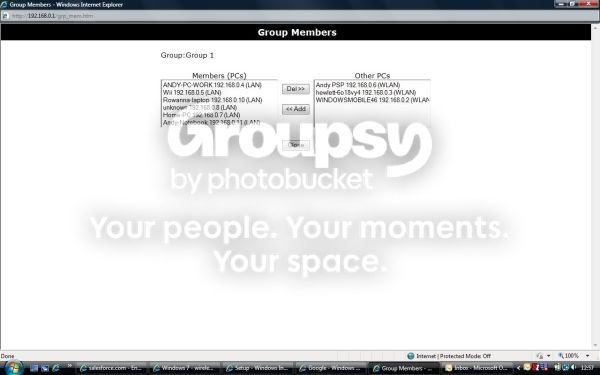
Try logging onto the router from another working PC...usually something like 192.168.0.1 and go to the user management section. There you should find a list of wireless/wired computer names that the router can see. Make sure that your new laptop is permitted to use the router.
I get this loads due to the number of wireless gadgets around the house and frequently have to re-permit one of them.
 
ah try disabling ipv6 in windows.. might be your older router is playing silly buggers if windows is trying to use it.

go into network and sharing center -> change adapter settings -> right click wireless network connection and do properties.

untick "internet protocol version 6" click OK.

repeat for local area connection.

reboot and retry.


This worked, thank you very much. Brilliant help guys.
 
Try logging onto the router from another working PC...usually something like 192.168.0.1 and go to the user management section. There you should find a list of wireless/wired computer names that the router can see. Make sure that your new laptop is permitted to use the router.
I get this loads due to the number of wireless gadgets around the house and frequently have to re-permit one of them.

Emma suggested mine doesn't show on the list. If she adds it her lap top drops off?

Sorry I'm not being very clear with this stuff, but I do appreciate your help.
 
My router has 5 groups that I can use ie Group 1 = Laptops, Group 2 = games consoles etc etc. See if Emma can see more than a single group.

Router.jpg


Router1.jpg
 
Normally during the day 3 laptops, main PC (hard wired), Wii, iTouch and Ipaq, however we have times when a forth laptop and a couple of PSP's are added. I used to group them as mentioned ie Laptops, Games consoles etc, but it was a bit of overkill. The god think is, anyone can log onto the router (who has permission) and re-permit if they drop out.

I use this method to keep out the neighbours too.
 
Im having the same issue with my netgear dg834g, was working and then just stopped, no matter what I do, just cant get it to connect via wired or wireless. Getting to the point where I am going to just buy another modem/router, any recommendations on what to buy?

Ive had enough of playing with the settings and trying to get it to connect in any way.
 
Re one laptop dropping off when the other connects, is it possible that the laptop/s have conflicting ip addresses? are they both set to automatic?

Also, Win 7 Home does not really have very good networking options, I had to upgrade to ultimate to get mine to work the way I wanted it to.
 
Re one laptop dropping off when the other connects, is it possible that the laptop/s have conflicting ip addresses? are they both set to automatic?

i was thinking more devices than the router could issue but 2 should be perfectly acceptable..

i cant get my head around why it would work temporarily after disabling ipv6..

do you have any apple software installed?
 
Not installed any apple software on the PC as yet. Have now uninstalled belkin software for wireless stick and re put on but no joy. Will just switch my laptop and phone off and see what happens in case it is either a conflict or too many devices though it was fine pre windows 7.. Emma
 
Back
Top