Beginner Can someone help explain this.

Messages
561
Edit My Images
Yes
I am thinking of entering a competition

300ppi and the largest size file you have (up to a max of 46cm on the longest side)
So I usually make all my images 1600 / 1200 pixels, but I am thinking about entering a comp and the above is the instructions.
Will this instruction make it a massive image up to 46cm is reads, and I have done a test and the file is massive.
JPG format and saved at quality 10 or above, or the maximum quality possible.
JPG I understand, what is quality 10 and above, is that 10 or 100 on a sliding scale my scale goes up to 100 ?
RGB (Adobe RGB is best but sRGB is also fine)

Don't understand the RGB or sRGB but I am assuming it pretty much standard with editing programs, I use Nikon NX Studio.

Thanks in advance.
 
(46cm = 18.11") x 300 dpi = 5433 pixels wide. So a bit of a jump from your 1600 wide.

Not sure what is meant by quality 10, I'd assume 100% as they what to see the best output(?)

Adobe RGB has more colours than sRGB which is a simple Microsoft profile that means most people can see the same colours on the average monitor via the internet etc.. just use what you feel comfortable with.

I don't enter comps, but hope this helps in some way.
 
Last edited:
(46cm = 18.11") x 300 dpi = 5433 pixels wide. So a bit of a jump from your 1600 wide.

Not sure what is meant by quality 10, I'd assume 100% as they what to see the best output(?)

Adobe RGB has more colours than sRGB which is a simple Microsoft profile that means most people can see the same colours on the average monitor via the internet etc.. just use what you feel comfortable with.

I don't enter comps, but hope this helps in some way.
It has helped, its a bit of fun for me as I want to enter the Black+White photography comps at some point in the near future.
On here I just set my pics to 1600/1200 pixels as that is the same as the club I am in requires..
That is easy, and I have got used to it, might have made me a bit lazy.
As I rapidly approach retirement I want to really try and make a bit of effort to achieve something with photography.
Been doing photography for about 2 years now and think its worthwhile.
Gets me out and walking all over, loads of benefits for me.
Just need to work on getting some material now.
 
I suppose Quality 10 must depend on what processing software they use. My Adobe CS2026 goes to 12 and 12 results in a larger file than 10.
 
Surely Quality here is synonymous with JPEG Compression Quality - scale 0-100. Where 10 is low quality, 25 is medium, 50 is high, 100 is highest (file sizes are about 1:20 (low:high) - handwavy numbers)
 
I struggle with the 300ppi part. If ppi stands for pixels per inch (usually in the context of printing, as I thought) I don't understand it here. A full frame sensor is about one and a half inches across, so 300ppi means an image of 450x300 pixels. Surely not...
 
I am thinking of entering a competition

300ppi and the largest size file you have (up to a max of 46cm on the longest side)
So I usually make all my images 1600 / 1200 pixels, but I am thinking about entering a comp and the above is the instructions.
Will this instruction make it a massive image up to 46cm is reads, and I have done a test and the file is massive.
JPG format and saved at quality 10 or above, or the maximum quality possible.
JPG I understand, what is quality 10 and above, is that 10 or 100 on a sliding scale my scale goes up to 100 ?
RGB (Adobe RGB is best but sRGB is also fine)

Don't understand the RGB or sRGB but I am assuming it pretty much standard with editing programs, I use Nikon NX Studio.

Thanks in advance.

I am sure someone will correct me if I have got this wrong.

I suspect that those instructions were written for Photoshop. If you are using something else just set the quality slider to 80% or above.

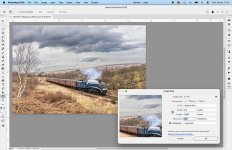
Pixels per inch (ppi) is the resolution of the image. An image with a ppi of 72 will appear a lot smaller than an image with a ppi of 300 when both images are viewed at 100% on the same computer screen. However the dimensions in centimetres / inches does not change.

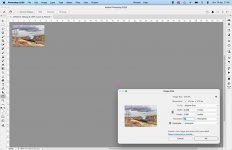
Screenshot-2026-04-19-at-11.56.39.jpgScreenshot-2026-04-19-at-11.57.16.jpg
 
300PPI is in many ways a throwback to the printing industry, but it is now the accepted PPI for a physically printed image. and the 46cm limit is to limit print size to A3 or A3+ paper.
You say you normally set your images at 1600 x 1200, but you do not mention the PPI, 1600 x 1200 is normally fine for screen display images, and the accepted PPI is around 72, but screens have improved since then so a higher resolution does not hurt.
What you have not mentioned is if the proposed competition is a print (Physical on paper) or what some refer to as a digital print (which is a projected image), for a good print to be viewed at a reasonable distance (and that sets the resolution in some cases) the 240 - 300ppi is the norm and on an A3 paper, Jpeg 8bit is likely to be around 7 to 8 MBytes, not massive by todays cameras. You may have sub 1MByte files at 1600 X 1200 but these will be screen view quality. RGB and sRGB are similar in colour range as someone mentioned above and one or either is often specified when club or competition images are to be projected.
Personally I am not a fan of club competitions using projected images as you can (and I have) captured a sky lark in flight and in the frame it is tiny, but cropped to fill a frame it looked very good on a screen, but no way would it be acceptable as a print. Photoshop would make a reasonable fist of it, but to what point.
 
I assume you are talking about PDIs rather than prints...

Our club rules are max 1600 width 1200 height, but if your image is 3:ratio you have an image that is 1600X1067 landscape or 1200x800 portrait. Although my PC profile is Adobe RGB, club specifies sRGB. Image quality is max 12. ppi doesn't come into it.
 
Back
Top