Beginner Can someone help explain this.

Messages
450
Edit My Images
Yes
I am thinking of entering a competition

300ppi and the largest size file you have (up to a max of 46cm on the longest side)
So I usually make all my images 1600 / 1200 pixels, but I am thinking about entering a comp and the above is the instructions.
Will this instruction make it a massive image up to 46cm is reads, and I have done a test and the file is massive.
JPG format and saved at quality 10 or above, or the maximum quality possible.
JPG I understand, what is quality 10 and above, is that 10 or 100 on a sliding scale my scale goes up to 100 ?
RGB (Adobe RGB is best but sRGB is also fine)

Don't understand the RGB or sRGB but I am assuming it pretty much standard with editing programs, I use Nikon NX Studio.

Thanks in advance.
 
(46cm = 18.11") x 300 dpi = 5433 pixels wide. So a bit of a jump from your 1600 wide.

Not sure what is meant by quality 10, I'd assume 100% as they what to see the best output(?)

Adobe RGB has more colours than sRGB which is a simple Microsoft profile that means most people can see the same colours on the average monitor via the internet etc.. just use what you feel comfortable with.

I don't enter comps, but hope this helps in some way.
 
Last edited:
(46cm = 18.11") x 300 dpi = 5433 pixels wide. So a bit of a jump from your 1600 wide.

Not sure what is meant by quality 10, I'd assume 100% as they what to see the best output(?)

Adobe RGB has more colours than sRGB which is a simple Microsoft profile that means most people can see the same colours on the average monitor via the internet etc.. just use what you feel comfortable with.

I don't enter comps, but hope this helps in some way.
It has helped, its a bit of fun for me as I want to enter the Black+White photography comps at some point in the near future.
On here I just set my pics to 1600/1200 pixels as that is the same as the club I am in requires..
That is easy, and I have got used to it, might have made me a bit lazy.
As I rapidly approach retirement I want to really try and make a bit of effort to achieve something with photography.
Been doing photography for about 2 years now and think its worthwhile.
Gets me out and walking all over, loads of benefits for me.
Just need to work on getting some material now.
 
I suppose Quality 10 must depend on what processing software they use. My Adobe CS2026 goes to 12 and 12 results in a larger file than 10.
 
Surely Quality here is synonymous with JPEG Compression Quality - scale 0-100. Where 10 is low quality, 25 is medium, 50 is high, 100 is highest (file sizes are about 1:20 (low:high) - handwavy numbers)
 
I struggle with the 300ppi part. If ppi stands for pixels per inch (usually in the context of printing, as I thought) I don't understand it here. A full frame sensor is about one and a half inches across, so 300ppi means an image of 450x300 pixels. Surely not...
 
I am thinking of entering a competition

300ppi and the largest size file you have (up to a max of 46cm on the longest side)
So I usually make all my images 1600 / 1200 pixels, but I am thinking about entering a comp and the above is the instructions.
Will this instruction make it a massive image up to 46cm is reads, and I have done a test and the file is massive.
JPG format and saved at quality 10 or above, or the maximum quality possible.
JPG I understand, what is quality 10 and above, is that 10 or 100 on a sliding scale my scale goes up to 100 ?
RGB (Adobe RGB is best but sRGB is also fine)

Don't understand the RGB or sRGB but I am assuming it pretty much standard with editing programs, I use Nikon NX Studio.

Thanks in advance.

I am sure someone will correct me if I have got this wrong.

I suspect that those instructions were written for Photoshop. If you are using something else just set the quality slider to 80% or above.

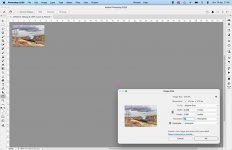
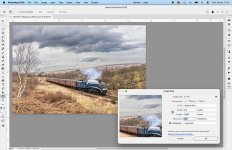
Pixels per inch (ppi) is the resolution of the image. An image with a ppi of 72 will appear a lot smaller than an image with a ppi of 300 when both images are viewed at 100% on the same computer screen. However the dimensions in centimetres / inches does not change.

Screenshot-2026-04-19-at-11.56.39.jpgScreenshot-2026-04-19-at-11.57.16.jpg
 
Back
Top