24-105L Soft?

Messages
217
Name
Martin
Edit My Images
No
Hi all,

I had some issue with recently with my 24-105L regarding focus on Landscape shots and in the end it looked like my technique. Yesterday i went down the local dog walk and the first daffs were out so i thought i would test the lens for focus/Sharpness. On reviewing the results they are showing similar issues to the landscape shots which although you can see where its focused there is no real area of complete sharpness.
Now i have a 100MM L Macro so thought am i being over critical as this lens is tack sharp but i also have a 550d with a 18-55 which i thing sharpness wise is better! I have enclosed a sample and would appreciate any thoughts, focus point is on the open flower head.

Thanks
Wolfy
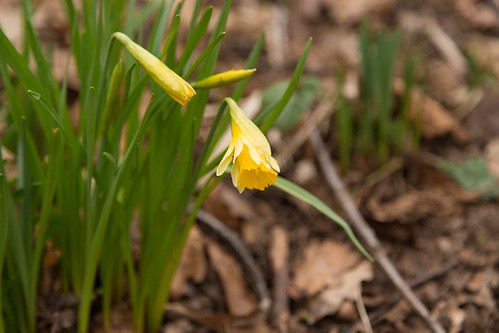
test2 by wolfyccfc, on Flickr
 
hmm, looks ok from the image here but when opened up full size I can see what you mean, the tip of flower isn't too bad though

You do have it wide open, is it better if you stop it down ? If nothing else it should help widen the depth of field
 
Last edited:
I was having similar with the lens and my 650d, however once I started using manual or aperture mode things definitely got better.

Strangly (probably an eyesight thing) I also found it easier to get sharper pictures through the viewfinder rather than using Live View

Pictures are now much better and more consistent and I think its a great lens.
 
The open flower looks OK really, it's not the easiest of subjects as everything is rounded and possibly moving, at your shallowest Dof on F4.
 
I did take some snow drops as well at F8 and they show similar sharpness, they were taken at 105mm which may not be the best for this lens but the landscape photos I take are at the other end of the range 24mm and generally show similar sharpness. I don't think it's MA needed either as nowhere in the shot is any sharper than the intended AF point. Just wondered what others get with this lens? Could anyone post examples of what they get at similar settings?

Thanks for the replies
 
Last edited:
You could always send the camera for service, see if they can find anything wrong. Where are you ? maybe there is someone nearby who has one, you could meet and swap to compare copies.

I don't have any problem with my copy. Random stuff from flickr below. If you want to see a full size one let me know


Top Of The Rock by c20let, on Flickr


Lower Manhattan by c20let, on Flickr


Goodwood by c20let, on Flickr


USS Intrepid by c20let, on Flickr


USS Intrepid by c20let, on Flickr
 
Similar distance type shot yesterday at F13

IMG_6850f.jpg
 
I can't see the exif information on those but if you're starting to push the ISO speed up, you will loose sharpness. The same goes for any type of filter fitted to the front.
 
thanks guys for the samples, as Craft said my image looks ok at the posted size but when viewing the original it looks soft. I zoomed in on a couple of your images and it does look similar but maybe your images have a slight sharpness to them. I think the main thing i cannot get my head around is how sharp my pics should be on my IMAC 24". When using DPP i utilize the fit to screen setting which the pics look ok on but when changing to 100% they look nowhere near as good. I do not do any printing but was looking to get some of my photos ordered on canvas and cannot work out what to expect on canvas compared to on screen! I don't want to spend cash and get a soft photo canvassed.

I will test the lens again on the 550d my daughter is now using and see what i get on a similar picture, just to check if the lens results are the same and eliminate the body.

thanks again guys.
 
One perhaps obvious question - are you shooting in RAW format, because that near enough always requires sharpening up so I have been told on here

Yeah raw and jpeg. I can get a slightly better photo in raw and using lr4 but comparing the out of camera on other lenses the results are better in terms of sharpness. Have to say though that other aspects from the 24-105 the image looks better so there is marked difference towards the L lens
 
Its frustrating when things happen like this - I would mention in the short time I have had my lens there have been sessions where the photos have been poor to what I hoped for for no obvious reason - so put it down to user error !!!

You are using the IS on the lens as well arent you ?

You should always get better with RAW when you know what you are doing as its similar to processing negatives in the old days - you do it yourself rather than let the camera guess what it thinks is right for the photo
 
Last edited:
It might be a case of learning post processing, I always think that I'm not too great at it and should be able to get more out of what I shoot.

I have to say that the noise in your picture surprised me, has exposure been pushed in PP ?
Can 5d3 owners tell us if that noise is typical ? After seeing the 7d repeatedly knocked for bad noise handling and that full frame is the way to go I am currently wondering what all the fuss is about.
I did notice its ISO 250, so not a full stop - this is something that has been discussed before with regards to software manipulation to arrive at half/third stop ISO settings.

Be interested to see what someone with lots of experience of theCanon range like Tim Dodd thinks.

You could also look here for sample images http://photography-on-the.net/forum/showthread.php?t=142974

Have you got more examples that you think should be sharper ?
 
Now you've got me more worried ref noise! Lol.

I will take some test images using 550d, 18-55 and 100L in various combos to see what I get.
 
Now you've got me more worried ref noise! Lol.

I will take some test images using 550d, 18-55 and 100L in various combos to see what I get.

5D3 and 24-105 should be a pretty sharp combo, but you can read anything into the daffs pic - could be lens, could be focus, could be noise, camera shake or subject movement. The flat overcast lighting doesn't help either. You need to do some controlled tests, side by side with 550D as a reference.
 
5D3 and 24-105 should be a pretty sharp combo, but you can read anything into the daffs pic - could be lens, could be focus, could be noise, camera shake or subject movement. The flat overcast lighting doesn't help either. You need to do some controlled tests, side by side with 550D as a reference.

I think I can rule out focus as the sharpest area looks soft, is that right? Also movement as daff was perfectly still!
 
how old is the lens? ..
was it new when you bought it ...
 
Bought last October new with the body as kit. Not really used in anger until Xmas as was a present
 
I think I can rule out focus as the sharpest area looks soft, is that right? Also movement as daff was perfectly still!

You're looking at one image, thinking the lens isn't sharp when it could be all sorts of things, and comparing it against another camera/lens when you don't have a valid comparison.

All I'm saying is if you have a concern (and frankly I'd use it a bit more before jumping to conclusions) but if you want to know what's actually happening you need to test side by side and eliminate all other variables as far as possible.
 
What colour settings are you using, I remember being disappointed with muddy looking noisy pictures and it all magically improved when I changed everything to RGB.
 
What colour settings are you using, I remember being disappointed with muddy looking noisy pictures and it all magically improved when I changed everything to RGB.

Yes, in-camera settings very important, vital for JPEG output, and post processing adjustments for Raw. Must be identical for valid comparisons.
 
Ok guys, as I am using raw do the in camera settings affect output of detail/sharpness? When I say that I obviously mean settings away from the standard iso, ap & shutter
 
Last edited:
Yes you will near enough always need to at least sharpen them.

Think of the RAW file as a negative. A Jpeg is a file after a negative has been processed with the cameras selection as to what is best.

You can do almost anything you like with a RAW file - best way to learn is to experiment because when you have finished processing amendments you open the RAW file then you can save it as xyz.jpg for example, and then go back and work again on the RAW file from where you last were.
 
What colour settings are you using, I remember being disappointed with muddy looking noisy pictures and it all magically improved when I changed everything to RGB.

There are only 2 settings as far as I can see " sRGB & AdobeRGB" it's on the recommended sRGB. Is that what you are referring too?
 
Have you microajusted your camera do the glass?
 
Ok guys, as I am using raw do the in camera settings affect output of detail/sharpness? When I say that I obviously mean settings away from the standard iso, ap & shutter

No. Apart from exposure, the only in-camera setting that is applied to Raws (on Canons) is Highlight Tone Priority because that works by tweaking ISO.
 
Some quick observations:

1) the image is slightly front focused. (ie the sharpest area is just before the flower)
2) the lens is not for macros and is generally a bit poor over 70mm.
3) test it at normal distances to subject (1.5m to infinity)
4) delete DPP and use Lightroom as the former is unbelievably poor at doing the job right. The image is full of chroma noise at iso 250, that's how bad DPP is
 
I do have LR4 and just use DPP for import and for looking at the focus point.
 
Think i might have got somewhere guys, i thought i read somewhere that the picture style setting did not affect Raw files so i have never been worried about it and has been set to 'Faithful'. On reading the manual i cannot see anywhere it says this so i changed it to Auto, Raw images became a lot sharper. Reading the manual 'Faithful' will lead to a dull and subdued images. Can anyone confirm if the Picture style does apply to Raw and JPEG?

Out of interest what do other Canon uses have this set to?
 
Think i might have got somewhere guys, i thought i read somewhere that the picture style setting did not affect Raw files so i have never been worried about it and has been set to 'Faithful'. On reading the manual i cannot see anywhere it says this so i changed it to Auto, Raw images became a lot sharper. Reading the manual 'Faithful' will lead to a dull and subdued images. Can anyone confirm if the Picture style does apply to Raw and JPEG?

Out of interest what do other Canon uses have this set to?

Apart from HTP as I mentioned before, in-camera pre-sets do not affect the Raw file. But you're using DPP, and that picks up the in-camera settings and applies them to the Raw as default for viewing. So with DPP if you shoot both JPEG and Raw, they will both look identical initially, but that's only for starters - you can change the Raw a lot more than you can the JPEG becuase everything is fluid. With LightRoom, it attempts to mimic the in-camera pre-sets and they usually look very similar, but again those settings are not baked into the Raw file.
 
Ok so if I use DPP to import from the camera and then import into LR4 the raw images should display slightly differently as DPP applies the in camera settings but LR4 does not, is that correct?

Sorry for all the questions by the way and also apologies for being a bit thick but I am still learning.
 
Last edited:
Ok so if I use DPP to import from the camera and then import into LR4 the raw images should display slightly differently as DPP applies the in camera settings but LR4 does not, is that correct?

Sorry for all the questions by the way and also apologies for being a bit thick but I am still learning.

No worries Martin, ask away :)

Not sure what you're trying to do there, but as I recall, LR's attempt to match Canon's picture styles etc is pretty close to the real thing though that's not guaranteed and as said, that's just a starting point.

But if you have LR, then import direct to that - it does everything, from Raw conversion - and some say it's slightly better than Canon's DPP, using the same Raw processor as Photoshop's Adobe Camera Raw. And then you can do what you like to it. I stopped using DPP when I got LR, as that also does all the cool stuff like CA removal, distortion and vignetting correction etc, just like DPP - but better :thumbs:
 
Back
Top