A Mac Mini M4.......makes sense?

Messages
17,664
Edit My Images
No
Hi all

I have been content with my self build PC (in 2023) and it does perform well with it's RTX3060 and i5 13th generation CPU. NB currently still on W10 but is W11 ready.

However, the likes of DXO Photolab 9 can now make use of MS ML to improve processing speed etc. Or the Mac hardware with it's Neural Processing. My perception is that as each new version of PL is released the MS ML and Neural Processing will be majored by the programmers.

Now MS ML is only available with the newer gen Intel Ultra CPUs

Hence the question, to upgrade my PC I would need a new motherboard & CPU with possibly a cost of approx £500 not including new DDR 5 ram as/if needed?

A quick look at the Mac Mini M4 is approx £360.........

So the Mac looks interesting but wonder if anyone else has gone that route and what other costs have I not yet realised???

TIA for any experience & insights that I need to consider :)

PS my Logitech MX keys AFAIK can be switched to operate on both the PC and the Mac
My Logitech mouse likewise I think.

Again AFAIK my BenQ SW271C can equally be connected.
 
I switched from windows to mac a few months ago ( laptop not desktop). I found that photo editing was not a problem but other things were such as keyboard shortcuts. Something to consider, good luck!
 
Where can you get the M4 for £360 ?
Possibly my bad(?) not sure where I saw that but a search shows that sort of price as refurbished:( and looks like it would cost more like £500 for a decent spec'ed version.


Oh well, c'est la vie........was just a thought (for now) :)

PS will have to see what hardware spec changes come for PL10 when it is released later in the year. NB I noted that ON1 for example have abandoned support for what were likely still a largish user base of W10 users i.e. min software spec is W11 for them them but to date DxO have not done the same.
 
Last edited:
From my distant, and hazy, days of supervising the support of about 600 PCs, you may also have to factor in such things as a new PSU and graphics card. When I retired from IT (about 20 years ago) I swore I would not touch a Microsoft PC again and went Apple. I am certain Microsoft have improved massively since then, but I have never regretted my move. Only on my second Mac since then, without any upgrades. Not that you realistically can …
 
From my distant, and hazy, days of supervising the support of about 600 PCs, you may also have to factor in such things as a new PSU and graphics card.
I very IMO overspec'ed the PSU @850W but yes though my GPU is an nVidia RTX3060 it is now at the lower end, though it has 12GB of VRAM so, still so far, pretty speedy for post processing....though no doubt sloooow for gaming (in which I have no interest)

When I retired from IT (about 20 years ago) I swore I would not touch a Microsoft PC again and went Apple. I am certain Microsoft have improved massively since then, but I have never regretted my move. Only on my second Mac since then, without any upgrades. Not that you realistically can …
 
Just my 2 pence worth. I moved to MAC mini M2 from Win 11 and in all honesty I struggled with the MAC interface and keyboard short cuts, still not that competent as don't use a lot of what the MAC offers and only use it for post processing and that is where I didn't do enough digging, some of my apps where not compatible with the MAC and others would not allow the download of the MAC version unless you paid again, on the up side to date never had a problem with MAC its self with plenty of updates and also no viruses or the likes although still run virus protection before opening any apps. Russ.
 
I've been using a base-spec M1 Mac Mini for a few years now and I love it. It doesn't take up much space on my desk, it works brilliantly for anything photo or music that I throw at it, and I honestly find the keyboard layout more convenient than the Windows version.
I have an M3 iPad which is a beast, so I'm sure the M4 Mac Mini will rip through anything you throw at it.
 
So the Mac looks interesting but wonder if anyone else has gone that route and what other costs have I not yet realised???
As someone who uses both OS-X and Windows 11 every day, I would class them as equally good but each is now "just that little bit different".

About thirty years ago, they were so different that switching back and forth was accompanied by a complete change of expectations. These days, they're so similar that it is very easy to press a key combination and something you really didn't want happens! Changing between the two systems therefor requires a certain amount of caution.

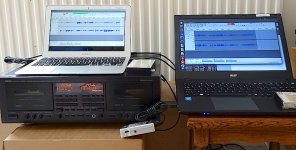
That said, if you can find the same applications for both operating systems (generally more common with open source software) the transition will be easier. Here's a MacBook and a Windows computer, both using Audacity to handle different sound streams at the same time...

Laptop computers and cassete tape recorder DSC00580.JPG
 
I switched from a an Intel NUC to an M4 Mini around six months ago and as long as you can get along with the OS found it faster with Lightroom and PS. In all other respects is was about the same speed as my two year old NUC. In hindsight I would probably have been better off with one of the latest and much faster mini PC's as I already had keyboards and accessories but at least I know what the grass is like on the other side. Not my first Mac by the way as I had an iMac some years ago and am on my 4th iPhone and 3rd iPad.
 
I generally find that most people who move to Mac like it. They are clearly very well built machines.

I just can't get on with the O/S which is not that it's bad, it's just not how my brain has been wired (with lots of Windows use over the years). I prefer Android on my phone too. I think W11 is a pretty decent o/s. I prefer Linux Mint but there's some software (like LR) I just need windows for
 
Last edited:
I generally find that most people who move to Mac like it. They are clearly very well built machines.

I just can't get on with the O/S which is not that it's bad, it's just not how my brain has been wired (with lots of Windows use over the years). I prefer Android on my phone too. I think W11 is a pretty decent o/s. I prefer Linux Mint but there's some software (like LR) I just need windows for
Yes, when I moved over to Mac from working professionally with Windows since Windows 3 in around 1991 it took me a few months to get my head round it. Mind you, I was used to constantly changing operating systems such as IBM DOS/VM, IBM OS/VS1, IBM MVS, Data General AOS, and Wang something or other. Not to mention a bit of Unix (which was the hardest of all and I did not really conquer it!).
 
Regarding price: Apple gear tends to be extremely reliable and hold its resale value. I've bought a few refurbished items from the Apple Store over the years and they've all been just as reliable as new ones.

The new Mac minis are extremely impressive for the price. The new MacBook Air also looks excellent.
 
I’ve had Mac’s for years now , moved to m1 mini a couple of years ago , but after camera upgrades Z8 I found it was dragging a bit , so after a long chat with my computer minded lad I upgraded to a base Mac mini m4 ( sub £500 at Costco) and a external 1 tb ssd for my Lightroom library , to say that it whizzes through would be a understatement. I don’t do video so not sure how it would handle it
The only other extras to price in are a keyboard and mouse ( apple optional) I also bought a docking station for the extra usb ports but it’s not really needed .
Don’t get dragged into the you need extra ram arguments ,you honestly don’t unless your making home movies on a Hollywood scale
 
Regarding price: Apple gear tends to be extremely reliable and hold its resale value. I've bought a few refurbished items from the Apple Store over the years and they've all been just as reliable as new ones.

The new Mac minis are extremely impressive for the price. The new MacBook Air also looks excellent.
Also some of the third-party refurb suppliers are good. I bought an M2 Macbook a while back and it was like new.
 
Rtx3060 is head and shoulders above any intel npu. It would be strange if it was explicitly not supported. Maybe a reason to switch software in that case. Adobe for example makes full use of gpu, and you can obviously upgrade to a newer gpu model

It is a different question if m4 is better but i think a reasonably modern desktop should be more than capable in this case
 
Rtx3060 is head and shoulders above any intel npu. It would be strange if it was explicitly not supported. Maybe a reason to switch software in that case. Adobe for example makes full use of gpu, and you can obviously upgrade to a newer gpu model

It is a different question if m4 is better but i think a reasonably modern desktop should be more than capable in this case
This is what the Photolab 9 User Guide says of the performance settings.

"Performance tab

AI acceleration


  • Auto: Mode is automatically selected if the GPU is supported*.
  • GPU brand and model: manual selection of the GPU (some PCs may have more than one GPU, make sure to select the main one).
  • Use CPU only: Forces AI acceleration to use the CPU rather than the graphics card, in case of problems with the latter.
*For more details about AI acceleration settings, please check the Overview > Getting started with DxO PhotoLab > Optimize IA performance page.
Windows ML Acceleration

These options improve DxO PhotoLab’s AI performance with the help of Windows ML (Machine Learning) acceleration:

  • Maximum performance (recommended): default setting from Windows 11 23H2 and onwards (can be switched to Compatibility mode).
  • Compatibility mode: default setting with Windows 10 and Windows 11 below 23H2 (Maximum performance option not available).
  • Changing the Windows ML acceleration requires restarting DxO PhotoLab.
  • If you experience instability in Maximum performance mode, please switch to Compatibility mode."

In my settings it has defaulted to Compatibility Mode.

My reading of it seems to indicate that when the OS and the CPU (Intel Core Ultra?) are 'Windows ML Acceleration' capable/enabled they supplement the AI operating of the GPU and improves overall performance.
 
Back
Top