Adding images from flickr into Blogger

Messages
8,193
Name
Pat MacInnes
Edit My Images
Yes
Trying to put images into my blogger page from Flickr but I can't get any of the html/bb code links or the url to work - anyone got any advice other than to manually upload images>?
 
You can get Flickr to create a blog post straight from Flickr. It works really well.
 
Hi Pat

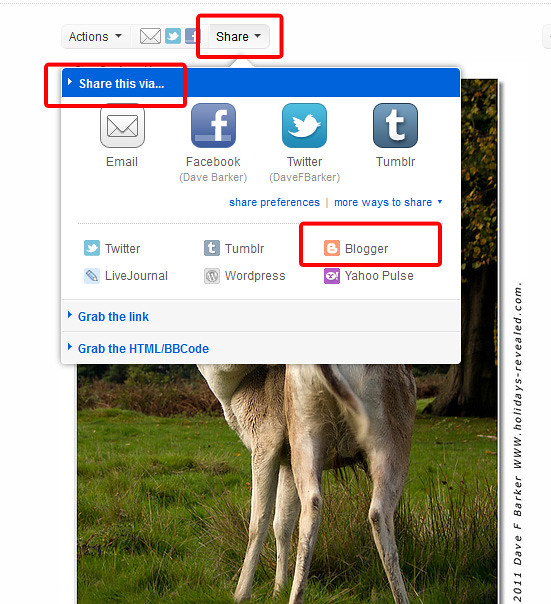
Use the Share option, Share this Via, Click More ways to share HTHs

6319653242_104ac2dcc8_z.jpg
 
Last edited:
Dave - didn't even notice that!!! doh!! :)

Does that only work for sharing single images per blog post, or will it allow you to add several into one blog post?
 
Last edited:
That's what I meant, but put more eloquently. I think it is only one image at a time.
 
That's what I meant, but put more eloquently. I think it is only one image at a time.

Ah well, suppose if I want to get a few images into a blog post it won't kill me to do it manually. The flickr > blogger action is nice and easy though for single images.

Really impressed with how easy the blogger site is to use; has took me no time to get my blog sorted and it's quite easy to just add to it on-the-fly. really looking forward to creating something that people may find intresting :)
 
Hi Pat

I just did a test and if you have several images to put into one post, first you need to have the images open in new tabs so you can get the html code from them

First to post the image you want first in your blog, do as below (see image) using the flickr blogger post, add you description or write up what ever, then go to one of the tabs with the other images now grab the HTML code go back to your original and paste it in the box under your description, do the same for any other images then press Post, go to your blog to see the result HTHs

****** By the way the link in your sig to your blog, doesn't work, I think you have changed the name of your blog to theviewingangle and your link is going to anglingimages
 
Last edited:
Cheers dave - that will help massively. Seems to be the easiest way to do it.

BTW, thanks for the heads-up on the siggy - have changed it now so links through to the blog fine. Now, just have to get some content onto it :)
 
Back
Top