Advice on nailing focusing

Messages
2,154
Name
James
Edit My Images
Yes
Hi all, not been on here for a while. Iam now a proud uncle and ive been trying to get some highish qualitiy photos of my niece but in pretty much all my photos iam struggeling to get a nice sharp focus.

Now I try to focus on the eyes, but I find this is difficult as she doesn't always look at the camera. Can anyone give me some advice? :)
 
Use the AF point selection button to select a single AF focus point and use that rather than letting the camera decide for itself.

If you want her to look at the camera make a funny noise to get her attention :)
 
Use the AF point selection button to select a single AF focus point and use that rather than letting the camera decide for itself.

Sorry I dont quite follow what you mean by AF point selection button...on my 400d in AF Mode ie got, one shot, AI Focus and AI Servo.

If you want her to look at the camera make a funny noise to get her attention :)

Yup, tried that but it doesnt always work :baby:
 
Sorry I dont quite follow what you mean by AF point selection button...on my 400d in AF Mode ie got, one shot, AI Focus and AI Servo.


Yup, tried that but it doesnt always work :baby:

On the back of the camera on the top right hand corner theres a button with a symbol of 5 dots in a cross pattern in a rectangle. Press that and the AF points will appear on the screen then use the wheel to select the point you want. The camera will then focus on that point alone. This only works with P, Tv, Av, and M modes by the way :)
 
If you're after that classic shallow DoF portrait with just they eyes in focus while the rest of the image fades into lovely soft mush, then I'm afraid the answer is: 'Practice'...

With kids, they move so fast that most of the images will be OOF...
 
With kids, they move so fast that most of the images will be OOF...

I found this out recently taking photos of 6 month old twins, it was bloody nigh on impossible at times, their heads were all over the place and inevitably when i took my eye away from the viewfinder for that micro second they would produce a great big smile :bonk: :lol: i think next time i have to do this i will try just putting the camera on a tripod, frame the shot using live view mode(never used it to date)and just snap away using a remote release, but as Rob said practice practice practice.

 
Yup been practicing loads, always get at least one image that iam happy with :) lets hope I can make that 2 soon!

Iam Iain my 50mm, to get a nice sharp face and blured background do I need to shoot at 1.8?
 
Yup been practicing loads, always get at least one image that iam happy with :) lets hope I can make that 2 soon!

Iam Iain my 50mm, to get a nice sharp face and blured background do I need to shoot at 1.8?


You can use a narrower aperture the closer to the subject you get and still get the same result.
Watch for facial distortion as you get closer though...big noses, small ears...

For a 'head-and-shoulders' shot that fills the frame, the optimal focal length is generally taken to be between 85-135mm on a full-frame camera.
50mm is good for half-body (adult) shots or full-body (under 12's).
 
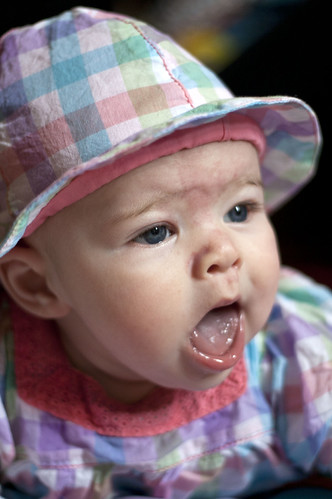
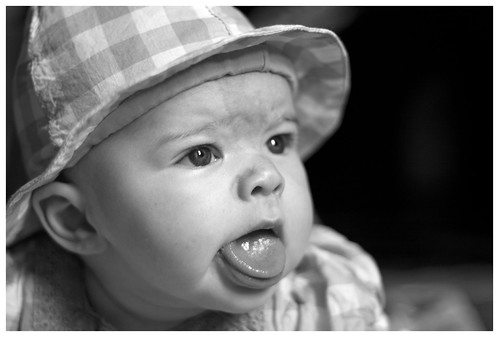
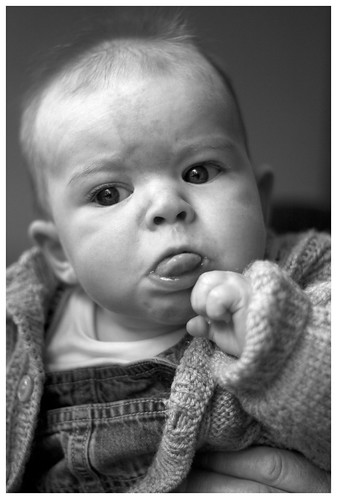
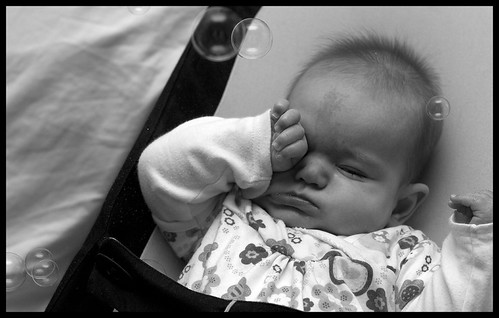
Can you recommend how I could improve the focusing on these please?

5199759484_8857d0e3e0_z.jpg


5199758380_1ee1d697f1.jpg


5199162779_65b53e4c96.jpg


5199161687_9de653d182.jpg


5199754840_520fc0baa6.jpg
 
Hard to tell from small versions but they look in focus to me, it's just that the aperture is too wide so not all of the face is sharp due to the narrow depth of field. If your using f/1.8 try between say f/2.8 and f/5.6, somewhere there you should be able to get the whole head in focus but still have a blurry background.
 
Yes. If you want the background to stay out of focus then try decreasing the aperture by one or two stops. I couldn't see what aperture you had set as the exif data has been removed from the pics :)
 
Iam Iain my 50mm, to get a nice sharp face and blured background do I need to shoot at 1.8?

You may want to try f/2 rather than f/1.8 as a maximum opening.
This will increase the depth of field obviously, but many lenses are not working at their best wide open as far as they can go. Mine is sharper at f/2, and can still produce the depth of field look.

(also, as I suspect you have already found out, keep the ISO on the 400d as low as possible)
 
Yes. If you want the background to stay out of focus then try decreasing the aperture by one or two stops. I couldn't see what aperture you had set as the exif data has been removed from the pics :)

Ok thanks, yeah thats annoying do you know how the exif data has been removed? The photos are straight off Flickr which where P&P in PS.

You may want to try f/2 rather than f/1.8 as a maximum opening.
This will increase the depth of field obviously, but many lenses are not working at their best wide open as far as they can go. Mine is sharper at f/2, and can still produce the depth of field look.

(also, as I suspect you have already found out, keep the ISO on the 400d as low as possible)

Thanks, will keep it at ISO100 then, would you suggest using a flashgun? Will be doing more shots indoors again.
 
Last edited:
focus on the eye area...and set the camera for some depth of field...large f no
if you are on auto you may not be able to control the aperture
so you could set on aperture priority...
with children you need speed...so i think that suggestion isnt very good
try flash then you wont have to be so concerned about iso and daylight settings
 
Back
Top