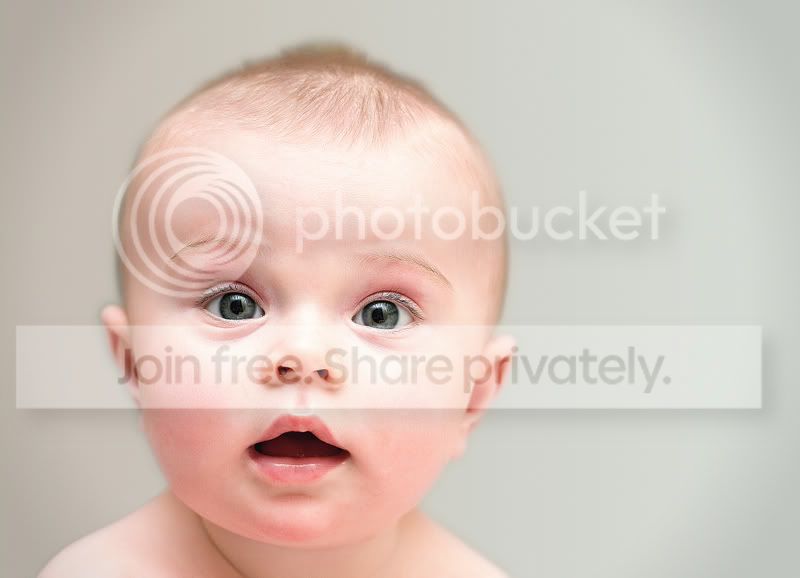
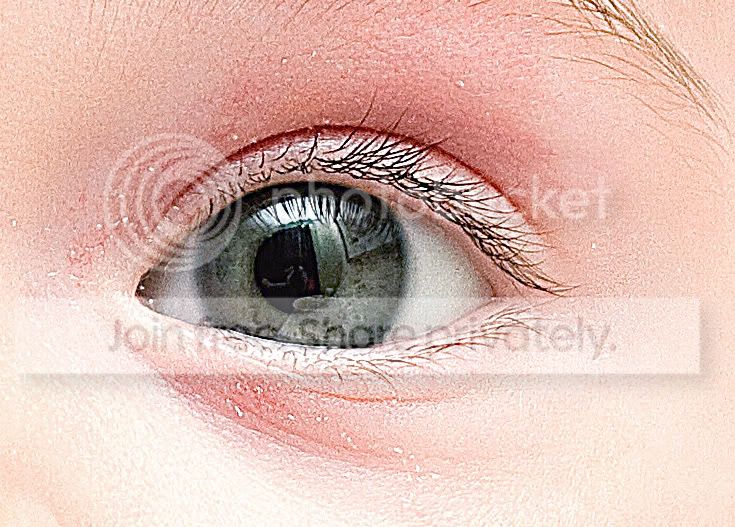
Alamy QC - does this look soft to you?

I always sharpen prior to submission, any failings I've had in QC have never been due to excessive sharpening in their info :thinking:

I don't think they have excessive sharpening as one of their pre-set reasons for rejection. I think the idea is that the end user needs some leeway as to how they want the final image to look after they bought it (which includes sharpening). Of all the submissions I've made I think I've only added any sharpening to 5, the rest as just resized by 130% from the RAWs.
 
but to further confuse the issue and really baffles me they have also passed QC on this shot which to me looks exactly like the other monkey shots to me. What's different about this one to the others?

After the initial submission they don't check every image in a batch - unless you get a reputation for submitting poor images. So, just because an image is in a batch that passes QA, it don't mean that it's definitely of acceptabe quality.
 
After the initial submission they don't check every image in a batch - unless you get a reputation for submitting poor images. So, just because an image is in a batch that passes QA, it don't mean that it's definitely of acceptabe quality.

this is true, but even my initial set were very similar to all of these posted and these were all accepted with my initial submission. I guess this is where my confusion is. Seems to me like it's a little bit of a lottery. :shrug:
 
Here's a perfect example - looked back through my initial submission - this one passed the QC but to me this is heavily over sharpened and has a lot of artifacts or are my eyes wrong?

IMG_1905.jpg


IMG_1905b.jpg
 
What method of sharpening are you using?
 
I use unsharp mask in Photoshop now, although the image above I can't tell you what I used as it was a while ago when I was starting to get to grips with pping
 
this is true, but even my initial set were very similar to all of these posted and these were all accepted with my initial submission. I guess this is where my confusion is. Seems to me like it's a little bit of a lottery. :shrug:

I think you may be right when you suggest it's a bit of a lottery.:shake:
 
I suspect it is supply and demand. I don't think Alamny will be short of photos of grey squirrels. so they can be picky and you may find that they are getting bored of looking at them.

However if you had a shot of this mornings incedent of the oil tanker hitting the container ship in the north sea, even if it was taken with a desposable camera, They would be all over you to get it because not matter the quailty, that image will sell.

Stuart
 
I suspect it is supply and demand. I don't think Alamny will be short of photos of grey squirrels. so they can be picky and you may find that they are getting bored of looking at them.

how could you get bored of looking at them? :lol:
 
I use unsharp mask in Photoshop now, although the image above I can't tell you what I used as it was a while ago when I was starting to get to grips with pping

Do you use the Lab method as it helps avoid the colour artifacts? The resolutions you are shooting at should be giving you loads of flexibility.
 
I suspect it is supply and demand. I don't think Alamny will be short of photos of grey squirrels. so they can be picky and you may find that they are getting bored of looking at them.


Stuart

I doubt it. As far as I know the content is unimportant to Alamy. As long as its "sharp and not lacking in definition....." it'll be accepted.

And some guy sitting at a desk in Hyderabad or wherever wouldn't recognise a tree rat if one sat on his keyboard.

(sorry, squirrel lovers....)
 
When you've got your image open in Photoshop do the following:

Image / Mode / Lab Color

Windows / Channels

Make sure only the "Lightness" one is highlighted

Unsharp mask (Raduis=1 Threshold=4 and then adjust the strength amount to suit. Increasing the radius tends to mess things up I've found so I keep it at 1)

Image / Mode / RGB Color


Because you are only sharpening the "Lightness" channel it avoids creating the colour artifacts.
 
They look severely over sharpened to me, when you start seeing halos.. you're overdoing it.
 
When you've got your image open in Photoshop do the following:

Image / Mode / Lab Color

Windows / Channels

Make sure only the "Lightness" one is highlighted

Unsharp mask (Raduis=1 Threshold=4 and then adjust the strength amount to suit. Increasing the radius tends to mess things up I've found so I keep it at 1)

Image / Mode / RGB Color


Because you are only sharpening the "Lightness" channel it avoids creating the colour artifacts.

alrigthy, thanks for the tip.

I tried it out however on a photo I took last night and I can't see any difference between running the sharpness this way or just a straight unsharp mask on the image. I applied the exact same threshold and radius and amount. The images look identical to me, just the lab method took longer to do. Was this a bad example to use? Or are my eyes broke?

click for a larger image, can you tell which method was used in which image?


Picture 1 by MrJoeBoy, on Flickr
 
I can't really add much that hasn't already been said but to me they do look soft.

They look severely over sharpened to me, when you start seeing halos.. you're overdoing it.

it's so interesting when two people look at the same images and come to the complete polar opposite conclusion :lol:

I found myself agreeing to the second conclusion that they are over-sharpened :thumbs:
 
it's so interesting when two people look at the same images and come to the complete polar opposite conclusion :lol:

I found myself agreeing to the second conclusion that they are over-sharpened :thumbs:

In MY opinion the images are all a bit oversharpened.
Oversharpened does not = sharp though.
Once you go beyond the point of acceptable sharpness the image starts to get deteriorated which I think is why some people are saying these images are 'soft'.
I certainly wouldn't have called them soft in terms of focus or camera shake or equipment fault but to my eye they aren't sharp either.
 
How about using the high pass filter?

Duplicate the layer. Filter > Other > High Pass, select 5% and blend the layers using softlight.
 
ok, thanks for another sharpening method suggestion. I've applied all three methods to the same pic below are the results, one is standard unsharp mask, one is the lab method and one is high pass

which one is the best sharpening result in your opinion?

EDIT the first in the setup is now the unsharpened original after a request further down


sharpening by MrJoeBoy, on Flickr
 
Last edited:
or how about (for Alamy only) doing what they advise and not sharpening at all?

yes I think I will do this for alamy, I guess now I'm moving onto what sharpening I should use for myself since my current method doesn't seem to be producing the best results
 
yes I think I will do this for alamy, I guess now I'm moving onto what sharpening I should use for myself since my current method doesn't seem to be producing the best results

I do like the high pass filter method in PS. It works very well and doesn't affect and noise or other arteifacts in the image. Normally I find between 4-8 (depending on the image) PXL radius and then converting the layer to soft light works really well
 
I do like the high pass filter method in PS. It works very well and doesn't affect and noise or other arteifacts in the image. Normally I find between 4-8 (depending on the image) PXL radius and then converting the layer to soft light works really well

care to guess which of the three above was high pass and the one you like the most?
 
care to guess which of the three above was high pass and the one you like the most?


if you pushed me(and I'll make my excuses my laptop screen is s*** now and its hard to tell at web resolutions) I'd say the top 1 is certainly the best of the three
 
ok duely noted I'll reserve telling you which method that is until i get some more opinions, I want people to tell me what image they prefer before they know the method as I don't want any bias. I also prefer the top image the most.
 
Can you guess which one I think outshines the rest?

if you think the original is the best then I'd suggest you should get your eyes checked :lol::lol:

the original is from a raw with no sharpening at all, even from the camera.

This is how i will send them to alamy from now on but for my own uses, I'll certainly be adding some sharpening as I think the images looks softer without any at all.
 
Sharpening is not a mechanical process, each photo is unique in how much sharpening it requires. You can't just follow a set formula e.g.(100% radius 1.0) and expect good results.

I linked this in another sharpening thread and I think it's relevant here http://www.ronbigelow.com/articles/sharpen1/sharpen1.htm

Take some time to read that, it will improve your sharpening techniques greatly.

Also, watch the high contrast areas of your image and look out for signs of halos, that's when you know you have sharpened it too much (unless you're preparing it for print and you know it needs that much sharpening)
 
just looking at this example I have to say it does seem soft but that maybe my comp is it web shrunk by anychance maybe if the original was to be seen would disagree but think from ths AC has called it right
 
or how about (for Alamy only) doing what they advise and not sharpening at all?

And they've got good reasons for wanting unsharpened images. As we can see in this thread, everybody has their own opinion on how much sharpening an image needs and what method produces the best results. By insisting on unsharpened images, Alamy can let the customer decide on any sharpening for themselves.
 
In my personal opinion - and not saying I could do any better - I'd say it looks as though the eye lashes are a bit sharper than the eye itself.
I'd also say, again in my opinion - which as hollis_f suggests is a personal thing - the unsharpened image is the only one where the eyelashes - and to a degree, the eyebrows and skin texture - look right.
 
In my personal opinion - and not saying I could do any better - I'd say it looks as though the eye lashes are a bit sharper than the eye itself.
I'd also say, again in my opinion - which as hollis_f suggests is a personal thing - the unsharpened image is the only one where the eyelashes - and to a degree, the eyebrows and skin texture - look right.

to your first point, thats just my user error though, nothing to do with the sharpening method.

the second point, well, I suppose if it's peoples opinions that determine what is sharp and what is soft then that means there is no actual real definitive definition of a sharp image or not then - but thats surprises me
 
to your first point, thats just my user error though, nothing to do with the sharpening method.

the second point, well, I suppose if it's peoples opinions that determine what is sharp and what is soft then that means there is no actual real definitive definition of a sharp image or not then - but thats surprises me

To your first point, possibly not user error, if you were using af the selected af sensor could have been larger than the eye and the camera chose to focus on the eyelashes as there is more contrast there.

The second point, I think its more that opinions of what is over sharp varies more than opinion of what is not soft.
 
To your first point, possibly not user error, if you were using af the selected af sensor could have been larger than the eye and the camera chose to focus on the eyelashes as there is more contrast there.

The second point, I think its more that opinions of what is over sharp varies more than opinion of what is not soft.

I must have focused between both eyes rather than on the eye though because at 2.8 from that focal length and subject distance the dof was 2.56 cm. So if the focus nailed on the eyelash the eyeball would have still been within that range as there's less than 1.31cm behind the focal point.
 
Hi Joe,
there is definately a problem with these images. Would you care to post your workflow? Are you processing RAW files? If jpeg - is in camera sharpening turned off. If RAW is the sharpening turned off in ACR (or whatever you are using to convert) Are you up-sizing, if so why?? 5d Mk2 produces 62mb file. Even severe cropping will get way over the minimum 24mb now required.
I'm wondering if you are somehow sharpening twice.
Webby
 
Hi Joe,
there is definately a problem with these images. Would you care to post your workflow? Are you processing RAW files? If jpeg - is in camera sharpening turned off. If RAW is the sharpening turned off in ACR (or whatever you are using to convert) Are you up-sizing, if so why?? 5d Mk2 produces 62mb file. Even severe cropping will get way over the minimum 24mb now required.
I'm wondering if you are somehow sharpening twice.
Webby

never done any upsizing, can you clarify which pics you refer to as there are all sorts in the thread now. The monkey shots all taken with the 7d, the cat with the 7d, the little girl with the 5d and the pics of the eye with the 5d.

Over the months I've probably done a variety of workflows as it's been in tandom with me learning to use my cameras and processing. Always shot in raw though never any sharpening in ACR or in camera.

The only ones i can remember exactly what i've done to them is the girl pics as the others were a good few months ago.
 
Last edited:
Back
Top