


- Messages
- 548
- Name
- Greg
- Edit My Images
- No
Thought I'd share some thoughts on a new Monitor I took delivery of last week, the ALogic 40C5KPD Edge 40" Ultrawide 5K.
Not a brand I'd heard of before, they're Australian, and very little in the way of reviews online, but I'd finally 'outgrown' my BenQ SW271 and decided to take a risky punt on one of these. I was looking at Asus ProArt range but nothing was really taking me and then I stumbled across the ALogic's, I think it was a facebook ad. Anyway, I looked into it more and the more I looked the more it seemed to fit my needs.
The obvious need was for a wide gamut and the Edge kind of delivers here, featuring 100% coverage for both sRGB and DCI-P3 and a fairly decent 94% for AdobeRGB. Anything in the 95% ballpark for AdobeRGB is generally all you need (although true colour purists will point to Eizo's and the BenQ offering 99-100%). Figuring that this is a 21:9 ultrawide screen, then I can accept a compromise of a few % that my eyes can't even see.
In terms of connectivity there is a decent hub on the rear that handles signals from HDMI 2.0 (decent), DisplayPort 1.4 (better), and a 90W USB-C port (display and power - best). There's an Ethernet RJ45 port, 2x USB-C (5W) ports, and a 3.5mm audio jack. I'd have liked another higher power USB-C, but haven't really got a use for one right now.
In terms of resolution, it's not a true 5K monitor, resolution is 5120 x 2160, which represents 4K in terms of screen height...the extra 1K comes from the extra width over a typical 4K, 5120 pixels as opposed to 4096...and that width is what I really wanted. From being able to have my work laptop and my mac mini connected at the same time with Picture By Picture (or PIP) to being able to edit wide panoramas, or just have selected windows like stocks or social media feeds alongside a decent piece of screen real estate for editing. This monitor ticks those boxes.
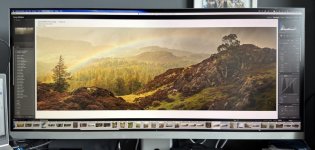
I was particularly nervous about how good it would be for photo editing, but I need not have worried. As soon as it arrived I calibrated a profile using my trusty i1 DisplayPro and boom...images in lightroom look exactly like they did on the BenQ. I don't seem to be missing anything with the slightly less AdobeRGB coverage...although I still have to do some prints with images edited from scratch on the new Monitor.
Design-wise, build quality is solid and the stand is hefty. The panel itself is about the thickness of an iPhone/iPad and the silver finish I chose fits very nicely with my MacMini (the other option is space grey/black). The quality isn't the same as Apples Studio screen's (and neither is the pixel density for that matter) but they give them a decent run for their money and are a lot cheaper, relatively speaking. I paid just under £1200 and had delivery in just less than a week from order.
So, for anyone looking for a decent alternative to the expensive Apple offerings or the more established offerings from BenQ, etc...and if you are wanting to scratch that ultrawide itch, I think it's a decent choice. My desk is also slightly less cluttered now as I had the 27" BenQ (used for photography) alongside another 27" Acer (used for work), and now I only have the one 40" Monitor for both needs.
Not a brand I'd heard of before, they're Australian, and very little in the way of reviews online, but I'd finally 'outgrown' my BenQ SW271 and decided to take a risky punt on one of these. I was looking at Asus ProArt range but nothing was really taking me and then I stumbled across the ALogic's, I think it was a facebook ad. Anyway, I looked into it more and the more I looked the more it seemed to fit my needs.
The obvious need was for a wide gamut and the Edge kind of delivers here, featuring 100% coverage for both sRGB and DCI-P3 and a fairly decent 94% for AdobeRGB. Anything in the 95% ballpark for AdobeRGB is generally all you need (although true colour purists will point to Eizo's and the BenQ offering 99-100%). Figuring that this is a 21:9 ultrawide screen, then I can accept a compromise of a few % that my eyes can't even see.
In terms of connectivity there is a decent hub on the rear that handles signals from HDMI 2.0 (decent), DisplayPort 1.4 (better), and a 90W USB-C port (display and power - best). There's an Ethernet RJ45 port, 2x USB-C (5W) ports, and a 3.5mm audio jack. I'd have liked another higher power USB-C, but haven't really got a use for one right now.
In terms of resolution, it's not a true 5K monitor, resolution is 5120 x 2160, which represents 4K in terms of screen height...the extra 1K comes from the extra width over a typical 4K, 5120 pixels as opposed to 4096...and that width is what I really wanted. From being able to have my work laptop and my mac mini connected at the same time with Picture By Picture (or PIP) to being able to edit wide panoramas, or just have selected windows like stocks or social media feeds alongside a decent piece of screen real estate for editing. This monitor ticks those boxes.
I was particularly nervous about how good it would be for photo editing, but I need not have worried. As soon as it arrived I calibrated a profile using my trusty i1 DisplayPro and boom...images in lightroom look exactly like they did on the BenQ. I don't seem to be missing anything with the slightly less AdobeRGB coverage...although I still have to do some prints with images edited from scratch on the new Monitor.
Design-wise, build quality is solid and the stand is hefty. The panel itself is about the thickness of an iPhone/iPad and the silver finish I chose fits very nicely with my MacMini (the other option is space grey/black). The quality isn't the same as Apples Studio screen's (and neither is the pixel density for that matter) but they give them a decent run for their money and are a lot cheaper, relatively speaking. I paid just under £1200 and had delivery in just less than a week from order.
So, for anyone looking for a decent alternative to the expensive Apple offerings or the more established offerings from BenQ, etc...and if you are wanting to scratch that ultrawide itch, I think it's a decent choice. My desk is also slightly less cluttered now as I had the 27" BenQ (used for photography) alongside another 27" Acer (used for work), and now I only have the one 40" Monitor for both needs.
Last edited:
