

just spentthe weekend in london, on a black tie dinner suite event.
I decided not to take my camera (moment of stupidity based around not wanting to leave it in a hotel room)
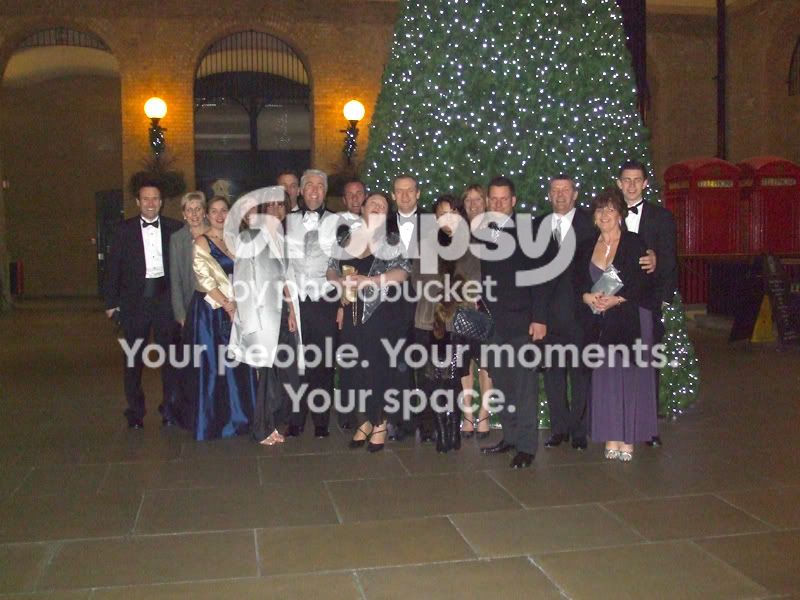
any way, oen of the guys did take a fuji a900 but only got 1 shot of the group as a whole.
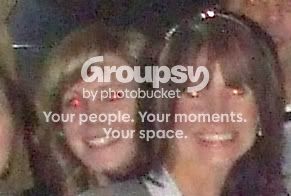
unfortunatly it is suffering from red eye and the (I think) for more worrying white eye. When I zoom in to try and fix it, the image is too pixalated for CS2 to be able to fix with red eye tool (it give the ladies rather unflattering pander eyes)
I have tried to manualy fix it, btu I am strugling a bit.
can any body give me any tips advice etc.
he is the original, but reduced to 800 x 600 for the net, and a straight forward crop of a part of it, to give you an idea of what i have to work with.
Yeah I know was a big mistake not taking my camera, and it was a passerby who took this shot on the fuji.
will CS3 or CS4 do the red eye better?
thanks in advance if anybody can help
I decided not to take my camera (moment of stupidity based around not wanting to leave it in a hotel room)
any way, oen of the guys did take a fuji a900 but only got 1 shot of the group as a whole.
unfortunatly it is suffering from red eye and the (I think) for more worrying white eye. When I zoom in to try and fix it, the image is too pixalated for CS2 to be able to fix with red eye tool (it give the ladies rather unflattering pander eyes)
I have tried to manualy fix it, btu I am strugling a bit.
can any body give me any tips advice etc.
he is the original, but reduced to 800 x 600 for the net, and a straight forward crop of a part of it, to give you an idea of what i have to work with.
Yeah I know was a big mistake not taking my camera, and it was a passerby who took this shot on the fuji.
will CS3 or CS4 do the red eye better?
thanks in advance if anybody can help


