Anyone want 3 screens for their mac?

joescrivens

Suspended / Banned
Messages
15,052
Name
Joe
Edit My Images
Yes
If you are a mac user and have toyed with the idea of a 3rd screen but dubious about how to do it or what products will be mac compatible. I've just bought this from the US:

http://eshop.macsales.com/item/Other World Computing/VIDU2DVIA/

I ordered it online on Tuesday and choose fedex and got it today. The whole thing including postage cost $100 shipped priority to the uk (you can get standard shipping and it would be about $80) which is £60. I paid no duty on it when it arrived. Plugged it in to my Sympodium tablet display, installed the driver and restarted and it worked without a single hiccup.

It supports up to 1600x1200 resolution and I've found it to work seemlessly. I did a test and video flickers a little but I'm not using it for that I want to use my pen tablet as and when I need to, so I'm a happy chappy.

Check it out
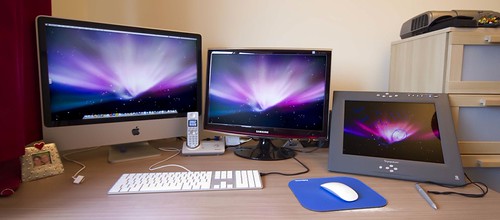
4155344350_f92a3e63e4.jpg


24inch iMac, 22 inch Samsung, 15 inch sympodium
 
so that is the price for the adapter ... NOT the screen ??? had me going there for a minute :lol:
 
Is it happy with different resolutions on the screens. I have a 24 inch mac and a 20 inch monitor but when i am displaying my pics to clients i use the plasma in my office. It is a pain to have to keep changing the mini dvi plug on the back to move between the 2 monitors but it works.

Will it happily run imac at full res, monitor at 1280x1024 and plasma at 1024x768.

Thanks
Mac
 
Is it happy with different resolutions on the screens. I have a 24 inch mac and a 20 inch monitor but when i am displaying my pics to clients i use the plasma in my office. It is a pain to have to keep changing the mini dvi plug on the back to move between the 2 monitors but it works.

Will it happily run imac at full res, monitor at 1280x1024 and plasma at 1024x768.

Thanks
Mac

Thats exactly what I am doing, I've got iMac 24 inch at 1920x1200, Samsung at 1680x1050 and Sympodium at 1024x768 no problem at all!

It's only the last screen thats running off the usb so it's not affecting my imac and my samsung screen, thats connected through dvi.

The usb comes with dvi, vga and uga adapters
 
good grief.

USB uses the processor while handling data, regardless of platform.

i know that I was being facetious, plus we all know the mac processor is more efficient than on a pc don't we!!!

JOKE, don't take the bate!
 
It's made by wacom but it's sold by SMART Technologies who are an interactive whiteboard company I work for. It's used in the education world as a presentation tool but essentially it was a wacom product used by graphic designers just rebranded.

The version I have is now obsolete but essentially it's one of these:

http://www.wacom.com/pendisplays/
 
Thanks.
I have actually been looking for one of those (but also thinking it is not going to be cheap enough)
 
yeah they aint cheap, you can probably pick up a 2nd hand id250 for about £300 though. Brand new they are around a grand I think
 
that massively can't work????

usb has a 400mb/s bandwidth thats not enough to run 1600x1200, a pci-e x16 is 768m/s

ok maybe it can work now I found some numbers
 
I just checked it on my other display at 1600 x 1000 using dvi and it worked fine.
 
There are a load of things like this available for PCs - just like the one you mentioned, but finding some that specify they are mac compatible is a challenge, hence why I started this thread as I found two decent ones that are compatible for mac.

the one you mentioned under details says windows only like most of the others do
 
If you are a mac user and have toyed with the idea of a 3rd screen but dubious about how to do it or what products will be mac compatible. I've just bought this from the US:

http://eshop.macsales.com/item/Other World Computing/VIDU2DVIA/

I ordered it online on Tuesday and choose fedex and got it today. The whole thing including postage cost $100 shipped priority to the uk (you can get standard shipping and it would be about $80) which is £60. I paid no duty on it when it arrived. Plugged it in to my Sympodium tablet display, installed the driver and restarted and it worked without a single hiccup.

It supports up to 1600x1200 resolution and I've found it to work seemlessly. I did a test and video flickers a little but I'm not using it for that I want to use my pen tablet as and when I need to, so I'm a happy chappy.

Check it out

http://farm3.static.flickr.com/2580/4155344350_061a3617d1_o.jpg

24inch iMac, 22 inch Samsung, 15 inch sympodium

Staff Edit : Images changed to clickable links. Pictures must not exceed current forum limits as per the rules.
Please feel free to replace this with a fresh/resized image and remove this text :)

Not sure why this got changed to a link, since it's panoramic and the rules are 1024 on the longest edge for panoramics
 
Not sure why this got changed to a link, since it's panoramic and the rules are 1024 on the longest edge for panoramics

"We consider an image panoramic if it contains 2 or more shots stitched together, and has a 2:1 size ratio or higher"

I think that will answer your question...though if it is stitched, you really need to sort the barrel distortion :lol: ;)
 
well the image was 1024 x 452 and unless my maths is wrong thats a ratio of 2.27

but it's your forum and you can do what you like I suppose
 
well the image was 1024 x 452 and unless my maths is wrong thats a ratio of 2.27

but it's your forum and you can do what you like I suppose

But was it 2 or more images stitched together? because it really doesn't/didn't look like it.
 
Correct.

But thats 500 pixels so allowed. If there's a bigger version of it over 800 wide and it definitely hasnt been stitched together then it should be linkified :)
 
Lol so that pic isn't a panoramic?

I think I need to go back to Photography for dummies then!! ha ha, first task look up what panoramic means! Cos I was pretty sure the definition didn't include "at least 2 shots stitched together"

:-)
 
Back to another question, how do you find the tablet & display? We looked at those at work but couldn't run the hi-res we wanted, plus were very pricey.

An interesting idea though, do you use it for your editing?
 
Well I didn't buy it on purpose, work had a spare one and let me have it. I've only properly been using it for a few days since I got this usb hub, before then I had to disconnect my other screen to connect it, and it was just too much hassle.

I used it last night for some freehand selection and dodge and burn stuff and it was really good. But it doesn't have a high res (1024x768) and the color isn't a match at all for my other two monitors so it's not the greatest for doing any really major photo work. What it is really good for though is masking, selecting and clone stamp - stuff like that.

There are others on the market that wouldn't suffer from the problem I have with the color though, mines a good 3/4 years old and the actual use model of drawing with a pen straight onto the screen is really cool and a lot easier than using a tablet with no screen.

I reckon when this comes out i'll be saving some pennies :-)

http://www.innosight.com/blog/apple_tablet.jpg

but possible not for photo editing since it will be touch, I just want one !!
 
Back
Top