B&W: colour filters vs. post processing.

Messages
1,642
Edit My Images
Yes
Could anyone tell me if there would be any advantage to using a coloured filter and shooting in black and white mode as opposed to desaturating using the channel mixer tool when I'm processing images?
Doing it in processing tends to leave me with a pretty noisy image, such as here: http://www.flickr.com/photos/the-matt/2951235143/
I am guessing this is because the channel is underexposed and lightening it to an acceptable level creates the noise. Am I right? If so, that means using a filter instead would get around this, yes?
 
Matt, never done it myself, but what you say sounds right.

To darken a blue sky, fit an orange or red filter, and shoot at the lowest ISO to minimise noise. If you over expose a bit, pushing the histogram to the right, this will also minimise noise. And noise reduction will improve things still further. Shoot in Raw with a black & white JPEG to preview the result, but if you do it with filters, the Raw file will also be affected. So...

I'm thinking about this as I write :thinking: Maybe you could replicate the way filters work by fooling the camera's white balance? This would work to some extent at least and as the Raw file would not be affected, you've got nothing to lose. You would do this by setting custom white balance but instead of reading off a white card, you'd read off a coloured card. Basically, you're foxing the camera into doing what you would do in post by pulling the colour chanels. It would be fun playing with this idea, and obviously wouldn't require any costly filters.

I've not heard of anyone doing this before but I can't think I'm the first to think of it, so therefore somebody will come along and tell you more, or tell you not to bother!

Good luck,

Richard.
 
If I'm intending on PP'ing an image to make it b&w with the red channel I will over-expose a bit knowing that the red channel wont be clipped.

A colour histogram is useful for things like that although I just overexpose a little bit.
 
Thanks for the input. I had not thought about fiddling with the white balance but I may give that a go before I splash out on more glass.

Mole: good idea. I will try that. I don't have colour histograms on my camera but will take guesses about how much to overexpose by.
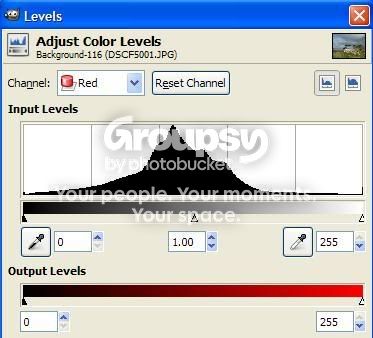
Looking (with my untrained eye) at the histogram for the one above, it doesn't look too bad though:
levels.jpg

Do you still think underexposure is the cause?

Continuing to think out loud, if I want the really dark moody skies that a red channel gives, don't I want the red channel to be a bit underexposed? Now I'm confusing myself :)
 
Matt, that histogram is way under underposed for optimum. You could add another two stops to it at least. You might get away with three before you lose anything important. This will make a massive difference to your noise problem. If you get that bit right, and also shoot at lowest ISO, noise will be sorted and surely with a bit of noise reduction on top would deliver a pretty good file :)

It would be interesting to see what fooling the white balance would do. I imagine a major benefit, particularly when you are experimenting, would be getting a 'filter effect' JPEG to view immediately on the LCD, without the Raw file being touched. Gotta be worth trying - and I'd really like to know how far you can mimic filters in this way ;)

These things are confusing, and is not my greatest area of expertise, but if you you want dark blue skies, then the blue channel needs to be under-exposed. Fitting a red filter to the lens will do that under any circumstances, however it will also affect the Raw file. But I'm not sure digital works exactly like black & white negative film here, so for all I know digital might achieve this better by upping the blue and green channels, rather than cutting red... if that makes any sense. In theory it could work either way, but in practise one method will surely be better. I suspect the difference may be confining noise to just one channel rather than two.

Please give it a bash and let us know :)

Richard.
 
I tried overexposing the red the other day. Noise free (yay), but it also lost the moody dark feel That I'm doing it for (not yay) and darkening it in PP brought back the noise (further not yay).
Still, there's plenty more here for me to go on. Next: try pratting about with the WB. I'll let you know how it goes but i foolishly forgot to shoot any raw the other day...
 
Cheers Matt. On the WB thing, since I've never heard of this technique before, I suspect that it maybe doesn't work too well, or surely this would be a popular trick.

It works in theory for sure, but the range of colour adjustment you need to correct for, say, artifical light, is not going to get you near what a strongly coloured filter will give. So don't get your hopes up ;)

On the other hand, on the noise issue, if you shoot at lowest ISO, optimise exposure, and run a noise reduction program, then that must get you a good quality useable file.

Richard.
 
I will have to look at getting some noise reduction software as currently I have none. Unfortunately the sensors on fuji cameras are renowned for being naturally noisy, even at the lowest ISO so that probaly puts me at a bit of a disadvanage.
 
Back
Top