Backing up SD cards without a PC?

Messages
185
Name
John
Edit My Images
Yes
Hi all, I'm going to New Zealand next year for 6 weeks and really want to take my camera gear with me! My only concern is backing up the memory cards? I don't want to take a laptop with me due to extra weight, so was thinking maybe a tablet and external hard drive? Can anyone recommend a tablet or alternative way of transferring data?

John

Tittle was supposed to read SD cards! Bloody phone!
 
Last edited:
John,

I have a small netbook I take with me when I go on holiday. The problems with tablets is the size of the built in member and time it would take to back up to tablet and then move it all to an external hd.

Kev
 
I have the passport hard drive already. Just need a device to transfer the data. The netbook sounds like a good idea, but I was really after something smaller and maybe less fragile?

John
 
Pack the netbook in hand baggage for any flights but in the main suitcase while you're on terra firma. Most tablets will be a bit restricted as far as their internal memory goes and it'll be a faff loading from a card to the tablet then from the tablet to an EHDD. Most netbooks have SD card readers built in and at least one USB port, often USB3 these days. Might be worth taking an external optical writer too and a stack of trusted disks. Might sound like overkill but you can never have too many backups!
 
Check out the Hyperspace Colorama UDMA 2 drive.
It sounds perfect for you.
 
I have the passport hard drive already. Just need a device to transfer the data. The netbook sounds like a good idea, but I was really after something smaller and maybe less fragile?

John

The passport drive I linked to has a built in SD card reader ........
 
Sorry, didn't realise that was a link! Looks good though.

John
 
I have a device called Belkin USB Anywhere. Allows you to copy from one USB device to another, i.e. card reader to hard disc. The Belkin is battery powered - 3xAAA - or uses a power adapter. In fairness, whilst cheap it's slow.

Another option could be to use your smartphone, assuming it has a microSD port? Copy through the phone's USB port to a microSD card, and just carry lots of them?

When I did a 6 week trip to NZ (you'll love it) I used a device called a SmartDisk. It is internally powered, has it's own internal HD (albeit mine is only 40gb, but no reason why it couldn't be upgraded), and every card reader orifice going! The SmartDisk itself is no longer made, but is available used, plus other manufactures make similar devices.
 
Just checked another device I own - a Kingston MobileLite - and found it'll do what you want.

It's has an internal rechargeable battery (that can be also be used to recharge a phone), connects to any device (up to 3 simultaneously) via wifi, and allows transfer of files from an SD card to an ext HD, both of which plug directly into the device, and is controlled via an app on your phone. None of the reviews, nor the instructions that come with it seem to mention this facility, but I've just tried it and it works fine. It's around £15 to buy.

There seems to be a big brother from the same manufacturer that's around £25 and can host up to 5 devices simultaneously, and maybe other stuff as well.
 
Hi all, I'm going to New Zealand next year for 6 weeks and really want to take my camera gear with me!

Unless you want to process shots I'd just take more cards. The card in my A7 holds well over 1,000 raws so I wouldn't need too many of those even for 6 weeks. They're cheap enough, very small and weigh next to nothing, so much so that I don't see the need to take any storage device.
 
I used to take a Netbook away on my travels, but it was quite heavy for hand luggage, had poor battery performance and needed mains to recharge it. I replaced it with a Samsung Tab 3.8.0 which is featherweight by comparison, has great battery performance and can back up my photos. I can also recharge it using my motorbike battery feed on bike trips and it seems to tolerate the vibrations without complaint.

Most modern tablets have a USB OTG (on the Go) capability, accessed by buying an accessory USB OTG cable. A card reader can then be attached and files transferred from the camera SD card to the micro SD card in the expansion slot on my Tab which takes cards up to 64 Gig capacity. A hard drive could also be fitted to the USB OTG cable, but needs the addition of a powered USB hub, the Tab does not produce enough power to power a conventional Hard Drive. I don't know if a Solid State Drive could be used without a powered USB Hub and of course, some Tabs and all IPads do not have a memory card expansion slot at all.

My tab also doubles up as a wireless remote control using the brilliant DSLR Dashboard App for my Nikon D3200 or the Lumix App for my GH3. I could also transfer pictures wirelessly from the Cameras to the Tab without a card reader, that would be slow and not all Apps support RAW transfers. Lastly, I have a Networked Wireless Western Digital Hard Drive at home which can supposedly be accessed securely over the internet, but I have never managed to get this facility to work, the set up arrangements are fiendishly complex. Most of the Hard Drive manufacturers offer something similar, so given better or simpler configuration and access software, it would be feasible to send photo files back to a home networked hard drive from any high speed WIFI connection in the world.

 
Where will you be staying? Most hotels have pc's that guests can use so all you will need is a usb adapter for your cards and a portable hard drive. Have done this on several holidays.
 
I'll be going all over, I'll have access to a pc as the have family there but I won't be staying there all the time. The biggest problem is the gopro which will be on my motorbike helmet, that thing eats memory! I like the look of the WD passport though, but here seems to mixed thoughts on the battery? I'm not interested in the streaming or the WiFi.

John
 
Hi all, I'm going to New Zealand next year for 6 weeks and really want to take my camera gear with me! My only concern is backing up the memory cards? I don't want to take a laptop with me due to extra weight, so was thinking maybe a tablet and external hard drive? Can anyone recommend a tablet or alternative way of transferring data?

John

Tittle was supposed to read SD cards! Bloody phone!

edited for you ;)
 
Unless you want to process shots I'd just take more cards. The card in my A7 holds well over 1,000 raws so I wouldn't need too many of those even for 6 weeks. They're cheap enough, very small and weigh next to nothing, so much so that I don't see the need to take any storage device.

NO!!!!!!!!!!!!!! For a trip like the one planned, I'd take sufficient smaller cards to allow for 2 per day, that way loss or corruption of the media would only result in loss of half a days shots.

As you say, ' They're cheap enough, very small and weigh next to nothing', which describes why it's madness to scrimp and how they get lost.
 
Last edited:
Thanks for the post. I usually take a laptop on hols with me but it's becoming a pain with airline restrictions being what they are for both electronics and weight- especially as everything is in hand luggage. Having read this thread and a couple of reviews I've now hit the button on the mobilite wireless reader and a couple of trasncend 1TB shock resistant external HD's for taking on my hols. I should be able to back up to both HD's and then have a flick through my images from my ipad or iphone and I can always carry the HD's in my jacket pocket at the airport.

Looking forward to less shoulder stress at the airport now. I thought 1Tb was overkill as the images will be weeded out and transferred onto my main computer once home but there's only a couple of pounds diffrence from 500Mb to 1Tb- I reckon that's about 15-17,000 images per disk

Hope you find a solution that works for you but I wasn't thinking along these lines until I read your post- thanks
 
I did think about buying enough cards, however I'm going for about 30 days, so 30 days cards for 2 camera's(as the gf will use one) plus about 1 card a day for the gopro. That is going to be a lot of cards!

John
 
Also Yv, thanks for editing the post name but can you change to without a pc?

John
 
Why not get an old surface tablet, it has an SD card Slot and USB ports so you can just use it as a middle man, the first versions are about £150 now (that was at cex in town so maybe cheaper on ebay)
 
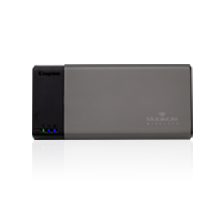
A wifi SD card reader let's you view and backup pictures to any mobile device. This one costs is down to £14 as there is a new model out: Kingston Technology MLW221 Mobilelite Wireless Reader
prod-MLW-thumb.png

http://www.kingston.com/en/wireless/wireless_readers
 
Last edited:
The cheap (but slow) option if you have a smartphone - copy from camera to smartphone via USB OTG, then from phone to USB Stick or portable HD.

A bunch of USB sticks allow for multiple backups and fairly high capacity for low cost.
 
Last edited:
Just got myself the belkin usb anywhere... It doesn't seem to support my host powered hard drive! Guess it's the netbook option!

John
 
Just got myself the belkin usb anywhere... It doesn't seem to support my host powered hard drive! Guess it's the netbook option!

John

Pretty sure you can get similar devices which have their own power supply so EHDDs can be used with them. Like http://www.amazon.co.uk/aLLreli®-Mi...e=UTF8&qid=1423728757&sr=8-2&keywords=otg+hub . Please note that I am not necessarily recommending this actual product, just showing it as an example of an OTG hub with a power supply!
 
30 days? I'd take two drives too and copy the cards to both. One in the backpack/hand luggage and one in the motorhome/hotel/hold luggage. That way you're covered against a drive failure/loss/theft too.
 
I use a Colorspace UDMA2. I bought the version that comes without a hard drive and installed a drive to suit what I needed.

I also take enough memory cards to avoid having to reuse any while I'm away and so have my images in two different places.
 
Back
Top