

You are using an out of date browser. It may not display this or other websites correctly.
You should upgrade or use an alternative browser.
You should upgrade or use an alternative browser.
Blown Highlights
- Thread starter Speedy136
- Start date


- Messages
- 2,845
- Name
- Jon
- Edit My Images
- Yes
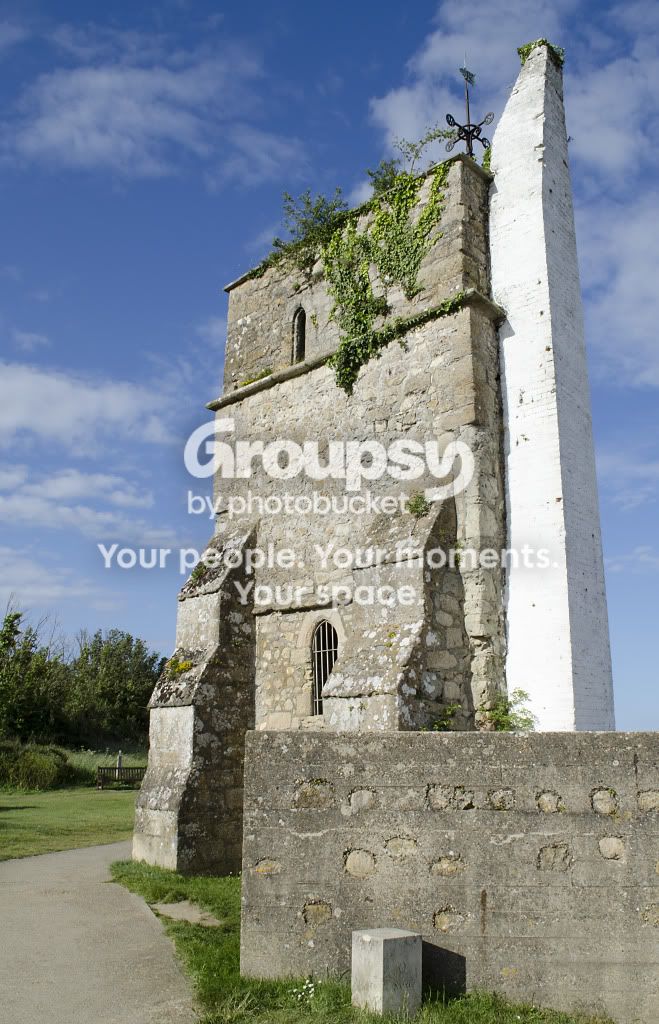
If you shot in RAW, you can pull back the 'exposure' slide by around a stop without too much damage. But if the highlights are truly blown, there is no information there to be recovered, I'm afraid. (Even if you shot in jpeg you can try opening the file 'as RAW' and pull the exposure back, or do this in Photoshop, but it won't give you as much latitude). Otherwise, you could clone some of the brickwork from the side to the front - difficult!

- Messages
- 3,093
- Name
- Russ
- Edit My Images
- Yes
In a similar situation would I have been better off metering off the white while taking the shot?
Possibly but what I would do is enable highlight over-exposure warning (or "blinkies" as they're also known) so that you can easily see blown highlights in the view finder. This gives you the opportunity to adjust your settings at the time rather than find out you've blown something when you look at it on your PC :bonk:
You really want to take a reading from a neutral source rather than the brightest/darkest.
Depending on the scene, it can be acceptable to blow hightlight if those areas are unimportant. For instance, a landscape shot where you're trying to capture a field, trees, hills etc. You need to get the details in the darker areas/foreground so you could choose to blow the sky if it's not that important to the shot.
The only other ways you'd get a shot where the dymanic range is high would be to use an ND filter or take multiple exposures and merge in PP.

- Messages
- 6,605
- Name
- Graham
- Edit My Images
- No
In a similar situation would I have been better off metering off the white while taking the shot?
Assuming you mean spot meter for the bright area, you would likely have ended up with an underexposed image as the camera would be seeing only very bright tones and would drop the exposure to suit. No blown highlights but you'd potentially have unrecoverable shadows or a very noisy image.
A bit late now of course but if this were me, I'd have checked the histogram at the time to check that nothing was falling off the right hand side and used a little exposure compensation to pull it back. And definitely shoot raw as it effectively gives you more dynamic range to play with after the event.
If for any reason the scene has too big an extreme of light and shadow and you can't get everything to fit within the sides of the histogram you have a choice to make. You could either take more than one exposure and combine later or you would have decide whether or not too blow some highlights or leave some areas in shadow.

TCR4x4
Wishes he had a couple more Inches
- Messages
- 8,852
- Name
- Tom
- Edit My Images
- Yes
Just opened it it in LR. Its actually not blown, only a very minute area at the bottom on the edge of the tower.
I have the red highlight warning on, as you can see, very little is red.
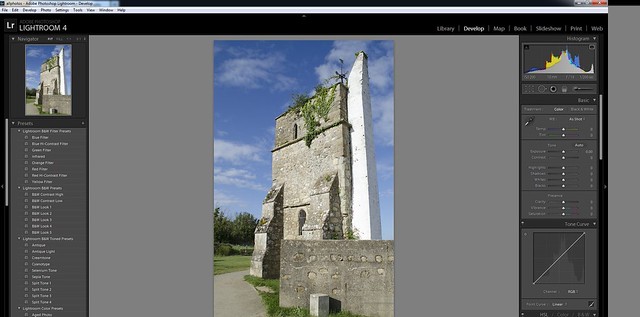
towerhighlights by TCR4x4, on Flickr
I have the red highlight warning on, as you can see, very little is red.
towerhighlights by TCR4x4, on Flickr

- Messages
- 1,224
- Name
- Adrian
- Edit My Images
- Yes
Just opened it it in LR. Its actually not blown, only a very minute area at the bottom on the edge of the tower.
I have the red highlight warning on, as you can see, very little is red.
towerhighlights by TCR4x4, on Flickr
Hi Tom - I'm getting:
This photo is private.
Oops! You don't have permission to view this photo.
When I click on your picture-link to get a closer look.

- Messages
- 3,661
- Name
- Richard King
- Edit My Images
- No
sometimes with a shot like this (static, high dynamic range) I shoot it 2 or three times at different exposures (vary the shutter speed) and then re-combine the images in layers in photoshop
OP

- Messages
- 2,905
- Name
- Nick
- Edit My Images
- Yes
Thanks for the input everyone, my son is pretty much a Pshop wizard but getting him to sit down and teach me is a difficult task.
My son also has Light room so I will try running the image through that. Thanks for pointing out how to check the highlights Tom. I am still very much at the beginner stage with digital, my last SLR was an F4 and this seems a million miles different but I am loving the challenge.
What is the best program to use, Photoshop or Lightroom for everyday use?
Thanks.
My son also has Light room so I will try running the image through that. Thanks for pointing out how to check the highlights Tom. I am still very much at the beginner stage with digital, my last SLR was an F4 and this seems a million miles different but I am loving the challenge.
What is the best program to use, Photoshop or Lightroom for everyday use?
Thanks.
TCR4x4
Wishes he had a couple more Inches
- Messages
- 8,852
- Name
- Tom
- Edit My Images
- Yes
Speedy136 said:Thanks for the input everyone, my son is pretty much a Pshop wizard but getting him to sit down and teach me is a difficult task.
My son also has Light room so I will try running the image through that. Thanks for pointing out how to check the highlights Tom. I am still very much at the beginner stage with digital, my last SLR was an F4 and this seems a million miles different but I am loving the challenge.
What is the best program to use, Photoshop or Lightroom for everyday use?
Thanks.
Lightroom 100%. It's built for photographers, whereas photoshop is for designers, just happens to be very good for photographers too.
I don't really ever use photoshop anymore since getting Lightroom 2 years ago.


- Messages
- 6,481
- Name
- Tim
- Edit My Images
- No
That was done with the local adjustment brush to reduce exposure, and boost contrast, clarity and sharpness just on the chimney in order to bring out the details. Auto masking meant it was very easy to confine the adjustment to the relevant areas without touching anything else.
In fact I started brushing in just an exposure adjustment and once I'd seen the result (confined to the area of interest) I update the existing brush adjustment with further tweaks.
In fact I started brushing in just an exposure adjustment and once I'd seen the result (confined to the area of interest) I update the existing brush adjustment with further tweaks.

- Messages
- 5,000
- Edit My Images
- Yes
Just opened it it in LR. Its actually not blown, only a very minute area at the bottom on the edge of the tower.
I have the red highlight warning on, as you can see, very little is red.
towerhighlights by TCR4x4, on Flickr
Well regardless of what LR says the highlights definitely look blown to me meaning that I cannot distinguish individual bricks on a lot of the tower.
.
TCR4x4
Wishes he had a couple more Inches
- Messages
- 8,852
- Name
- Tom
- Edit My Images
- Yes
petersmart said:Well regardless of what LR says the highlights definitely look blown to me meaning that I cannot distinguish individual bricks on a lot of the tower.
.
So you are saying the histogram is lying?
You may not be able to see the detail, but it's not blown. With a small tweak, you could get the detail back.. If it was blown, you wouldn't be able to do anything with it.
- Messages
- 5,000
- Edit My Images
- Yes
So you are saying the histogram is lying?
You may not be able to see the detail, but it's not blown. With a small tweak, you could get the detail back.. If it was blown, you wouldn't be able to do anything with it.
I accept that so show me.
.
TCR4x4
Wishes he had a couple more Inches
- Messages
- 8,852
- Name
- Tom
- Edit My Images
- Yes
If you actually look at the image closely at full size, you can see some parts of the tower are very clear, others arent. This is due to the construction and painting of the tower, not the way its been photographed.
I could spend all day fiddling with it, but if it isnt there in real life, I cant put it there.
I could spend all day fiddling with it, but if it isnt there in real life, I cant put it there.
OP
- Messages
- 2,905
- Name
- Nick
- Edit My Images
- Yes
I used the method Tim described in Lightroom and I did manage to get most of the detail from the brighter side of the white tower. A first time try and I got reasonable results! Have certainly learnt a great deal today.
Many thanks for your input guys
Many thanks for your input guys