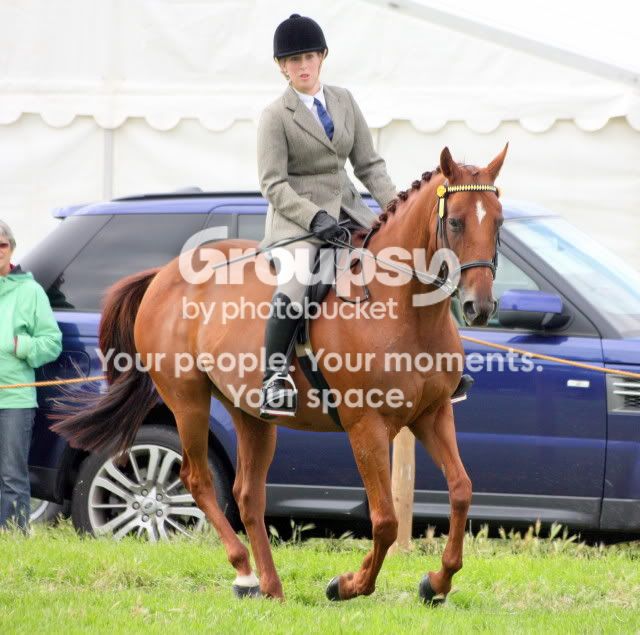
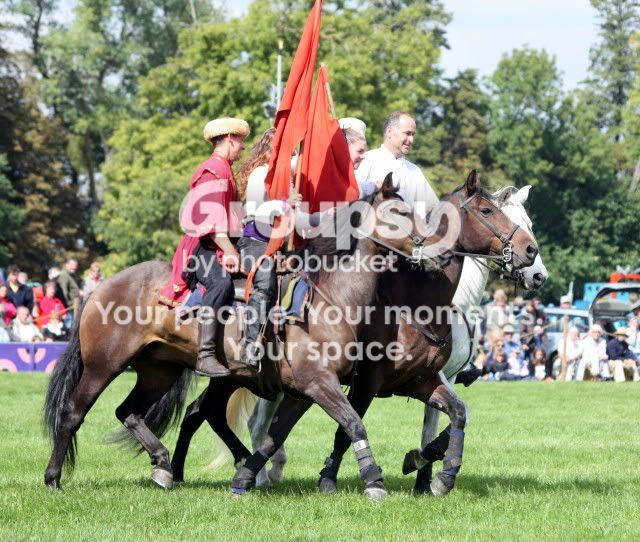
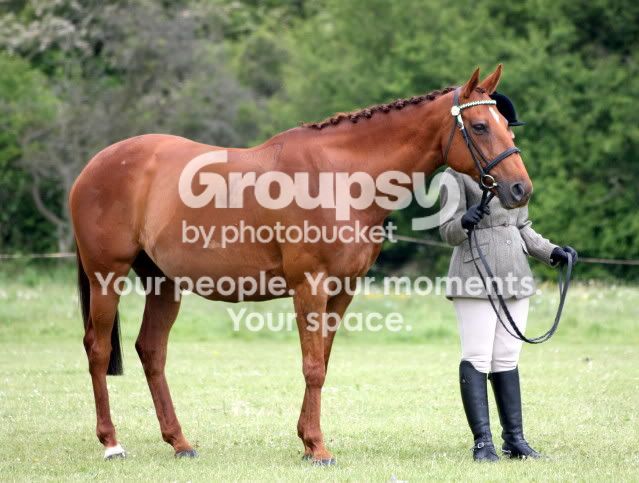
Blur!!??

Messages
769
Name
Donna
Edit My Images
Yes
Some of the horse and rider pictures i do end up with the riders / riders face out of focus, but horse in focus.
What am i doing wrong?
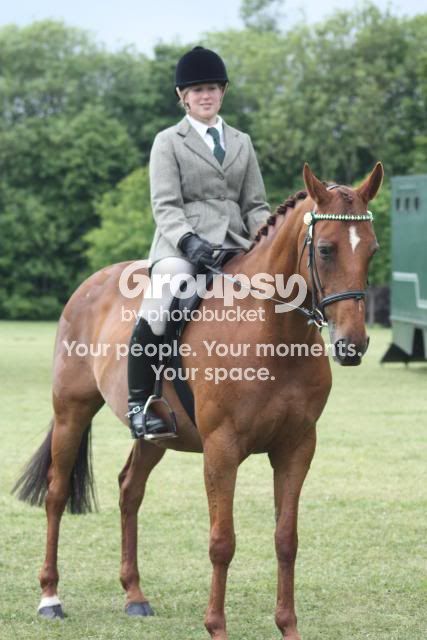
Stevenageshowingshow2010009.jpg
 
The smaller the aperture (higher f number) the more of your picture will be in focus. But this will allow in less light and will require a slower shutter speed or higher ISO.

So what if im doing a horse cantering or galloping? Id need a faster shutter speed wouldnt i? So what should i do..Up the Iso?
 
You've got me there. I have a Nikon, and buried in the menus are various focussing options. I'm assuming Canon have the same or similar.

Hopefully a Canon guru will be along soon.
 
So what if im doing a horse cantering or galloping? Id need a faster shutter speed wouldnt i? So what should i do..Up the Iso?

Yep, if you need fast shutter speeds and narrow aperture, you'll generally end up compensating by upping the ISO. It should be noted that in poor light you sometimes just run out of options and have to accept defeat.
 
It is the art of compromise. You want a fast shutter speed to freeze the action, a small aperture (larger f number) to have the complete subject in focus and as low ISO as possible really for noise reduction, so it is finding a balance between them.

What mode do you usually take pictures in?
 
It is the art of compromise. You want a fast shutter speed to freeze the action, a small aperture (larger f number) to have the complete subject in focus and as low ISO as possible really for noise reduction, so it is finding a balance between them.

What mode do you usually take pictures in?

Before i came into this forum, mostly on sport f4.6 iso 400 all the time:nono:
 
I would try experimenting a little.

Either shoot in Aperture priority mode, with a smaller aperture (maybe around f8? i'm still learning too :lol:) and see if the shutter speed is quick enough to freeze the action. If not you should be able to tweak it a bit by bumping the ISO up and making the shutter faster; or shoot in Shutter speed priority and adjust the Aperture using the ISO.

Someone else may have better advice but that is where I would start!
 
also what focus point were you using?

in this shot, i'd manually select one of the top focus points and position it over the riders head.

it looks like the cameras autofocus system has just decided to focus on the closed thing (which it does in the default mode).

on the 450d, i think it's the button which looks like a mini chess board on the right side of the camera as you look at it from the back. from there you can cycle with the dial which point you want to use (the active one will light up red in the viewfinder).

you should never let the camera pick an autofocus point for you, it will almost always focus on the wrong thing.
 
Another thought is if the subject is moving which i'm guessing they will be then you could try AI Servo mode. This will constantly refocus on the subject. However, doing this would make it difficult to focus on a specific point e.g. the riders head, however if you have a suitable f stop selected this shouldn't be a problem!
 
Another thought is if the subject is moving which i'm guessing they will be then you could try AI Servo mode. This will constantly refocus on the subject. However, doing this would make it difficult to focus on a specific point e.g. the riders head, however if you have a suitable f stop selected this shouldn't be a problem!

Thanks everyone...again.
Yes i have it in AI Servo now, So would i be better using manual focus ( think is my eye sight isnt the best ;)
 
I would say probably not if you are a beginner (like me). I find everything I have to do takes time and hence you miss the moment you are trying to capture. I suspect this would be particularly true for a moving target
 
I would say probably not if you are a beginner (like me). I find everything I have to do takes time and hence you miss the moment you are trying to capture. I suspect this would be particularly true for a moving target

Yes this is my worry.
If im taking a picture of a un moving horse and rider , i could try it.
 
This was a candid of some training I saw, excuse the composition and no post.


showpractice by Learnin' Curve, on Flickr

exif data:
http://www.flickr.com/photos/learnin_curve/5703554636/meta/in/set-72157626557343279
She was trotting, but for cantering I would guess 1/1000

Tip: keep your camera set on aperture mode on F8 iso 400 when it's turned off. In daylight this will give you the depth and speed to catch pretty much anything. Once you have that quick capture you can set it up for what you want.


Not a lot I could do with the resolution but I sharpened it twice, the whole thing and then the rider.

Also your photobucket is a bit fussy if you don't mind me saying.
 
Yes this is my worry.
If im taking a picture of a un moving horse and rider , i could try it.

wouldnt even try it on a standing horse to be honest, even when standing they move around a fair bit.

AI-SERVO, center point and move that focus control to the AF-ON or * button so that youre not locking exposure with a half press of the shutter button.
 
CS5
Duplicate layer, then high pass filter 10 is normally safe but this was done at slightly less iirc. Layer options was soft light and adjusted to 70%. I then flattened the image and selected the rider separately and repeated.
 
Your picture was shot at 1/800th sec @ f/4.5 - ISO 400. For a subject like this you could use a smaller aperture and a lower shutter speed - say around 160th sec - so you'd have a much better chance of getting the subject in focus. Also focus on the rider not the horses head in a shot like this. Don't chop the horses feet off either!
 
Always select the focus point manually (button under your right thum then use wheel to select middle point in this case) if you want to get only the rider in focus and blur everything else you will need a large aperture (f2 to about 5.6 depending on the lens, focal length and distance to subject) if you want both horse and rider clear then f8-f11 or even f16 on a sunny day.
 
Let's not confuse the OP by using the wrong terms. The only thing that controls blur is shutter speed. The aperture controls the degree of acceptable focus - depth of field. What you are talking about Sam is using a shallow depth of field to create bokeh - not blur.
 
Sorry it came out wrong, I was trying to say that if he is using a large aperture then field of depth will be small (a small area in front of and behind will be in focus) so if he focuses on the rider the head and the tail of the horse will be out of focus, if he uses a smaller aperture then the whole horse and rider will be in focus.
I was using the OP's terms for blur..

Title: Blur!!??

riders / riders face out of focus, but horse in focus.

So OP wasnt refering to bokeh because he meant blur= out of focus areas not bokeh which is the characteristic of the out of focus areas.

Also I have no idea about horse photography so maybe the aim is to ALWAYS get the whole horse and rider in focus
 
Last edited:
Also I have no idea about horse photography so maybe the aim is to ALWAYS get the whole horse and rider in focus

They don`t sell too well if you don`t..................:lol:
 
No isolated rider portrait shots then?

If you want the whole rider and whole horse in the frame, they sell better if you get them both in focus. Rider with part horse,part horse and part rider,part rider whole horse don`t really matter too much,partly............;)
 
if he uses a larger aperture then the whole horse and rider will be in focus.

I know what you mean but the terminology is wrong. You really mean a smaller aperture (larger number) - a larger aperture - e.g. f/4 or f/2.8 would reduce the depth of field.
 
Yeah sorry about that, used larger twice, corrected.

If you want the whole rider and whole horse in the frame, they sell better if you get them both in focus. Rider with part horse,part horse and part rider,part rider whole horse don`t really matter too much,partly............;)

Thats just too many parts right there :p
 
The photos themselves seem fine, I suspect it's the post processing not making them as nice as they could be.

Without more information I'm not sure if a couple of them are slightly soft or if it's the way photobucket is handling them (the file size is on the low side). I really would recommend using flicker - what are you shooting in, JPEG or RAW, and what editing program are you using?
 
Jpeg I think, not raw!
I'm in picasa at the moment , I've got Photoshop cs3 but no idea what I'm doing so not used it yet.
Think photobucket shrinks them a bit
 
I had a go in PS on one of them to see what it would do, it's not perfect as I'm still new at this and found the size rather difficult.


horses by Friesianfan69

edit: I am painfully aware the line round her needs blending properly as she looks cut out, if I had the raw and could bracket it would be much better.
 
Last edited:
I had a go in PS on one of them to see what it would do, it's not perfect as I'm still new at this and found the size rather difficult.


horses by Friesianfan69

edit: I am painfully aware the line round her needs blending properly as she looks cut out, if I had the raw and could bracket it would be much better.

Thankyou.
Im not brave enough to go raw...i find normal editing hard enough.
 
Raw actually makes it easier to edit as there is more information your processing program can interpret. It can be a little soft so you just need to sharpen it a tad. I am assuming canon comes with it's own program and that it would let you do it in there, TP has a few sharpening guides and tutorials that give you a guide on what settings you need. :)
 
Raw actually makes it easier to edit as there is more information your processing program can interpret. It can be a little soft so you just need to sharpen it a tad. I am assuming canon comes with it's own program and that it would let you do it in there, TP has a few sharpening guides and tutorials that give you a guide on what settings you need. :)

Yes im going to try the canon one
:)
 
Back
Top