BT & EE broadband service.....are you aware?

Messages
17,899
Edit My Images
No
We switched to EE, following the changes at Plusnet, a couple of months back and overall the service has been OK. NB there has an occasional network outage and a physical problem with our line affecting the speeds.

However and possibly of note for others using EE and AFAIK BT...........

I use a WiFi analyser App on my phone and spotted a few iterations of "EE WiFi". I discerned that my EE router was one of the sources of this low/no security hotspot.

Doing some research I learned that EE and BT do indeed act like public hotspots..... likely without the customers knowing as it turned on by default! It is not controllably accessible vid the App but it is via the account website.

Now, though 'they' say it only allows a small amount of your routers bandwidth that still means any number of strangers could be using your broadband access. I surmise there was mention of this in the contract terms & conditions but don't recall seeing it.

Suffice to I have disabled it via my website account access. It took 24 hours to register and disappear when I checked with the analyser.

It seems to me that they in a barely stated way claim their coverage based on the majority of customers routers unwittingly being shared as described above.

PS If I read about it correctly, it is only available to other EE (and BT users?) because to use it they are required to login in with their own user credentials i.e. it is not 'guest access'.
 
Roaming WiFi was always a feature of BT for users, though possibly many didn't realise how it was provided.
 
It's always been so. I've taken advantage of it myself. I logged in with my own credentials and got an internet connection. No drama, no access to anyone else's system or data. You can't use it yourself if you deny access to your router but if you think you'll never need it nothing stopping you turning it off
 
Roaming WiFi was always a feature of BT for users, though possibly many didn't realise how it was provided.
I doubt many users of the service realised how it was being provisioned and as mentioned above on wonder how many know that their own router is such a hotspot?
Note that although it is using the physical hardware and broadband connection, it is not giving others access to your personal network (LAN / WiFi).
Yes, I surmised that there was little to zero exposure to the router 'owner' and his/her settings.

It is more IMO a case even if the resource per individual is low (how is it limited or controlled?) but if, for example, there are 10 people accessing my router.......what impact might that have?

FWIW when I disabled it IIRC there was a note that said it could become re-enabled by an auto update to the firmware! So, after such FW update the note continued saying check it's status and disable it again if needed.
 
I doubt many users of the service realised how it was being provisioned and as mentioned above on wonder how many know that their own router is such a hotspot?

Yes, I surmised that there was little to zero exposure to the router 'owner' and his/her settings.

It is more IMO a case even if the resource per individual is low (how is it limited or controlled?) but if, for example, there are 10 people accessing my router.......what impact might that have?

FWIW when I disabled it IIRC there was a note that said it could become re-enabled by an auto update to the firmware! So, after such FW update the note continued saying check it's status and disable it again if needed.
From memory (it was a while back that I was with BT, so this may be incorrect) there was a cap of about 10% bandwidth, and I believe it also prioritised your usage.
So if you were using 30% of your bandwidth, 10% was available for BT WiFi, but if you were doing a big download and using 95% bandwidth BT WiFi would only be able to use the remaining 5%, it wouldn't cut into your usage.
 
It's always been so. I've taken advantage of it myself. I logged in with my own credentials and got an internet connection. No drama, no access to anyone else's system or data. You can't use it yourself if you deny access to your router but if you think you'll never need it nothing stopping you turning it off
FWIW
I don't recall any reference to lack of access elsewhere if I disabled the function on my router.

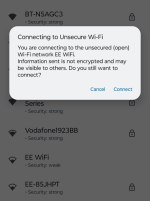
Of interest i looked for available SSIDs and there in one nearby so clicked to be greeted by this warning which I have seen with public WiFi such as the local hospital....
1000012251.png

From memory (it was a while back that I was with BT, so this may be incorrect) there was a cap of about 10% bandwidth, and I believe it also prioritised your usage.
So if you were using 30% of your bandwidth, 10% was available for BT WiFi, but if you were doing a big download and using 95% bandwidth BT WiFi would only be able to use the remaining 5%, it wouldn't cut into your usage.
That makes sense but by making it a default setting they are providing a freely accessible hotspot from customers who are paying full whack for their broadband.
 
Erm, you know that Plusnet is part of BT don't you?
Er! yes and when I was using their early supplied router(s) I don't recall such hidden functionality which may or may not have been 'active'.

However, for the record for the vast majority of the 23 years as a customer of Plusnet I used third party routers such as Netgear and latterly a nicely configurable BT business Smart Hub 1.
 
Back
Top