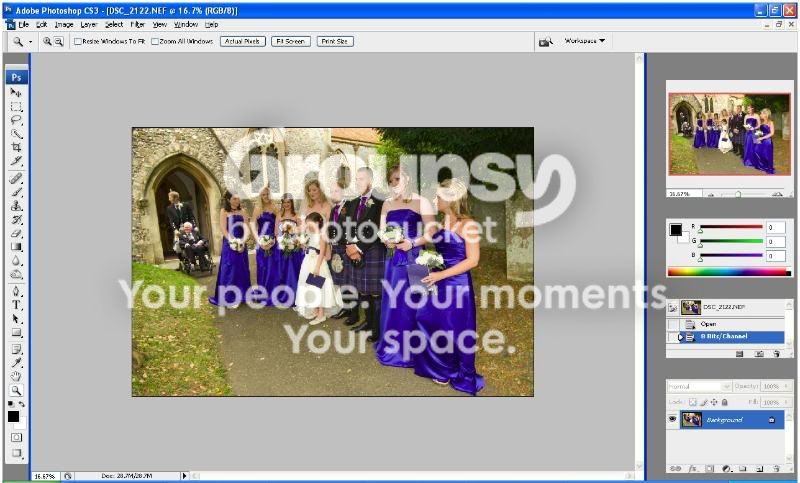
Can anyone explain this and save me

Messages
518
Name
Bruce
Edit My Images
Yes
Hi All,

This one has really puzzled me..as you can see I have shot a wedding photo (don't worry this was not a good shot).

When I open the file in CS3 the colours are shot to bits any ideas why obviously my RAW file is okay as ACDSee shows.

Please tell me this is easily sorted as I have no idea how I will process these without CS3

Correct bridesmaids dress colour
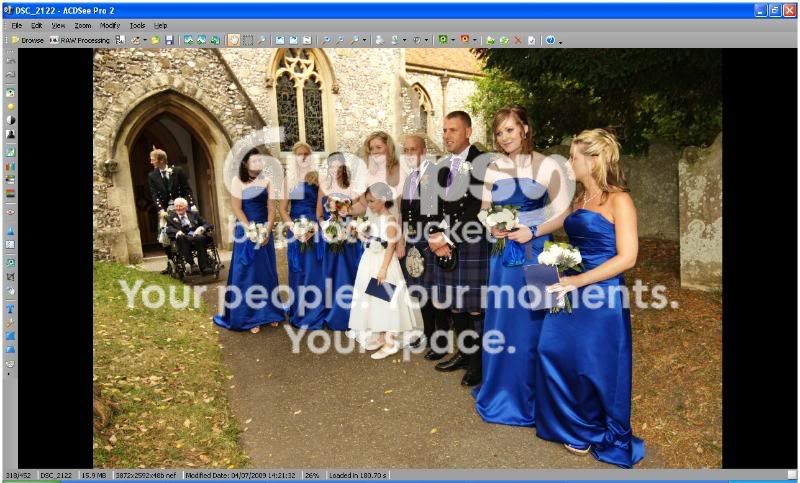
7534421.jpg


Incorrect

7544718.jpg
 
White balance on import maybe? I have purple flowers come out blue, or vice versa, can't quite remember.
 
No idea, but what about turning it into a jpeg before puttinging it into CS3 rather than letting CS3 do it, and see what happens.
 
I must be missing something as I can't see any difference between the dresses in the two images... :shrug:
 
I'm guessing your display isn't calibrated and AcDSee isn't managing colours whereas CS is which would explain the difference. As a result both are probably wrong but in different ways.
 
...both exactly the same colour of blue on my screen... :shrug:
 
Even the skin tones are different on my screen

Is your proof settings as sRGB?
 
I'm guessing your display isn't calibrated and AcDSee isn't managing colours whereas CS is which would explain the difference. As a result both are probably wrong but in different ways.

PXL8....good work mate, I calibrated my screen and changed my settings so that I can discard the colour profile on import and it has worked so once I am past my RAW workflow I get the right colour in CS3.

Not perfect as it is still wrong in ACR so any more info to correct this would be great but..

Cheers matey :)
 
According to the title strip for CS3, thats working in 8 bit RGB not sRGB.
 
They look different to me also and my screen is calibrated by windows adobe 2.2 thingy by my very own eyes.
 
Wow they both look exactly the same to me also.

How is that possible?
 
You won't see any difference in colour unless you view in Firefox or Safari as at present these are the only 2 browsers which are colour managed.
I use Safari and the bottom pic looks more purple.

Different colours in different RAW converters isn't anything to worry about, the finished jpeg with colour correction is far more important.
 
Have to admit I have to look pretty hard, but in Opera there is a marginal difference, the lower dresses have got a purple-ish hue rather then being purple and the whole image looks like it has had the exposure increased by half a stop over the top image, but it really does show what a difference colour management makes right across the range of picture viewing applications from professional editting software right through to browsers. Its a subject I know diddly squat about and like the OP, had to ask here when my CS3 suddenly started doing something similar but even more extreme last year. :bonk: Sorry, not very helpful, more of an encouraging 'been there done that, know how you feel' post for Bruce. :hug:
 
You won't see any difference in colour unless you view in Firefox or Safari as at present these are the only 2 browsers which are colour managed.
I use Safari and the bottom pic looks more purple.

Different colours in different RAW converters isn't anything to worry about, the finished jpeg with colour correction is far more important.


Nonsense.

I am using IE 8. Maybe you all need your eyes testing. :)
 
Bruce can you host (or one of the kind peeps on here) the raw file so we can have a try and look at the colours on our monitors?
 
Apart from one app not colour managing whilst the other is, another likely cause is that each raw app will decode differently - the "styles" that LR has in recent releases that match the camera's on board settings are a good example of this.
 
No, you shouldn't use monitor space as a working space - in effect you're turning off colour management as you're saying no conversion is needed from image colours to screen colours.

Keep things simple, stick with sRGB as your working space and any decent app with colour managment will pick up the monitor profile from system prefs - as long as you've got it set correctly. Then it should just work.
 
im on IE 8 as well and can see a massive difference in colour between them. monitor calibrated with a huey pro.

I just checked with IE8 and the difference is just as pronounced as in the Firefox version.

Classic case of colour aware vs. non colour aware applications.

Anthony.
 
You won't see any difference in colour unless you view in Firefox or Safari as at present these are the only 2 browsers which are colour managed.

Nonsense.

I am using IE 8. Maybe you all need your eyes testing. :)

IE 8 here and a definite difference Blue > Purple
 
both the same on my screen no colour cast to be seen maybe its just your monitor have you tried printing them :shrug:
 
Big difference for me in Firefox and monitor calibrated with a Huey.

The second one is unbelievably purple.
 
You won't see any difference in colour unless you view in Firefox or Safari as at present these are the only 2 browsers which are colour managed.
I use Safari and the bottom pic looks more purple.

Different colours in different RAW converters isn't anything to worry about, the finished jpeg with colour correction is far more important.

Strange while I argree with what you say I can see a difference with IE as well.
 
Neither image is tagged with a profile so there's nothing to colour manage - it doesn't matter what browser you're using, the difference should still be there. If it's not it's time to calibrate your display!
 
Nonsense.

I am using IE 8. Maybe you all need your eyes testing. :)

That's what I was thinking. Just opened in IE8 and firefox on calibrated monitors and both browsers are displaying exactly the same and there is a significant difference in colour between the two images (images not browsers).

Listen to pxl8, sounds on the money to me.
 
Back
Top