Canon 30d Banding

Messages
14,759
Name
Laura
Edit My Images
No
Hi everyone, been using a 30d for a while now, and i keep noticing at high iso's that i am getting horrible banding on higher iso images which i have not noticed before. This camera was purchased 2nd hand, is it a fault of the sensor? Or was it an inherrant problem with 30d's? Correctable with a high iso? Before this i used a 350d and i never noticed any banding from that camera at high iso's

So any help or information would be greatly appreciated.
 
008.jpg
 
I don't see any banding? (unless you're looking at the big grey vertical 'band' behind the birdy ;) ). A bit of noise, but nothign to really worry about from my point of view!
 
I cant see any either but I am on the lappy and its not the best for photo viewing.

Steve
 
I think I can see horizontal lines, a 100% crop would probably show it.

edit; most prominant left of the l/h perch
 
Last edited:
My eyes may be getting on but I've just downloaded that photo and viewed it at 800% and I can't see anything that looks like banding. Pixelation, obviously, but no banding.

20100728_233159_.JPG
 
Last edited:
Ditto. I've blown it up, sharpened it to excess, upped the contrast etc. Nowt except noise.
 
thanks for the replies everyone, I have noticed when viewing the files in picassa it is far more noticeable than it is in dpp, so maybe its a picassa problem? the difference is a lot, even just viewing in windows photo gallery shows a marked reduction of the banding, :thinking:
 
Michael, do you shoot raw or JPEG. If you shoot raw, maybe Picasa is just sh!t at rendering the files.

Here's a shot from my own 30D at 3200 ISO, converted in Lightroom 3 with no edits except white balance. The noise is evident. I think a good imagination is required in order to see obvious banding.

20071127_135935_0348_LR.jpg


100% crop....

20071127_135935_0348_LR-2.jpg
 
Last edited:
It sounds to me like your problem lies in your software, not your camera.

....., if it is picassa, then it will be gone

What will be gone in Picasa? Earlier you said Picasa showed banding, and now are you saying that the banding is gone in Picasa? I am confused. If you can post up a raw file somewhere perhaps we can take a closer look at the original file and remove (your) software from the equation.
 
Last edited:
I'm defo seeing something but maybe looking too closely


hard to see but soeone please tell me they see a horizontal line too :help:
 
Last edited:
Why are you looking at your pictures at 800%?

Viewing at 100% on a regular basis is considered to be a fairly bad case of 'pixel peeper' :p
 
that is the sort of thing im seeing, if an image is underexposed and i brighten it it shows up more, i dont have to go to 100% either

How much underexposure? Of course noise gets worse if you brighten an underexposed image, but whether the noise is in the form of a visible pattern of bands or simply random noise is another matter. So far I have seen nothing to suggest a banding problem with your camera.

Here's a severely underexposed shot from my 30D at 800 ISO and a crudely corrected version. This has had an exposure boost of 1.7 stops and black level reduced from 5 to 0 in Lightroom. I have not adjusted NR, which is at Lightroom defaults.

20060713_225204_0025_LR.jpg
20060713_225204_0025_LR-2.jpg


Can anyone see banding?

p.s. I have to apologise for the IQ, but I'd only had the camera for two weeks (my first DSLR) and I had to shoot this with the popup flash. This was an impromptu holiday snap.
 
Last edited:
1 maybe 2 stops, if im digscoping (30d on t2 over scope eyepiece) i sometimes have to under expose by 2 stops to stop the images being completely blown out, i have just looked at another raw file, image was taken with my sigy 70-300 apo, red banding appeared on a "perfectly" exposed raw image, the immediate image after is a crop and saved as jpg in dpp, no banding or anything, opened raw file up in dpp and its fine.
 
Michael, you're losing me completely here. You say you have to underexpose to prevent complete blowout? That doesn't make sense. All you have to do is to expose correctly, no more, no less. That is your responsibility, not the camera's.

Can you please make available one of these problematic raw files. I'd be very interested to see what is going on. I can PM you my email address and you can email one to me if you like. Just tip me the wink if you want me to do that.
 
i can see very slight banding noise in the original image.

for what it's worth my 5d 2 does it sometimes in shadow areas - it's not normally noticeable 99% of the time, but in an image like yours where it is slightly under exposed it can be visible - especially if you alter the exposure or levels in lightroom.

if you do a google search for "7d low iso banding noise", "5d low iso banding noise", "50d low iso banding noise" etc etc you'll see that there are many discussions on the issue with many different, modern and expensive cameras: basically it's normal, especially in under exposed images and when viewed at high magnifications and your original image seems to be a crop.
 
Last edited:
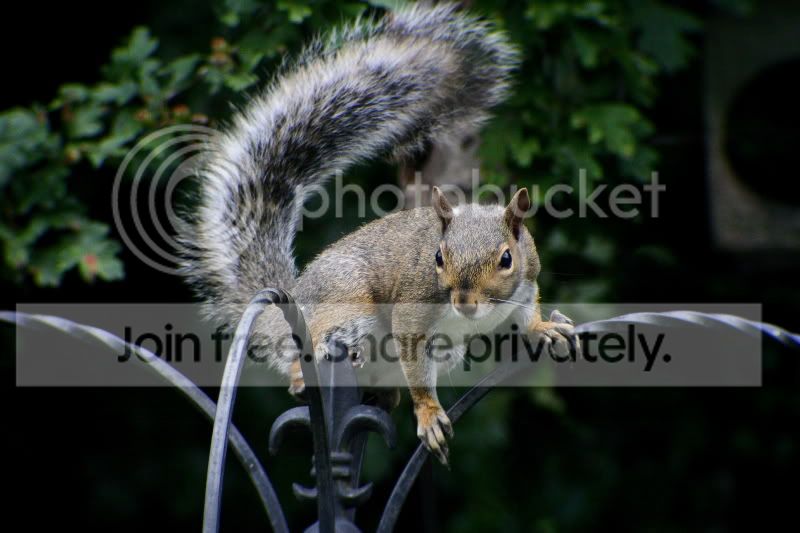
This image of the squirrel, is edited in dpp and converted into jpg, The reason i am seeing this banding must be down to picassa as there is no sign of it now in the converted jpg? Please excuse the iq and image editing, (editing isnt my strongest point)

036-3.jpg
 
I sometimes think we are all getting a little paranoid about noise in general, particularly at high ISO. If we're all struggling to see it when purposely looking for it, does it really matter? Sure, viewing at 100% will make it really obvious but what relevance does that have in the real world?
 
i can see very slight banding noise in the original image.

for what it's worth my 5d 2 does it sometimes in shadow areas - it's not normally noticeable 99% of the time, but in an image like yours where it is slightly under exposed it can be visible - especially if you alter the exposure or levels in lightroom.

if you do a google search for "7d low iso banding noise", "5d low iso banding noise", "50d low iso banding noise" etc etc you'll see that there are many discussions on the issue with many different, modern and expensive cameras: basically it's normal, especially in under exposed images and when viewed at high magnifications and your original image seems to be a crop.


+1. Underexposing and then pushing a high ISO shot on a crop cam is probably not the best idea. I have seen horizontal banding on plenty of cameras at high ISO before.
 
I've looked into this as well, and banding does seem to be an artifact introduced by underexposing a shot and then pushing exposure hard in RAW processing software. Some cameras are more susceptible than others, but they all seem to do it to some extent.

The answer is, expose correctly in-camera - any noise you get will be natural-looking, depending on the capabilities of the sensor.

A.
 
I have a 20D which I think will be pretty similar to the 30D and even with a correctly exposed shot I can see noise in the darkest areas if I keep hitting the zoom button way beyond what is sensible.

I find that even ISO 3200 shots can be acceptable if you expose correctly or if possible expose to the right and back off in processing. It is subject dependant though and if you have a scene that tends to show noise to it's worst effect things can look bad but if you consider the higher ISO's to be better than not getting the shot and manage to stop yourself from zooming in too much I think that the higher ISO settings are worthwhile.
 
Back
Top