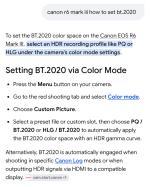
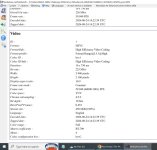
MediaInfo states the video on my Canon R8 is BT.2020 when using Log 3. So I'm just wondering why the R6 is BT.709 when using Log 2.
On Davinci, the R6 video clips has Canon Cinema Gamut/ Log 2 for the Input Color Space. However, the R8 video clips has Rec.2020 for the Input Color Space.
I am sure mediainfo is misleading you in this case, your R6 is recording clog2 in cinema gamut as reported by davinci. The bt709 entry you are looking at is the YCbCr matrix coefficient, not the recorded gamut.
Different cameras allow for different combinations of let's call it "brightness" and "colour" are recorded, to give you choice to pick the best combination for what you need. It's hellishly confusing to start with tbh.
Here is how I understand it:
brightness = how light and dark values are recorded; affects contrast, highlights, shadows, and dynamic range
colour = how wide a range of colours can be recorded
with canon here are the typical options:
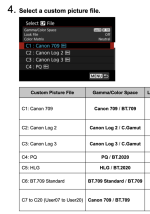
┌──────────────────┬──────────────────┐
│ "brightness" │ "colour" │
│ Gamma / │ Gamut │
│ Transfer Curve │ │
├──────────────────┼──────────────────┤
│ Canon 709 │ BT.709 │
│ Canon Log 2 │ BT.2020 │
│ Canon Log 3 │ Cinema Gamut │
│ PQ │ │
│ HLG │ │
└──────────────────┴──────────────────┘
"brightness" options:
- canon 709 - finished looking, no editing needed
- canon log 2 - very flat tone curve designed to preserve as much of the camera’s dynamic range as possible. compresses highlights strongly and lifts/compresses the darker tones so more information fits into the recorded signal. the result looks low-contrast and washed out until transformed or graded.
- canon log 3 - a milder curve that still preserves a wide dynamic range, but keeps the image closer to a conventional video response. it compresses highlights and reduces contrast, but not as aggressively as log 2.
- PQ - Perceptual Quantizer, an HDR transfer curve designed for precise brightness mapping to HDR displays.
- HLG - Hybrid Log-Gamma, an HDR transfer curve that is more broadcast-friendly and better for older displays.
"color" options:
- bt 709 - standard colours visible even on SDR displays e.g. older devices and tvs
- bt 2020 - colours for use on UHD/HDR displays e.g. modern devices, tvs and monitors
- cinema gamut - wider colour space than bt2020, intended to retain colour information for grading rather than direct display
with this background, what combinations to use for what situations?
- Canon 709 + BT.709 - I just want straight out of the camera. Fast turnaround.
- HLG + BT.2020 - I want HDR output with a simpler, broadcast-friendly workflow and better compatibility with SDR/older displays.
- PQ + BT.2020 - I want HDR output with minimal grading; essentially an HDR-ready workflow.
- C-Log3 + BT.2020 - Give me some latitude for post, but I already know I’m happy to work in bt2020 gamut, so I don't need the additional gamut flexibility of cinema gamut.
- C-Log3 + Cinema Gamut - I need plenty of room to make decisions later / lighting or exposure may be tricky to control perfectly.
- C-Log2 + Cinema Gamut - The lighting situation is tricky. I'll expose as well as I can, but I need to preserve as much as possible to deal with it properly in post.
Why do different cameras make different combinations possible? I guess a combination of technical constraints and marketing. R8 allowing for clog3 + bt2020 is a useful addition as illustrated in the example situations above.
Just to note, if you shoot Canon RAW, you preserve the sensor data and can choose the “brightness” curve and “colour” space later in post, rather than baking those choices into the recorded video.
I hope this helps.
If I've got anything wrong here, please feel free to correct.