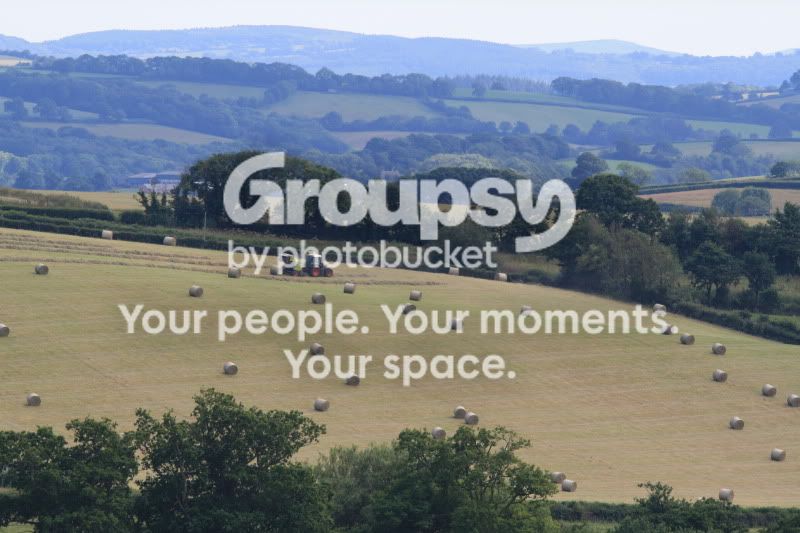
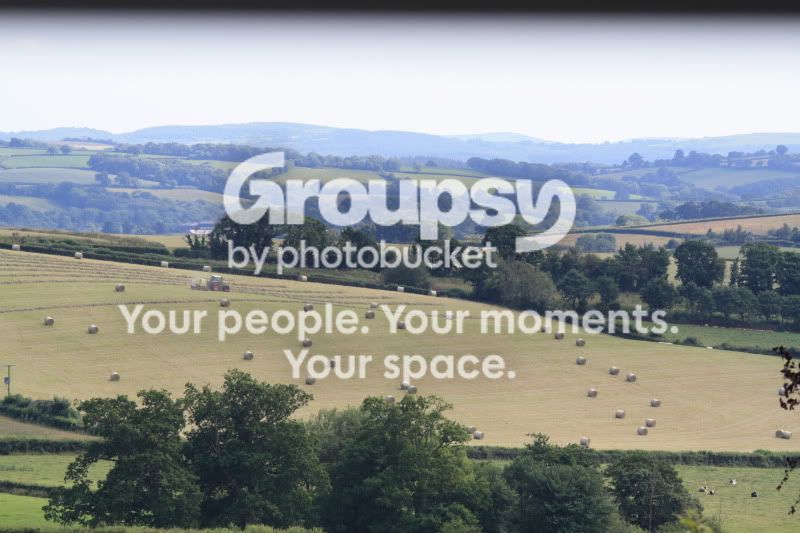
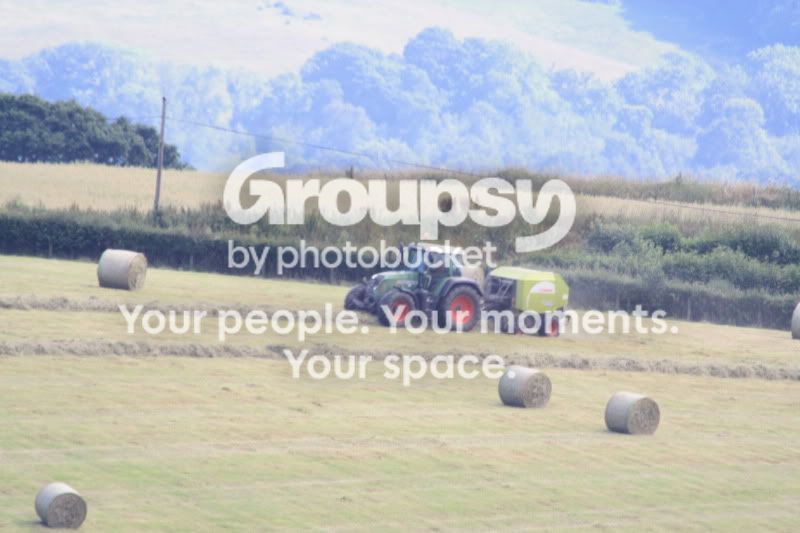
cloudy after zooming in

Coley.

Bryant Gumble
Messages
444
Edit My Images
Yes
Evening all,

Im new to photography and bought a canon 1000d with the standard 2 kit lenses. The main reason i bought a dslr was because i liked being able to capture shots further and further away. Shortly after i bought a sigma DG 150-500mm and also a kenko 2x teleconverter. Hopefully that might mean something to you :thinking: All the gear but no idea springs to mind :geek:

Well im trying to forget auto mode now and start learning the basics.
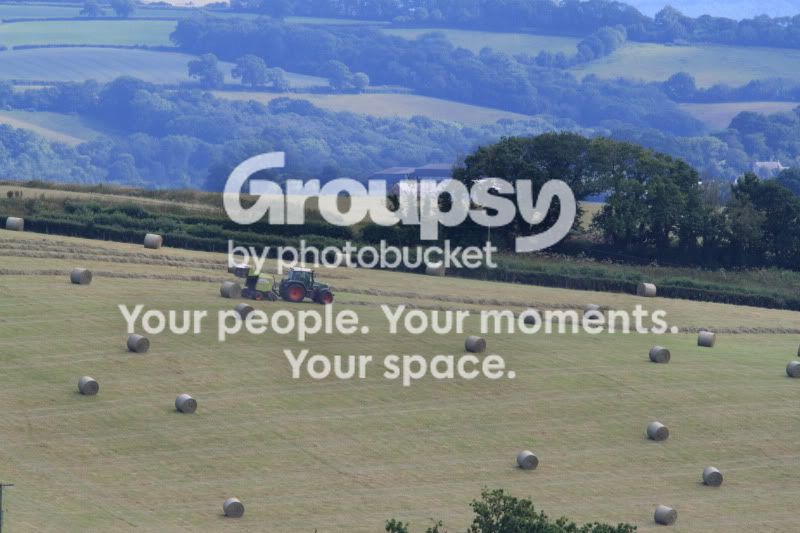
I got home and noticed they were bailing way over across the fields. I managed to wedge the window wide open and shoot between a 6 inch gap.
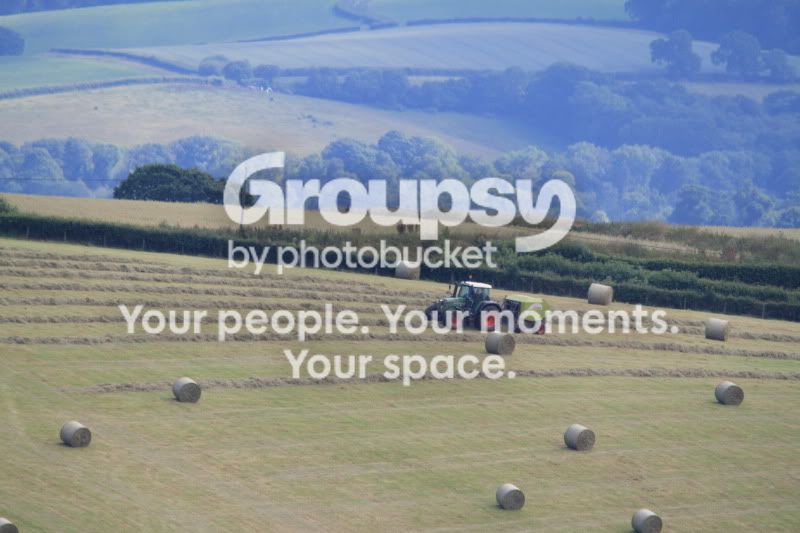
a548f43a.jpg


41cc425e.jpg


df9463d4.jpg


fdb378a9.jpg


74807c57.jpg


I would love any advice on how i could improve these photos. After reading this forum for a while, i also added a tripod and remote to my kit. Before that, pretty much every shot was blurred so atleast im heading in the right direction.

Main questions are, is it really difficult to get a lovely sharp shot at full zoom (sorry not sure of the right terminology) Also i think when i use the 2x teleconverter it looks as if theres almost a white cloud over the image. When i use the converter i have to use manual focus which also slows me down a bit. Would having a higher pixel camera be more usefull here?

If i planned on taking alot of photos like this (full zoom), which camera mode would you reccomend for a newbie?
None of the photos have been played with- straight from the card. If any of you would like to play around with them, i'd be more than happy. I've been meaning to get a mouse mat for a while so i'd probably put one of them onto that.

Any help greatly appreciated

Simon
 
Its part technique, part atmospehere.

For tack sharp shots at that distance, the camera needs to be rock solid. Even half a mm of movement will be massively exagerated at those sorts of lengths.
Also most lenses arent their sharpest at the extremes of thier focal lengths, so at 500mm the sigma will be softer than at 400mm. Stick a converter on and you are exagerting this too.

Then you get the atmosphere, which is often hazy at those sorts of distances due to the heat and pollution in the air.

Not much you can do about that really. There are filters you can buy which will reduce the haze slightly, but still at those distances it will be evident.

You could shoot in RAW and add a little contrast to try cut through it a bit, but apart from that, not much else you can do.
A new camera will make no difference at all.
 
And also, "full zoom" (or high/100% crop) is never going to give you great shots really, that's why people talk about 'filling the frame' when composing shots. Unfortunately, if you are taking shots of things far away you often need big expensive lenses.

That said, not much you can do about haze other than try a polarising filter.
 
No filter will help with atmospheric haze. Nor will a new camera. Shooting through a window, even an open one, will make matters worse as it's quite likely that there will be additional air currents to make the atmosphere even more 'gloopy'.
 
Haze - you gotta love it or loathe it....

The final shot is overexposed, probably because the camera is metering for a tighter scene that's full of dark tones.... dial in a bit of underexposure (at least a stop) and it'll look miles more natural :)
 
watched a program on telescopes once,, those huge ones that take pretty pictures of the galaxy.
there was talk about atmospheric disturbance and that the atmosphere is full of dust that interferes.
Interesting thing to watch.

Anyway to the point, haze cant really be cured on long focal lengths or with any accessory, not to any point that its worth while.

Other things that have been mentioned; focal length + lens shake how ever minor and long focal lengths unless the lens is purpose designed tend to be soft at the extremes.

Also agree that it looks a little over exposed.
 
Thanks for all of your thoughts

So to sum up, i'd be best to never shoot at full crop, possibly 80% would be better most of the time ? i just find it strange that i can look at it with my eyes and it appears nice and sharp, but as soon as i put a lens onto it, it appears almost ever so slighty foggy. - also the greens dont look green enough to me, the colours look almost :thinking: bland ? Would the action of the shutter opening and closing add camera shake? I made a weight to hang off the tripod but thought it was unecessary as i was using the remote.

This is all a massive learning curve for me. When i get disapointing photos like these the only plus point i say to myself is 'atleast youve captured something!' With my trusty htc camera phone i wouldnt have stood a chance :lol:

I just imagined paps sitting with there big lenses and tripods getting nice clear images of celebs being naughty. Is this where the likes of photoshop, lightroom etc become very usefull ?

At the risk of offending :$:wave: i thought photoshop was mainly used for fixing operator errors or when there wasnt time to stage a picture so cropping was done later. Is it as much of an important tool as the camera ?

thanks again

Coley
 
You don't shoot at full crop, you might shoot at full zoom and that's ok. Cropping is done on the computer but ideally you wouldn't need to crop at all (i.e. compose it properly in the first place).
 
Thanks for all of your thoughts

i just find it strange that i can look at it with my eyes and it appears nice and sharp, but as soon as i put a lens onto it, it appears almost ever so slighty foggy. -

at the risk of offending :$:wave: i thought photoshop was mainly used for fixing operator errors or when there wasnt time to stage a picture so cropping was done later. Is it as much of an important tool as the camera ?

Another thought that bobbed in to mind, LENS HOODS! essential for stopping stray light getting in to the lens bouncing all over and creating a fog effect.
most supplied except on pro spec lenses are seldom up to scratch but still having them on helps more then a little :)

And Photoshop, I will say to you that I say to anyone else, would you like a car manufacturer to produce a product with a fault and openly say "I'le fix it later" ???

You'd have a dicky fit! you would be saying they should get it right in the first place.

Same ethics should apply to everything else, get it right when you first do it, not the other way around.
It takes a lot more to botch a job then it does to get it right first time :bonk:
 
And Photoshop, I will say to you that I say to anyone else, would you like a car manufacturer to produce a product with a fault and openly say "I'le fix it later" ???

You'd have a dicky fit! you would be saying they should get it right in the first place.

Same ethics should apply to everything else, get it right when you first do it, not the other way around.
It takes a lot more to botch a job then it does to get it right first time :bonk:

I disagree, a camera can't record a view in the same way that a human eye can and what it does record is based on some massive assumptions and generalisations which are not always correct. Once you realise that you'll realise that PP isn't cheating, if it is then shooting in jpg is cheating too.
 
Another thought that bobbed in to mind, LENS HOODS! essential for stopping stray light getting in to the lens bouncing all over and creating a fog effect.
most supplied except on pro spec lenses are seldom up to scratch but still having them on helps more then a little :)

:thumbs: its been sat in my drawer since i bought the lens.Never really knew what its purpose was- other than to make the big lens look even bigger :lol: Now you say about the light bouncing off it, it makes perfect sense. Is there any reason i couldnt keep the hood on there permanently? Or would there be times it might make things worse ? I had looks of horror as i took it in the camera shop with no uv lens for protection. This might also work in my favour if i fall AOT.

Feel ive learnt more today then i have since i bought the camera :)

Simon
 
Last edited:
The simple answer is to get closer and shoot with a more normal focal length.

Good quality long lenses like that are extremely expensive primes (not zooms) but even they can do nothing about atmospheric haze. Adding a telecon just makes everything worse. Best time to avoid haze is early morning.

Careful post processing can help, but with problems like that, frankly not much.
 
I had looks of horror as i took it in the camera shop with no uv lens for protection.
Are you sure it was horror and not greed? The salesman can probably make more profit on selling you a couple of 'protective' filters than he could selling you a camera.
 
Another thought that bobbed in to mind, LENS HOODS! essential for stopping stray light getting in to the lens bouncing all over and creating a fog effect.
most supplied except on pro spec lenses are seldom up to scratch but still having them on helps more then a little :)

And Photoshop, I will say to you that I say to anyone else, would you like a car manufacturer to produce a product with a fault and openly say "I'le fix it later" ???

You'd have a dicky fit! you would be saying they should get it right in the first place.

Same ethics should apply to everything else, get it right when you first do it, not the other way around.
It takes a lot more to botch a job then it does to get it right first time :bonk:

I too disagree with this. Simple matter of fact is, even a top end body will still fail to shoot exactly what you wanted a lot of the time. The colours, saturation, contrast, colour variation, shadow highlighting etc, is mostly done in post production.

To this end, there is a massive difference to what your eye sees, and what your 'minds eye' sees. What I mean is, I shoot something I know wont look quite how I want it, regardless of the settings I use (this could be down to haze, the sun not quite where I want it, dull sky etc where there is nothing I can do about it), but I have a plan for the image even before I've put the camera to my eye. I shoot raw knowing that when I get home, I can bring out the sky, make the sea as blue as it really is, bring out the highlights etc.

Post production is as important as the initial shoot IMO. Of course, you have to still get the best shot you can in camera in the first place.

Sorry for going off topic!
 
Last edited:
Thanks for all of your thoughts

So to sum up, i'd be best to never shoot at full crop, possibly 80% would be better most of the time ? i just find it strange that i can look at it with my eyes and it appears nice and sharp, but as soon as i put a lens onto it, it appears almost ever so slighty foggy. - also the greens dont look green enough to me, the colours look almost :thinking: bland ? Would the action of the shutter opening and closing add camera shake? I made a weight to hang off the tripod but thought it was unecessary as i was using the remote.

This is all a massive learning curve for me. When i get disapointing photos like these the only plus point i say to myself is 'atleast youve captured something!' With my trusty htc camera phone i wouldnt have stood a chance :lol:

I just imagined paps sitting with there big lenses and tripods getting nice clear images of celebs being naughty. Is this where the likes of photoshop, lightroom etc become very usefull ?

At the risk of offending :$:wave: i thought photoshop was mainly used for fixing operator errors or when there wasnt time to stage a picture so cropping was done later. Is it as much of an important tool as the camera ?

thanks again

Coley

Oh yes, its as important as the camera. As above, photographers mainly use Photoshop (or Lightroom, Elements etc) for post processing, not image manipulation, big difference! See my post above.

Example - not the best image but a recent one. 1st shot, as the camera took it, just converted to jpeg. I couldnt use an ND grad on this particular lens so had to shoot as was. The second shot is exactly the same file, but processed in Photoshop CS3;

1 unprocessed

vally 0 by Odd Jim, on Flickr

2 processed

vally by Odd Jim, on Flickr
 
Last edited:
I disagree, a camera can't record a view in the same way that a human eye can and what it does record is based on some massive assumptions and generalisations which are not always correct. Once you realise that you'll realise that PP isn't cheating, if it is then shooting in jpg is cheating too.

You cant polish a turd to put it crudely

Thats why you must assume to get it right in camera, you can enhance quality that is already there but you cant make up for a lousy photo, to explain where I am coming from:

One major gripe on shoots, looks at the back of the screen,, ""oh can photoshop that out"",,, well why not correct it now? here? saving hours of time? (that can be better spent with family par example? says me with a baby sat on my knee trying to type with me)

Like hair in the face, move it out the way, bra straps hide them, something slightly unsightly in the background, move it out of shot.
Flare; move the position of the camera so it lessens a detrimental effect, back light; why not use flash to balance the exposure and get rid of ugly shadows?

Landscape shot; use filters to add drama to the sky or take 2 exposures on a cheep tripod so both are of a standard that need very little work (apart from overlaying in post production), Sun in the wrong position,, well you can get a book that gives the times the sun sets and at what angle, then plan a shot round it ;)
Which reminds me really need to buy one of them, my mate wont borrow me his.

Ok drawing this reply out a bit :D you get the idea...

But in general the term: Photoshop now is used as a by word correcting mistakes that can be rectified at the time of shooting, colour correction bits of cropping minor exposure corrections and the like don't count ;)

But a shot with a tree growing out the head, unflattering lighting, 4 stops under exposed, camera shake, focus not right, double chins, gruff smiles, yes you can photoshop them all, but its foolish to think its acceptable when for 10-30 seconds extra time spent shooting the shot you can save 30 minutes at a pc.

:thumbs: its been sat in my drawer since i bought the lens.Never really knew what its purpose was- other than to make the big lens look even bigger :lol: Now you say about the light bouncing off it, it makes perfect sense. Is there any reason i couldnt keep the hood on there permanently? Or would there be times it might make things worse ? I had looks of horror as i took it in the camera shop with no uv lens for protection. This might also work in my favour if i fall AOT.

Feel ive learnt more today then i have since i bought the camera :)

Simon

Mine instinctively go on, mainly in case I drop so I dont smash the glass :bang: did knacker up a hood once and I could tell the flare was fogging shots in scenarios I usually had no problems :bang: had to use my hand strategically placed to cut it back,,, in fact theres an idea, try shooting in to the sun (not directly) and just wave your hand about see any differences!

Might see nothing, might see a lot depending on the lens.


Lens hoods in bag, reverse them on the lens and they can be clipped on that way saving space.
Easy peasy!
Come to shoot, flip them round.

As for stray light,, think of it like this, the bit of glass at the front is rounded so it has light hitting it from all angles in view, but your only framing about lets say 35 degrees of that?

you get a bit of stray light come in and it hits and an angle the lens is not designed for so instead of being directed to the sensor it just bounces somewhere between elements and all over the shop, and at a guess (me not being an accredited lens designer) I would say some of it ends up reflected in to the sensor after bouncing about giving that fog and annoying the exposure.

A hood blocks off the directions that other light can come from so this scenario is lessened considerably.

At least, that's what I was taught and if your confused I was the same, if your not, why aren't you curing world hunger lol.
 
Oh yes, its as important as the camera. As above, photographers mainly use Photoshop (or Lightroom, Elements etc) for post processing, not image manipulation, big difference! See my post above.

Example - not the best image but a recent one. 1st shot, as the camera took it, just converted to jpeg. I couldnt use an ND grad on this particular lens so had to shoot as was. The second shot is exactly the same file, but processed in Photoshop CS3;

1 unprocessed

vally 0 by Odd Jim, on Flickr

2 processed

vally by Odd Jim, on Flickr

The first ones a good example of getting the basics right in camera :thumbs:

Not sure about the edit though, the colours look unnatural :thinking: I assume you were aiming for an autumn look?
 
Haze, don't you love it.

And I got this shot using a Lumix TZ8 compact only yesterday. This is the French coast as seen from my Folkestone Harbour home location.

French%2BCoast%2BJuly%2B2011.jpg


Granted, I've had to crop the photo and then give it a cheeky contrast boost, but it shows clearly how visibility was superb at the time. It's really all in the air quality and how the haze affect being able to see things from a distance.
Mind you, it does look like you are shooting into the sun rather than with the sun behind you (such as the case in my french coast photo) so that must add to the haze effect.

Regarding my photo, I do wonder what could have come out on a top end 600 mm or something zoom lens attached to a DSLR!
 
Last edited:
The simple answer is to get closer and shoot with a more normal focal length.

I guess that would be the answer. More often than not im not physically going to places hoping to take a good picture. I just catch a glimpse of something and think ' that'd make a nice pic' Another reason, is i think i may be a little concerned about damaging something :nuts:

Are you sure it was horror and not greed? The salesman can probably make more profit on selling you a couple of 'protective' filters than he could selling you a camera.

I really dont think that was his intention. Imho he spent alot more time with me running through the basics then trying to make a sale. From memory i think he said something like ' its a no brainer, damage a £80 filter, or a much more expensive lens' I really cant fault the guy in terms of helpfulness.


Lens hoods in bag, reverse them on the lens and they can be clipped on that way saving space.
Easy peasy!
Come to shoot, flip them round.
:cool:Thats such a good idea, now why didnt i think of that :bonk:

Think i'd go down route of try to get the photo 'as good as' but if editing would make it better, i wouldnt be against it all- Providing the photo still looked natural if thats what i was after. Jim, shooting in raw is going to have to go on my list of things to do. In simple terms, is it a bit like having loads of layers in elements, then by merging them together you turn it into a jpeg? Thanks for posting your pictures youve edited. Pretty amazing how a little play around with some software can completely alter the image:suspect:

Im kind of relieved its not just me that has problems with haze. After taking photos like it for months i always thought it was something i wasnt doing quite right.

Mind you, it does look like you are shooting into the sun rather than with the sun behind you (such as the case in my french coast photo) so that must add to the haze effect.

Regarding my photo, I do wonder what could have come out on a top end 600 mm or something zoom lens attached to a DSLR!

Should shooting towards the sun always be avoided then ? Yesterday I was trying to take a few pictures of some lambs, with the sun in front. The pictures were really poor on the screen so i instinctively just faced the other way and had much more pleaseing results. Is this where grad filters become usefull ? I was driving earlier with my sunglasses on and the scenery look much better wearing them. Theres so much to learn ! This is like intense training :

Thanks for all your input thumbs:

Simon
 
You cant polish a turd to put it crudely

Completely agree in that you get the composition and exposure correct in camera and the rest is easy(ish). Still, to say that PP is redundant is clearly not true.

BTW, I exclude image manipulation in all of this as that's a debate about art vs. photography which is a different matter...
 
From memory i think he said something like ' its a no brainer, damage a £80 filter, or a much more expensive lens' I really cant fault the guy in terms of helpfulness.

There are loads of threads that discuss the pros and cons of 'protective' filters. Despite having diametrically opposite views, nearly everybody agrees that it's a no-brainer -

Damage a £80 filter, or a much more expensive lens - it's a no-brainer

Adding an extra layer of glass degrades image quality - it's a no-brainer
 
There are loads of threads that discuss the pros and cons of 'protective' filters. Despite having diametrically opposite views, nearly everybody agrees that it's a no-brainer -

Damage a £80 filter, or a much more expensive lens - it's a no-brainer

Adding an extra layer of glass degrades image quality - it's a no-brainer

But being such a good salesman, he forgot to mention that bit.
 
- also the greens dont look green enough to me, the colours look almost :thinking: bland ?

Coley
If you are shooting jpeg try changing the Picture Style in the menus to "Landscape". It should sort out the greens for you :thumbs:

Paul
 
'Coley' I am not sure if your sample shots are with the 2x tc attached but either way I would forget all about using the 2x (and the filter!!!) and just concentrate on getting thinks right with the bare lens. BTW was it the salesman who suggested a 2x tc with this lens?????
 
Last edited:
If you are shooting jpeg try changing the Picture Style in the menus to "Landscape". It should sort out the greens for you :thumbs:

Paul
That is very useful info Paul. I didnt think those settings were relevant once i stopped using full automode :nuts: I'll give that a try- think i just had it on 'neutral' setting thinking it would be one less thing to worry about. There is so much more to this photography lark, then i first thought.

'Coley' I am not sure if your sample shots are with the 2x tc attached but either way I would forget all about using the 2x (and the filter!!!) and just concentrate on getting thinks right with the bare lens. BTW was it the salesman who suggested a 2x tc with this lens?????

Hello Roy, i'll put the 2xtc converter to the back of the drawer for a while then;) Im guessing walk before you can run might be relevant here :naughty:

I bought the big lens first, then found i still couldnt get as close as i'd like. My bedroom window overlooks our field. Quite often i'd glance out and see lambs running around, jumping, playing etc. If ever i tried to get closer, they'd come running over for a chat and the moment would be gone.When i told a different shop my situation they suggested a 1.4x converter.- Not knowing much about lenses i just assumed 2x would be even better :suspect: even greater zoom. Was it a bad decision ?


Simon
 
That is very useful info Paul. I didnt think those settings were relevant once i stopped using full automode :nuts: I'll give that a try- think i just had it on 'neutral' setting thinking it would be one less thing to worry about. There is so much more to this photography lark, then i first thought.


Hello Roy, i'll put the 2xtc converter to the back of the drawer for a while then;) Im guessing walk before you can run might be relevant here :naughty:

I bought the big lens first, then found i still couldnt get as close as i'd like. My bedroom window overlooks our field. Quite often i'd glance out and see lambs running around, jumping, playing etc. If ever i tried to get closer, they'd come running over for a chat and the moment would be gone.When i told a different shop my situation they suggested a 1.4x converter.- Not knowing much about lenses i just assumed 2x would be even better :suspect: even greater zoom. Was it a bad decision ?


Simon

TBH Simon, if you ask anyone in a camera shop for advice, the answer will always end up with you buying something. Whether you need it or not, or even if it's a bad idea under any circumstances.

Any kind of telecon on your lens is a bad idea, full stop, to put it bluntly. It's not sharp enough to take one, even if it didn't leave you with an impractical maximum aperture that will run you straight into shutter speed problems. And you lose AF too.

I wouldn't use the Landscape setting either. Part of that scene mode is the assumption that you'll be using a wide lens and will want maximum depth of field and not be too bothered about the shutter speed - which is the reverse of what you actually need with a lens like that.

Using long lenses is not easy at the best of times ;)
 
Back
Top