Converting to Black & White

Messages
10,037
Name
Steve
Edit My Images
Yes
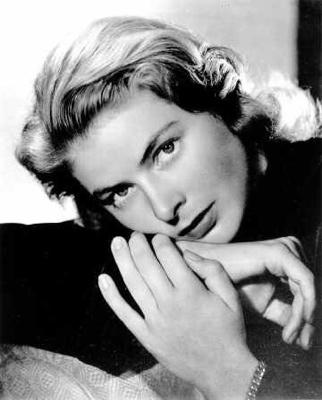
I have a real interest in the b&w portraits of the 40's & 50's, the stuff where you see the likes of Marilyn Munroe, Ingrid Bergman, Lauren Becall etc looking very classy.

I want to try and emulate this type of work but, is there something I should be aiming for at the shooting stage, rather than doing it all in the b&w conversion via Photoshop ?

I guess what I'm trying to say is , should there be elements or things that I do/don't do in the studio or perhaps even camera settings ? I always shoot raw and convert to mono after.

Any hints or tips would be greatly appreciated.

Steve
 
Ahhh I know the type of thing you are trying to emulate here.

I guess the first thing to say is try and get as much right in studio / camera rather than after. Really some of the best exercises you could set yourself is look at the image, try and work out what the lighting is and duplicate it. Using a light meter and shooting manual according to the meter can help.

Of course the final thing is these shoots were using film and it's certain "je ne sais quoi"... ;)
 
Just taken a look at your Flickr - some great portraits and nudes there.

Feel I have been trying to advise someone far more experienced than me!!!
 
Lighting will play a big role in getting to look right and it's probably worth doing a bit of research into the techniques used :thumbs:
 
How do you do your current B&W conversions? Straight B&W conversion using the defaults on your software or do you convert by adjusting the level of each primary colour etc that goes into the mix to produce the final B&W? If you have been using the defaults why not try messing with the levels to try and get the effect - IF however you do that already and what I'm saying is just trying to teach grandma to suck eggs then just ignore me :)
 
If you have been using the defaults why not try messing with the levels to try and get the effect - IF however you do that already and what I'm saying is just trying to teach grandma to suck eggs then just ignore me :)

I tend to use the image/adjustments/black & white control is CS3


Are you ready ?

suck-uk-egg-cup-timer.jpg


Well, you did say ......... :D


Steve
 
Consider that egg sucked :wave:

Have you got an example of what you are looking for, I can't help but I'm interested to know.
 
Thinking about it, the one thing that will really mark the shots as being from that era will be the hair and clothes. If that's not right then I don't think it will matter how they're processed, they will still look current.
 
As other have said, the lighting is important. I do remember reading an article somewhere about the lighting they used and I do believe that they simply adapted what they had in the film studio. They used continuous lighting from the film sets fitted with something called a fresnel lens which I believe allows the light to be focused.

Have a google for fresnel lens and you might turn something up Steve.
 
:thinking: :shrug:

Well I do have a 35mm camera (EOS620), but I was looking at it being a digital project, hence my original post.

I take it that nobody really has that much input then.....

Steve
you'll have to get the lighting/contrast right for the conversion to B&W to make it look like the 50's & 60's
 
OK, here's a few that have given me the inspiration:

Lana Turner
lana8.jpg


Lauren Becall:
Lauren_Bacall.jpg


Ingrid Bergman
ingrid-bergman-tm.jpg


I've got plenty more that I've been looking at.....

Steve
 
Yep, have a look at arri lighting Steve, I've done some homework and I think that's how they achieved the lighting.
 
plx8 is right, the whole scene needs to be authentic for it to work as a shot from another era, the processing forms only a small part, especially if its to be b/w.
I've seen allsorts of effects used to replicate older photo's, but they never look convincing with modern day content.
 
funny you should say this , ive just watched a lesson and how/why the pics from early days were that way.. the way that they use to meter was for this reason " expose for the shadows and develope for the high lights " , and of course we in the digital world " expose for the mid-tones and check the high lights ", im simple terms they would always get really black blacks and burnt out high lights, and midtones just fell into place.confused.... so was i until i tryd it, get playing with your camera is all i can add to that really.

i think that also shows in JELSTER pictures.

video ; PERFECT EXPOSURE , TIM COOPER
 
They also used quite harsh lighting in those pictures. Spots used for the movie production.
 
Back
Top