D90 Multiple Exposures

Messages
351
Name
Nick
Edit My Images
Yes
another silly thread from me.

I'm having an issue with the above feature of my D90 as I've read the manual, Mr Rockwell and a test freaks posting regarding taking 10 shots.

However when I check in the menus of my camera, all I get is an option for 2 or 3 shots.

Where am I going wrong? :thinking:

Nick.

ps: or why is Ken so very wrong, and hasn't changed this for a mature camera.
 
No no no its the Multiple exposure option I'm talking about, bracking is tres simples to figure out. :lol:

Nick.
 
You didn't really read anything, did you?...

I dont have a D90 but this is simple.

How to Get Here

Press MENU, click left and then up and down to select the camera (shooting) menu. You'll then see "SHOOTING MENU" on the top of the screen.

To use it:

1.) Choose the number of shots to combine (2 - 10).

2.) Hit OK.

3.) Go up to DONE.

4.) Hit OK. It only works if you remember to scroll up and hit OK.

You'll see a tiny icon on the top right of the top LCD that looks like two rectangles mating.

Make your shots. You'll see each on the color LCD as you make it. You'll also see the mating rectangle icon on the color LCD.

You'll keep seeing the flashing mating rectangles icon on the top LCD until you complete all the exposures for which you asked in step 1.).

The D90 won't tell you how many you've made until you're done. You can cancel it in the same menu if you want. Choose RESET.

When you've made the last shot the D90 shows it as it did for the other shots for a moment, then goes off and adds them all together. After the CF light blinks a few times you'll see the composite image on the color LCD. The intermediate single images are not saved.

It works with JPGs and NEFs.

Don't turn off the automatic exposure compensation, called Auto Gain. If you do you'll get at least a stop of overexposure.


Pretty much the old chinese saying dating back 3,000 years...."If you cant find settings on Nikon D90 then send to CraigF and he will send you a lolly pop".
 
And if you had tried a D90 you would see that above I stated the only options available in my camera are 2-3 shots, hence my question.

Whos not reading now?........

Sheesh.

Nick.
 
And if you had tried a D90 you would see that above I stated the only options available in my camera are 2-3 shots, hence my question.

Whos not reading now?........

Sheesh.

Nick.

Yeh, you get that on most cameras nowdays but are you Actually in the correct Menu?..

Press MENU, click left and then up and down to select the camera (shooting) menu. You'll then see "SHOOTING MENU" on the top of the screen.

Ok, further reading would lead me to conclude that there is a very important step been missed out in the chain on how to get to it.
Might be deep in the menu or hidden somewhere.

And if you are going to say "Sheesh" at least add "turn over, we have an hour " on to it.
 
Does any of this apply to the D90?

1- Get in the GREEN MENU / Shooting menu (the one that has the camera icon) using the directionnal buttons.
2- Press right to access it.
3- Scroll down the MENU until you get Multiple exposure then press right again.
4- Set the number of shots.
5- Set the AUTO GAIN to ON if you wish to have a balanced exposure shot
6- Press OK on DONE.
7- Take all the shots and wait for the camera to process.
 
sorry Craig, just a bit stressed this morning.

I am in the correct menu as its the one titled Multiple exposures, I'll have to assume that the possibility of taking 10 shots in this mode isn't possible and that the literature available (internet, it wouldn't be the first time!) is wrong.

Thanks for trying to help, and my apologies again.

Nick.
 
It will be there somewhere, it took me 4 days to find a hidden high speed flash option on a previous camera i had even though everyone said it wasn't there.

Also no need to apologize nick, it was all taken in good clean sarcastic humour.
 
Does any of this apply to the D90?

1- Get in the GREEN MENU / Shooting menu (the one that has the camera icon) using the directionnal buttons.
2- Press right to access it.
3- Scroll down the MENU until you get Multiple exposure then press right again.
4- Set the number of shots.
5- Set the AUTO GAIN to ON if you wish to have a balanced exposure shot
6- Press OK on DONE.
7- Take all the shots and wait for the camera to process.

Craig, all this is pretty much as I remember it (no camera today as I'm getting travel money and theres only so much value I'm willing to carry)

The problem occurs at number 4 where my only options are 2 or 3 shots, I've tried changing shooting speed, bracketing, raw/jpg etc... and its just 2 or 3....

Nick.
 
Its deffo there, i have just been looking at a website showing pictures from 2 to 10 exposures done in the D90.
There must be another option to Turn the Multi Exp on or Off.
I will keep searching, im like a dog with a bone now..lol
 
I'm not sure, the one photo I saw made me think that the info has been scraped from a D80 or D2/300 review.

Nick.
 
Does any of this apply to the D90?

1- Get in the GREEN MENU / Shooting menu (the one that has the camera icon) using the directionnal buttons.
2- Press right to access it.
3- Scroll down the MENU until you get Multiple exposure then press right again.
4- Set the number of shots.
5- Set the AUTO GAIN to ON if you wish to have a balanced exposure shot
6- Press OK on DONE.
7- Take all the shots and wait for the camera to process.

All applies to the D90, except you only get the option to take 2 or 3 shots, just checked on mine :)
 
D_Ninety, can you look for a Multiple Exposure setting in the menu somewhere, that seems to be the key to this.
From what i can gather you need to set that first then the other stuff.
If its no longer there i can only assume a firmware upgrade has removed the option.
 
There doesn't appear to be any other setting for multiple exposure in the menus (setup, custom settings or shooting). The D90 has never received a firmware upgrade, unless you mean that it changed from the D80.
 
Yep, I concur with D Ninety. I can only set 2 or 3 exposures in the 'Multiple Exposure' menu
 
Seems Like some people have used the D300 to assume the 90 is the same then, thats a shame, 10 shots actually would be useful, 3 is useless to me. Its poor work from those on the web who put crap knowledge online.

(I googled the DC resource review of the D300 and it mentions 2-10 shots)

Thanks all.

Nick.
 
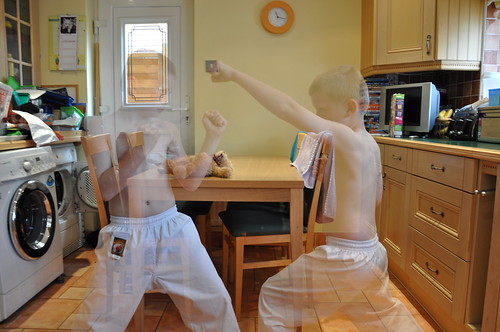
Does not seem worth the effort to me, tried it once and this is the result. You tell it how many exposures you are going to take, so the background is OK, but the moved subjects are 50% degraded.

 
Does not seem worth the effort to me, tried it once and this is the result. You tell it how many exposures you are going to take, so the background is OK, but the moved subjects are 50% degraded.


Yes I had a go at this earlier; my image was just like yours. I have to ask, what's the point? What's the best/easiest way to do multiple exposures?

Yes, I know... search the forum!
 
I really wanted the option to multiple expose 10 shots at a time for some attempts at star trail pics, storing shots in effectively compressed groups of 10 and that would save some serious amounts of space.
I'm off on Safari soon so no access to computers and I've "only" got 24Gb of memory (16Gb oem and an 8Gb Sandisk extreme III) and I want everything in RAW to make sure I miss nothing and also we are away for 18 days.

It does have a use, just cos you don't see it......

Nick.
 
Sloper.

Overlaying Star trails in camera to minimise usage on a memory card, white star lines on a black background, with the stars moving for each exposure, they wont be any more transparent than they would be with stacking on dedicated software.

I said that in post 23 directly above yours.

Nick.
 
Jeez, you are a grumpy git ;)

You're right though, I can't imagine a use for transparent subjects in a photo. Enlighten me.

It's called being creative.

I created this effect with one exposure - a simple long exposure.


You stand in one place for, say, 10 seconds, and then move somewhere else for another 10 seconds. This example isn't very good as it's the first time I ever did it, but I am standing on the right in front of the biege door, and on the left near the grey control panel.
 
Sloper.

Overlaying Star trails in camera to minimise usage on a memory card, white star lines on a black background, with the stars moving for each exposure, they wont be any more transparent than they would be with stacking on dedicated software.

I said that in post 23 directly above yours.

Nick.

My question, 'what's the point?' was in reply to leaky5's photo, which is as disappointing as my own shots with the multiple exposure feature on the D90. I've never dabbled with this before, my question was genuine. Maybe you'll post your star-trail photos..
 
Found this, it shows how to do multiple shots on a D3 (not too dissimilar to D90) for making HDR images in camera.
Although this may not relate to what your trying to do it may give some insight.

It mentions the fact that some cameras may only have a total of 3/5/10 shots combined. It also mentions star trails At 6:47 mins into the clip

Being a D90 owner I'll be watching this thread for any up dates.:)

Apologies if I've added to the confusion
 
The multiple exposure for me is about getting photos like this:


This was 10 shots. What the camera does is to even out the exposure so you don't end up with it being over exposed like it would be if you set it on say 10 seconds. In this photo I wanted the dreamy feel that a long exposure would give me without the aforementioned problems.

Regards

Chris
 
Chris

A lovely shot and something I may well try to replicate at some point.

Nick.
 
Chris, that is indeed a great shot. I didn't realise the camera evened-out the exposure. Thanks for the example.
 
I'm off on Safari soon so no access to computers and I've "only" got 24Gb of memory (16Gb oem and an 8Gb Sandisk extreme III) and I want everything in RAW to make sure I miss nothing and also we are away for 18 days.

A bit of topic, but if your going on such a trip maybe you should consider buying more memory, it's fairly cheap nowadays particularly if you don't need the extreme speed cards, try HERE ;)
 
i get an error this option it not available with current settings... yet everything i read it does NOT telling me any special settings i chould or should NOT have on my d90....HELP i want to try this feature
 
Back
Top