Depth of field, I need help

Messages
104
Edit My Images
Yes
Hi everyone

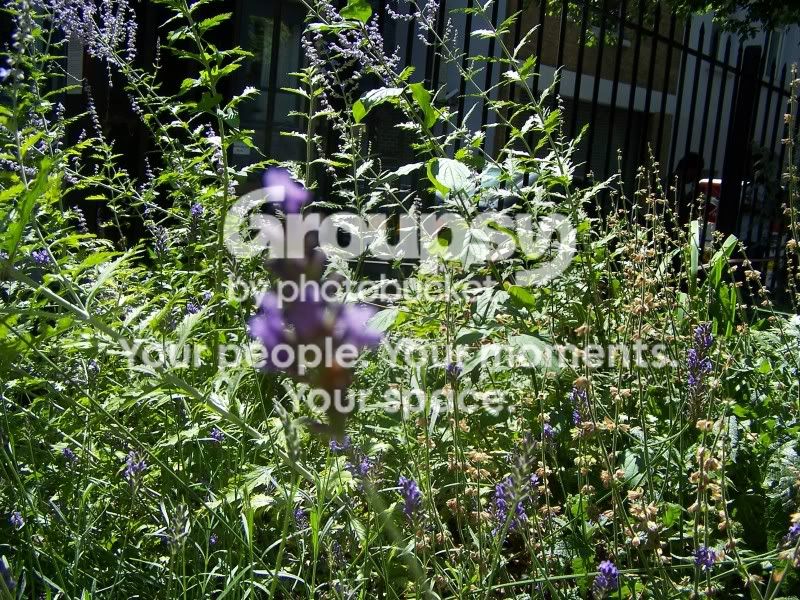
So i've been playing up with the settings on my camera and I wanted to be able to take pictures where the front subject is highlighted and the back is blurry, but most of my pictures came out the other way around.

What am I doing wrong? See example below

experiencias492.jpg
 
You are focusing on the background, you would need to move the focus to the flower at the front. What lens etc are you using?
 
Set your auto focus to Centre single area then put it onto what you want to focus on.
 
Hi,

Try using manual AF points because what is happening in ** picture the camera is using automatic AF points and focuses on the background subjects and making the flower at the front blurry. If you used manual AF points you would focus on the flower at the front making the background blurry.

When i started i used to ahve my AF point set to center, this makes it easier on the eye, once you get used to it, tryed playing around with AF points to make the composition you like.
 
What you want to achive your doing right as i can see from the exif you set the camera to F2.8

You just missed focusing on the flower at the front thats all :)
 
How did you see that?

Most people on here have a built in exif viewer so you right click on a pic and it gives you all the settings:) Usually this one http://www.opanda.com/en/iexif/ its free and no spyware or anything

ie your pic

[Image]
0000 = 0
Make = EASTMAN KODAK COMPANY
Model = KODAK Z740 ZOOM DIGITAL CAMERA
Orientation = top/left
Y Resolution = 230
Resolution Unit = inch
YCbCr Positioning = centered
Exif IFD Pointer = Offset: 504

[Camera]
Exposure Time = 1/1000"
F Number = F2.8
Exposure Program = Manual
ISO Speed Ratings = 100
Exif Version = Version 2.21
Date Time Original = 2004-01-02 01:42:13
Date Time Digitized = 2004-01-02 01:42:13
Components Configuration = YCbcr
Shutter Speed Value = 10 TV
Aperture Value = 3 AV
Exposure Bias Value = ±0EV
Max Aperture Value = F2.83
Metering Mode = Pattern
Light Source = unknown
Flash = Flash did not fire, compulsory flash mode
Focal Length = 6.3mm
Maker Note = 2412 Byte
Flashpix Version = Version 1.0
Color Space = sRGB
Exif Image Width = 2576
Exif Image Height = 1932
Interoperability IFD Pointer = Offset: 3514
Exposure Index = 100
Sensing Method = One-chip color area sensor
File Source = DSC
Scene Type = A directly photographed image
Custom Rendered = Normal process
Exposure Mode = Manual exposure
White Balance = Auto white balance
Digital Zoom Ratio =
Focal Length In 35mm Film = 38mm
Scene Capture Type = Normal
Gain Control = Low gain up
Contrast = Normal
Saturation = Normal
Sharpness = Hard
Subject Distance Range = unknown

[Interoperability]
Interoperability Index = ExifR98
Interoperability Version = Version 1.0

[Thumbnail Info]
0000 = 0
Compression = JPEG Compressed (Thumbnail)
Orientation = top/left
Y Resolution = 230
Resolution Unit = inch
JPEG Interchange Format = Offset: 3818
JPEG Interchange Format Length = Length: 8580

[Thumbnail]
Thumbnail = 160 x 120

 
www.photome.de

You may struggle for shallow DOF shots as the sensor in your camera is so small

does it work same as opanda one ? sorry really dont know.. for example i can simply right click on the picture in this post without removing or saving it... just click and get the info...is it same? i cant tell from the website?
 
does it work same as opanda one ? sorry really dont know.. for example i can simply right click on the picture in this post without removing or saving it... just click and get the info...is it same? i cant tell from the website?

Yes right click - it also gives a histogram and if the info's not been stripped the active focus points overlaid over the image as well as far far to much other info :)
 
BTW you may want to change the date in camera :)

I can't be botherered changing the date. :)

Wow I need to look at my pictures and get all that info. Picasa tells me the basics only. You gave me everything.

I looked on the settings and I have AF control continous or single and metering exposure i can choose, multi pattern, center-weight and center spot. It's on multi pattern whatever that means. Focus zone it's either multi zone or center.

I'm well confused
 
I just installed opanda working fine, installed also the firefox extention but that's not working so great

have ya closedit down and opened a new instance of firefox or ie? mine works bob on with ie
 
Dogfish magnet is right above, it's very hard getting nice blurry backgrounds out of a compact or bridge camera because of the small sensor. I used my bridge camera on Sunday and had it set to f3.5, zoomed all the way in on my subject and still the background was in focus. One way I used to do it on my bridge camera was to use macro, zoom right in on the object you want in focus and usually it gave a blurry background. Wait till/if you get a DSLR and you'll be amazed how easy it is.
 
I've been reading a fair bit and I thought i knew the theory when trying to take the shot but the results were somewhat different from what I expected

This is because of the size of the sensor in your camera, have a look at DOF master try some settings with your camera then use the same settings with a DSLR and you will see the difference.
 
Oh it makes sense now. I just used the calculator and although they don't have my model they have the previous one, it shows that the depth of field is smaller than 1cm and that may be a tad too small. Am I right?

:thinking: try these settings from your exif

Focal length 6.3 mm (38mm evq)
Aperture f2.8
Distance from subject 5feet

This gives you a total dof of 7.64ft - 1.75ft in-front of your focus point will be in focus and everything up-to 5.89ft behind your focus point will have 'acceptable' focus.

if you try the same thing will a Cannon crop body 30D,40D,50D etc

Focal length 23.75mm (38mm eqv)
Aperture f2.8
Distance from subject 5 feet

This gives you a total dof of 1.47ft - 0.63ft in-front of your focus point will be in focus and everything up-to 0.84ft behind your focus point will have 'acceptable' focus.

as you can see a camera with a larger sensor throws the backgroud out of focus a lot sooner than a camera with a smaller sensor.
 
Can you get this to display by right clicking on the image, or do you have to open the program first?:thinking:

You can display using right click

Download and install the app then

Open photome - click settings - click integrate with browser - pick browser

You may have to restart your browser after.
 
You can display using right click

Download and install the app then

Open photome - click settings - click integrate with browser - pick browser

You may have to restart your browser after.

Thanks dogfish. I've done this and working OK in Explorer, and I have downloaded the Firefox integration, but right click wont work in Firefox - any ideas?
 
I'm not familiar with the Kodak Z740, but with a lot of the small-sensor cameras, the best way to get the foreground in focus and the background out, is to use the Macro Mode Setting.

Something like this...

 
Thanks dogfish. I've done this and working OK in Explorer, and I have downloaded the Firefox integration, but right click wont work in Firefox - any ideas?

Silly me - I've reread Photome instructions and now realise I have to open my downloaded Firefox integration file in the browser and then install as add on. Working now.:thumbs:
 
I'm not familiar with the Kodak Z740, but with a lot of the small-sensor cameras, the best way to get the foreground in focus and the background out, is to use the Macro Mode Setting.

Something like this...


Yep, it is definitely possible to create background blur on compacts, it's just not as easy as on a DSLR. Getting up close and personal, using a low f/number and zooming in quite a bit will guarantee plenty of background blur.

That's an absolutely cracking picture there Big Yin - I was able to muster this up with a fixed focal length compact that had a choice between macro and infinity - and that was it!

Files.jpg


So yes, it's definitely possible to create DOF effects with a compact, you just have to get a bit creative...
 
To the orignal poster, the experts here are getting too complicated. Your target was a little too small for your autofocus to get a bead on it and you'd have nailed that picture simply by getting a bit closer. That way, your autofocus would have pinpointed your flower and put the background out of focus. Watch your viewfinder/viewscreen as you frame your shot, half press the shutter button to focus, and you'll see it lock in, then take your shot.
 
Back
Top