domain names.

the correct way is to change the nameservers in the control panel where you bought the domain from.. but first you would require zenfolio to make changes at there end for it to work... either them or you if you ahve that sort of access... I dont know what account you ahve with zenfolio to kn ow if they would allow it..

the only other way is cloaked using frames but i would very much advise against that

step one.. find out if zenfolio will allow own domains..
 
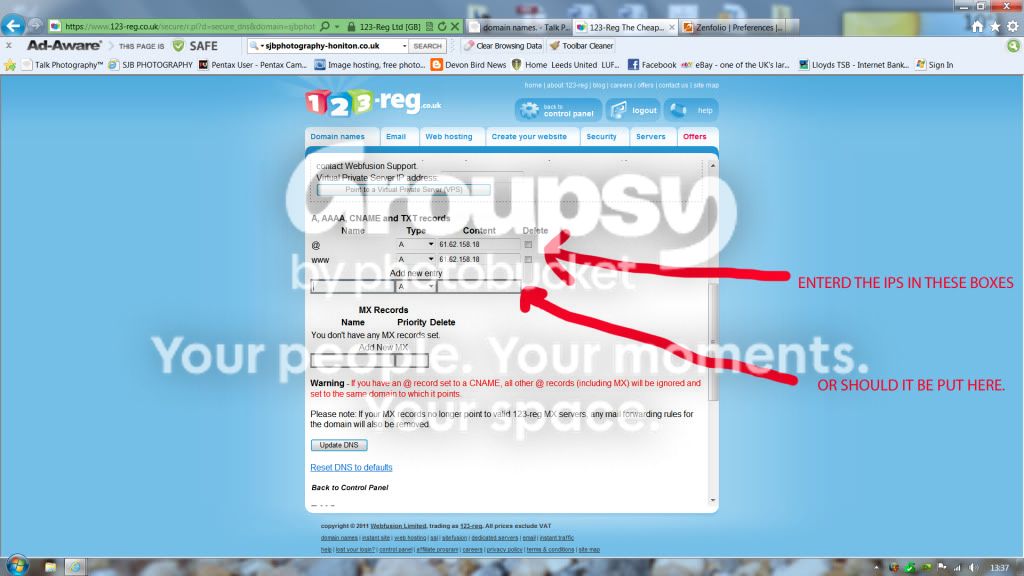
my zenfolio does allow domain names, and i have brought the domain name throguh 123- reg, i have gona and changed the ip address on 123-reg as advised in the video but they use another site and the layout is different so not sure if i have done it right and from the video all i have to do is enter my domain name in my prefferences
-Point a custom domain name to your Zenfolio pages and it should work(giving it 48hrs) but just wanderd if i was putting the ip address in the right place.
Capture.jpg
 
Last edited:
not too sure what you ahve done.. but if you ahve changed name servers or cname entry then it can take time to happen ..
 
I don't know how Zenfolio operates with names, but normally what you do at 123-reg is point the domain nameservers at the nameservers of your hosting package. That is, you allow zenfolio to become your nameserver for that website.

TBH, I can't see how it would work otherwise because if Zenfolio moved to a different IP address (for example) you'd have to update 123-reg's DNS lookup whereas if Zenfolio manage it, they can do what they like without you having to worry about it.
 
if he has been allocated an ip address for his account on zenfolio then changing the a record will work....
 
I don't know how Zenfolio operates with names, but normally what you do at 123-reg is point the domain nameservers at the nameservers of your hosting package. That is, you allow zenfolio to become your nameserver for that website.

TBH, I can't see how it would work otherwise because if Zenfolio moved to a different IP address (for example) you'd have to update 123-reg's DNS lookup whereas if Zenfolio manage it, they can do what they like without you having to worry about it.
im trying to work it out of the vido here,
http://www.zenfolio.com/zf/help/man...eferences-settings/using-a-custom-domain-name
and these instructions.
How to set up a custom domain

Configuring custom domain is a two step process:
1.
You need to setup a new CNAME record at the place where you registered your domain. Examples of such registrars are Network Solutions, GoDaddy, Register.com, 1&1, Yahoo, and others.

Check with your registrar for the exact procedure but adding a CNAME usually involves editing DNS configuration and pointing a subdomain to zenfolio.com.

For example, to point photos.yourdomain.com to zenfolio.com, you need to create the following CNAME record in yourdomain.com:
photos CNAME zenfolio.com.
If you want your entire domain to go to your Zenfolio pages, you would need to create an A record pointing to our current IP address:
@ A 64.62.158.18
 
Last edited:
OK, so you're doing it correctly. However, you appear to have configured it incorrectly:

Code:
$ ping sjbphotography-honiton.co.uk

Pinging sjbphotography-honiton.co.uk [61.62.158.18] with 32 bytes of data:
Timed out.

and from this page (from the one you posted): http://www.zenfolio.com/zf/help/need-more-help/configuring-your-custom-domain/a-record-cname

Zenfolio said:
In the IP field (this may be labeled something else, such as Value, Points To, or Destination) input Zenfolio's IP address: 64.62.158.18

Try changing the first number to 64 ;)

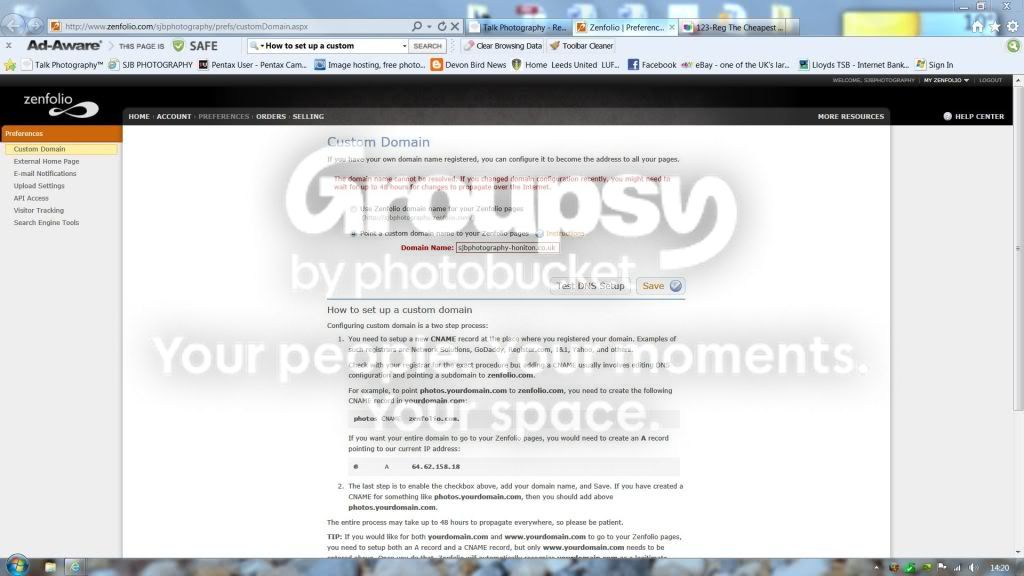
Also, you need to configure Zenfolio too (on the page I've posted above).
 
OK, so you're doing it correctly. However, you appear to have configured it incorrectly:

Code:
$ ping sjbphotography-honiton.co.uk

Pinging sjbphotography-honiton.co.uk [61.62.158.18] with 32 bytes of data:
Timed out.

and from this page (from the one you posted): http://www.zenfolio.com/zf/help/need-more-help/configuring-your-custom-domain/a-record-cname


Try changing the first number to 64 ;)

Also, you need to configure Zenfolio too (on the page I've posted above).
thanks and well spotted changed to 64.:thumbs:
here zenfolio page.
Capture2.jpg
 
The www. points to Zenfolio now but the one without doesn't (still at 61).


$ ping sjbphotography-honiton.co.uk

Pinging sjbphotography-honiton.co.uk [61.62.158.18] with 32 bytes of data:
Request timed out.


$ ping www.sjbphotography-honiton.co.uk

Pinging www.sjbphotography-honiton.co.uk [64.62.158.18] with 32 bytes of data:
Reply from 64.62.158.18: bytes=32 time=168ms TTL=55

Change that first.

The two entries you made in post #3 point sjb... and www.sjb... at 61.62.158.18. I suspect you have only changed the www entry but you are telling zenfolio you want the basename (without the www.) to be recognised.

Another way would be to make a CNAME record with www.sjb... pointing to sjb....
 
The www. points to Zenfolio now but the one without doesn't (still at 61).


$ ping sjbphotography-honiton.co.uk

Pinging sjbphotography-honiton.co.uk [61.62.158.18] with 32 bytes of data:
Request timed out.


$ ping www.sjbphotography-honiton.co.uk

Pinging www.sjbphotography-honiton.co.uk [64.62.158.18] with 32 bytes of data:
Reply from 64.62.158.18: bytes=32 time=168ms TTL=55

Change that first.

The two entries you made in post #3 point sjb... and www.sjb... at 61.62.158.18. I suspect you have only changed the www entry but you are telling zenfolio you want the basename (without the www.) to be recognised.

Another way would be to make a CNAME record with www.sjb... pointing to sjb....
Hi andy, i have changed both the &@ and www to 64 now, so hope full that will, work, the cname i aint got a clue, really appreciate your help.

scott
 
Hi andy, i have changed both the &@ and www to 64 now, so hope full that will, work, the cname i aint got a clue, really appreciate your help.

scott
Works for me :)

If you had a CNAME record set like:

www.sjb...co.uk CNAME sjb...co.uk

what the server would do is match the www.sjb...co.uk and restart the search as simply sjb...co.uk
 
Back
Top