Download speed for web images

Messages
12,519
Name
Jeremy Moore
Edit My Images
No
When I set up my first website, I was advised to keep the size and resolution of the images down so that they loaded fairly quickly.

That was before the mass adoption of broadband though, and now I wonder if i can increase the quality of the images at the cost of download speed.

What do others suggest?
 
Everyone's upload and downloads speeds can be quite different, at a rough guess maybe less than 1MB at least if you want a fairly prompt loading speed, most images that I will upload are anything from 400kb to 700kb at 700 pixels on the longest side.

They seem pretty safe.

Personally the quality of the image is a little more important than the size, I won't reduce the quality slider on export, just the width, JPEG artifacts at low quality really ruin a picture IMO.

<removal of all EXIF data will help ti keep the quality up but keep the file size down too, it's a tick-able box in the Lightroom export menu.

Oh, if you don't use it already, I couldn't recommend the output sharpen facilty in Lightroom's export menu also, it's superb, subtle but very effective.
 
Everyone's upload and downloads speeds can be quite different, at a rough guess maybe less than 1MB at least if you want a fairly prompt loading speed, most images that I will upload are anything from 400kb to 700kb at 700 pixels on the longest side.

They seem pretty safe.

Personally the quality of the image is a little more important than the size, I won't reduce the quality slider on export, just the width, JPEG artifacts at low quality really ruin a picture IMO.

<removal of all EXIF data will help ti keep the quality up but keep the file size down too, it's a tick-able box in the Lightroom export menu.

Oh, if you don't use it already, I couldn't recommend the output sharpen facilty in Lightroom's export menu also, it's superb, subtle but very effective.

Thanks, Tomas.
 
depends where the image will be used.. e.g a page graphic ought to be small. a thumbnail too. The medium pic after a thumnail ought to be pretty quick too. However, if you clicked on a link saying "full hi res image" people will wait

Its about how you tell the end user whats comming next
 
Thanks, Tomas.

Do you have a rule of thumb for file size, then, at 700 pixels wide?

No problem. :)

700 seems fine for both horizontal and vertical orientation, for blogs and flickr and uploading onto TP.
800 is good too but I find it a little large on the vertical.
I work with dual displays, the larger panel at 24" and even 800px in the vertical seems a little excessive at times for forums at least.

I would like to have maybe 1000px for horizontals, but with my website template the restrictions are 900 x 470 for the home page slideshow,
700 x 470 for the horizontal orientation and
313 x 470 for the vertical orientation.

Thumbnails are 80px I think?
 
this poses another question
what is the target resoloution for your web visitors

You may have a 24' widesceen, but somone on a 15' monitor will find a 1000 pixel wide image + template + whitespace at edges - Way too big

Have a look at your webstats - they ought to be able to show you what screen resoloutions your site visitors are using
 
No problem. :)

700 seems fine for both horizontal and vertical orientation, for blogs and flickr and uploading onto TP.
800 is good too but I find it a little large on the vertical.
I work with dual displays, the larger panel at 24" and even 800px in the vertical seems a little excessive at times for forums at least.

I would like to have maybe 1000px for horizontals, but with my website template the restrictions are 900 x 470 for the home page slideshow,
700 x 470 for the horizontal orientation and
313 x 470 for the vertical orientation.

Thumbnails are 80px I think?

Ta. I see you answered this Q in your first post as well. Must get some new glasses...or a new brain.

I notice the images on your site are VERY good quality. Maybe I should aim for that....

But now....out to take some pics.:D
 
Ta. I see you answered this Q in your first post as well. Must get some new glasses...or a new brain.

I notice the images on your site are VERY good quality. Maybe I should aim for that....

But now....out to take some pics.:D

Have a good outing!
Thanks for the comments, everything is exported via Lightroom, if I need to do a more in depth edit then a 'right click' and 'edit in photoshop' is the preferred method as it saves the PSD within your Lightroom catalogue afterward, everything stays in one place as it were.
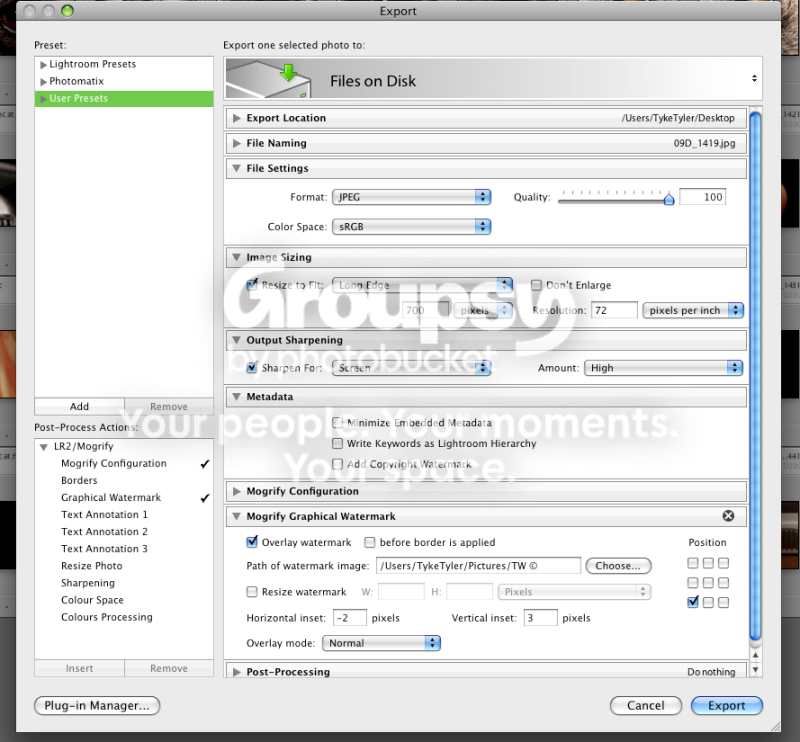
When the editing is finished, in Lightroom, the image has a right click and export, here are the settings:

Picture2-1.png


You'll notice that the output sharpening is set to high, it may seem excessive but it's quite subtle and really sharpens nicely without causing those terrible artifacts. :thumbs:
 
That's very useful. Thanks!

No bother Jeremy, you can also save your personal settings as a user preset and export all your chosen images in one quick swoop too.

Just configure your desired sizes and then click the 'add' button under 'user presets'.
 
Back
Top