NSFW Driving me crazy (Need Help Please)

Messages
4,784
Name
Neil Williams
Edit My Images
No
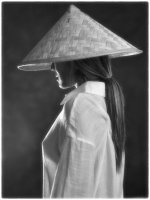
Guys I am trying to simulate this image in my studio but cannot get my fiancé left breast to show through her see thru top. I have tried many different light positions and different modifiers to no avail.
A little help would be much appreciated
IMG_2207.jpeg
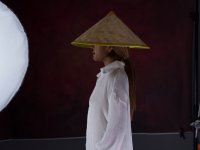
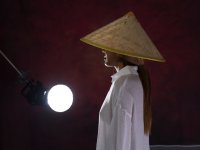
Below my two feeble attempts...........Nam Fon is not a happy model today
Fon Vietnam Hat_0087.jpgFon Vietnam Hat_0099.jpg
 
I could be wrong but the material in the example is different. It is an already sheer material, so it is see-through while the white linen shirt is thicker and bounces some of the light away.

Also the original has natural light which is more yellow/orange, if you have the option to adjust to a warmer/orange light, it might work better.
 
And possibly the light source needs to be nearer to her and out of sight of the camera I.e shine a torch at your finger and you can see them turn translucent
 
I could be wrong but the material in the example is different. It is an already sheer material, so it is see-through while the white linen shirt is thicker and bounces some of the light away.

Also the original has natural light which is more yellow/orange, if you have the option to adjust to a warmer/orange light, it might work better.
Fon has got another top so we will give it another go on Wednesday. My plan is to make it B&W in the studio and then we’re going to try it again at a outdoor location hopefully around sunset
 
And possibly the light source needs to be nearer to her and out of sight of the camera I.e shine a torch at your finger and you can see them turn translucent
The problem is, is that whenever I moved the light out of the frame I lost the effect.
Getting rid of the light in post is quite easy in PS.
On Wednesday I will try it with Fon sitting on a stool to make it easier on her but also easier to repeat the pose if you know what I mean.
Here is the only one from today but I’m sure we can improve on this as I fu&@£d with the settings on the camera and shot this wide open instead of stopping down to get more in focus……..
IMG_2279.jpeg
 
As always, I'll be blunt and honest and tell you what you need to know, not what you may want to hear.

Your entire approach to your photos of her is wrong. You seem to concentrate on what she's wearing (or not) and the pose and then you just stick lights where they don't get in the way.
If you learned about lighting, and the very basic physics involved, you'd know what can't work in lighting terms and modify the pose etc to suit the lighting, but you don't seem to do this.

Your lighting is hopelessly wrong. Before you do anything else,

1. Move that softbox so that it's pointing directly at her, rather than from behind and in front as it is right now. It also needs to be higher, but your choice of hat may not suit that.
2. Now, switch it off, but leave it where it is, because it's acting as a useful reflect.
3. Put a honeycomb on your key light, to both control the spread of light and to prevent flare.
4. Put it behind her, directly behind, if that doesn't work you may have to move it a bit to camera left, , if her right breast gets in the way of the left one, but start with it behind and, with any luck, completely hidden by her body. If necessary, move it further back too, the perspective effect will help to hide it.
5. Establish the power setting by test shots, it's easier and usually better than metering in this situation.
6. You will now have the effect you want, it may or may not be far too dramatic, but that's the starting point.
7. Switch the softbox light on if the results are too extreme, start at the lowest possible power setting, adjust upwards in small steps until you're happy with the result.
8. Make small incremental adjustments to the softbox position until you're happy.

That's all there is to it, it's fissics innit? :)

That frilly top may not be right, and maybe the hat isn't either, but these are easily changed.

 
I think the material of the blouse is to dense
A bit like me ;)
 
There's a couple of things to note about the example image.
First is that she is 3/4 backlit. That's what is creating the bit of rim lighting and silhouette; that seems pretty obvious and what you've tried to replicate.
But second is that the backlighting is not the primary lighting. If it were, all you would see is the silhouette.
Which means the primary lighting on her is frontal (diffused ambient); that is why you can see skin tone (reflected light) through the shirt. I.e. it is not the backlighting creating the effect... you've focused on the wrong aspect(s).
 
I think and hope that I said that - but you said it better:)
 
Back
Top