


- Messages
- 4,847
- Name
- Neil Williams
- Edit My Images
- No
How do I attach a short movie clip??
The problem started a few days ago when I made a print with 17 inch roll premium Luster paper. After the Printer started printing about two minutes into the print, there was a very loud whining sound followed by a paper jam warning.
I removed the jammed paper, reinstalled the roll paper and made a new print, this time it continue to print and finish the print but as you can see by the print there is something wrong at the top and at the bottom.
I removed the premium Luster paper and tried to reinstalled it again, this time got a warning to open the roll paper cover and when I did all the paper was jammed up inside the roll unit not inside the Printer. (I did receive a bleep sound to say that the paper was in the correct place and to close the lid of the roll unit cover prior to installing the roll paper)
Today I installed a different 17" roll of paper some Epsom archive matte paper. This paper installed perfectly first time but about two minutes into the print I heard the same very loud whining sound followed by the print jammed warning.
I managed to get this all on video.............Please see a picture and video attached showing the issues that I am having
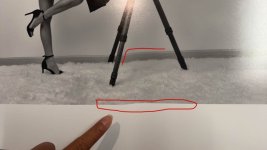
This is meant to be a straight line but looks like it stared moving up then correcting itself
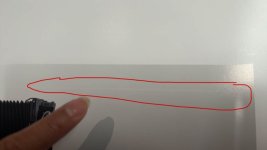
Here is a white line that is not part of the original image
How do I attach a short movie clip??
The problem started a few days ago when I made a print with 17 inch roll premium Luster paper. After the Printer started printing about two minutes into the print, there was a very loud whining sound followed by a paper jam warning.
I removed the jammed paper, reinstalled the roll paper and made a new print, this time it continue to print and finish the print but as you can see by the print there is something wrong at the top and at the bottom.
I removed the premium Luster paper and tried to reinstalled it again, this time got a warning to open the roll paper cover and when I did all the paper was jammed up inside the roll unit not inside the Printer. (I did receive a bleep sound to say that the paper was in the correct place and to close the lid of the roll unit cover prior to installing the roll paper)
Today I installed a different 17" roll of paper some Epsom archive matte paper. This paper installed perfectly first time but about two minutes into the print I heard the same very loud whining sound followed by the print jammed warning.
I managed to get this all on video.............Please see a picture and video attached showing the issues that I am having
This is meant to be a straight line but looks like it stared moving up then correcting itself
Here is a white line that is not part of the original image
How do I attach a short movie clip??