Exposure!

Messages
667
Name
alan
Edit My Images
Yes
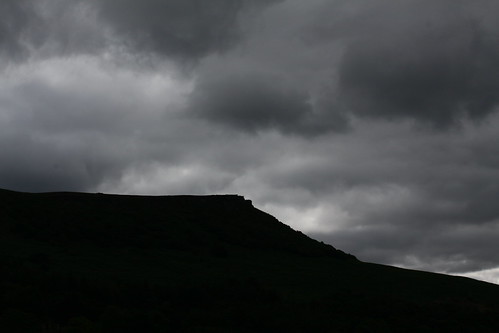
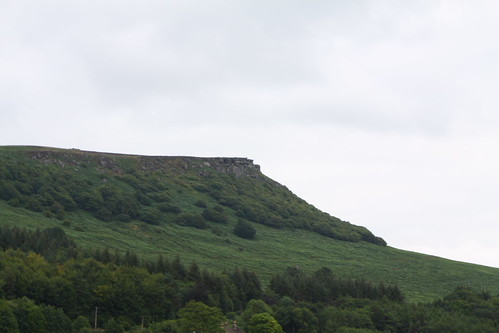
I've just been up to the Peak District.The sky was a bit nondescript..grey.I've a 50D and was trying landscapes at Ladybower.Problem was, I was on AV and a setting of 18.The sky would come out overexposed and the hillside would show up ok.To try to get more drama into the skies I turned the round dial at the back of the camera (yes, a beginner :) ) and on the LED display the mark would go below the zero.This worked producing reasonable skies but the hillsides are very very dark.Poetic, but too dark.Any comments?apart from I seem confused.If I knew how to upload a photo I woukd.Disappointd as there were some great vistas to be shot.
Thanks.
 
Last edited:
You cant get both without the use of filters, or using a computer.
The camera cant cope with the differernce in brightness between the very light parts and the very dark parts, so the camera tries its best to get a good medium.
Often this ends up with an over exposed sky.
The best way to deal with is with the use of ND Grad filters to lessen the exposure of the sky but keep the forreground exposed correctly.

You can also shoot 2 frames on the camera. One exposed for the sky and one for the forground then combine them in software.
 
So I can't get what I want straight out of the can.Going to have to look at filters then, I suppose.(Do they scew on?)
Thanks,Tom.
 
So I can't get what I want straight out of the can.Going to have to look at filters then, I suppose.(Do they scew on?)
Thanks,Tom.

Not when it comes to bright skies and darker foregrounds no.

I wouldnt reccomend the screw on type for graduated filters, as you have no control over where the graduation will be.
You'll want a slot in system like Hitech, Cokin or Lee.

This comes in parts, a holder, adapter and then the filters themselves.
The adapater screws into your lens, the adapter attatches to that and then the filters slot in. You can raise or lower them accordingly to get the darkened part in the correct place for the scene.
 
Bear in mind before buying filters and holders that will probably cost you £70 minimum for a basic set, that you can get photoshop elements for less than £50 and this will let you blend exposures once you get the hang of it. Also blending exposures in software means you dont have to worry about trying to find landscapes with flat horizons to match the filter graduation line.

EDIT: for the software blending to work, your 2 images will have to be taken without the camera moving. This usually means using a tripod.

2p
 
Last edited:
I did a last minute buy of a grad filter before going on holiday. The one I had was too small for my 77mm dia lens. Just bought the filter for c.£25 in Jessops (yes, it was that last minute) and they didn't have a holder. Just hold the square filter in front of the lens, putting the grad line where you want it.

If you have a tripod for your camera, then its easier to take two or more shots at different exposures, though.
 
Bear in mind before buying filters and holders that will probably cost you £70 minimum for a basic set, that you can get photoshop elements for less than £50 and this will let you blend exposures once you get the hang of it. Also blending exposures in software means you dont have to worry about trying to find landscapes with flat horizons to match the filter graduation line.

EDIT: for the software blending to work, your 2 images will have to be taken without the camera moving. This usually means using a tripod.

2p
You may have answered one of the ueries I had last night,Thw horizon was a sloping one, down from the top of the pyke to the bottom.If I can work out how to upload pics I'll post a couple.Thanks.
 
6045291404_c549744c2c.jpg
[/url][/IMG]
 
Bear in mind before buying filters and holders that will probably cost you £70 minimum for a basic set, that you can get photoshop elements for less than £50 and this will let you blend exposures once you get the hang of it. Also blending exposures in software means you dont have to worry about trying to find landscapes with flat horizons to match the filter graduation line.

EDIT: for the software blending to work, your 2 images will have to be taken without the camera moving. This usually means using a tripod.

2p

On a slot in system you can twist the filter holder around to get the graduation line where ever you want it at any angle. You could do the same with screw in filters too. If you use a soft grad also, it doesnt matter if some things like hills or buildings go into the ND part, the effect is not really noticeable. Only on hard grads can this sometimes occur.
 
As you have got editing turned on I have had a little play in PS with the two images you posted.Not very good but it shows the effect.
Is this what you are trying to achieve?

p1033681813-2.jpg


Open the two images copy the underexposed image( the one with the correct sky) and paste it over the other image so you have two layers.Make the top layer the active layer and get the eraser tool and rub out the foreground of the top (underexposed)layer.
The layers have to be exactly the same so take bracketed shots 'preferably on a tripod but if you set the camera to take 3 bracketed exposures and put the camera in burst mode it sometimes works depending on shutter speed.
Cheers
 
Last edited:
Yes, something like that,Chris. In PhotoShop then.I'm going to have to get it and learn how to use it.
(I was in editing trying to delete the post where the image didn't show, but I can't fathom how to delete ..)
 
Last edited:
Thanks,but I didn't think 18(or F18) was extreme for distance shots:thinking:

Well it depends really whether you have close foreground objects that you want to include in your shot and distant objects. If you do and you want both to be sharp then you may have to stop down that far so that DOF covers the whole distance between the near and far parts of the image.

Most lenses perform at their best at an aperture of f/8 or f/11. Using a smaller aperture than that, what happens is that your image is being squeezed through a very tiny aperture hole causing the light to deflect off the aperture blades and get bounced around within the lens, causing an effect called diffraction which is simply loss of definition (sharpness) due to light being bounced around within the lens.

Lots of landscape shots can be shot at larger apertures than you've used to avoid diffraction and in the example you've posted there was certainly no need to use f/18 as there is no close foreground detail to worry about being in focus. f/8 or even f/5.6 would have probably been ample for this shot.

It will probably help to have a look on-line for a handy DOF (Depth Of Field) table which you can print out and keep in your bag.
 
Last edited:
Many thanks.If I'd used say F8 or F11, would the colours have come out different?Sorry to be so basic.I obviously need to do some studying or go on a course.I was using the standard 18-55 IS.
Thanks for all your help.Most of the photos I took at the weekend were partly over or under exposed.So I was having the same problem.Very frustrating.
 
Many thanks.If I'd used say F8 or F11, would the colours have come out different?Sorry to be so basic.I obviously need to do some studying or go on a course.I was using the standard 18-55 IS.
Thanks for all your help.Most of the photos I took at the weekend were partly over or under exposed.So I was having the same problem.Very frustrating.

Not at all - provided of course that you'd adjusted the shutter speed to keep the exposure value the same there would have been no effect on colours.

Have a read of this tutorial - it sounds like it's just what you need. :)

http://www.talkphotography.co.uk/forums/showthread.php?t=185536
 
I'm getting a litle embarassed now :)
IF the colours would have been the same using a range of F8 -F11, then I would have been faced with the same issues of under and over exposure on that particular shot?So...what difference would the stopping down have made? :)
Sorry, some may be having a laugh at my ignorance.I've a good camera, I want to take good photos.
The link I've put in my favs.Thanks.
Phew!
 
There's no need to feel embarrassed. There's only one correct exposure for the shot, but it can be a longer shutter speed and a smaller aperture or a faster shutter speed and a larger aperture. The important thing to understand is that they both need to admit the same amount of light for a correct exposure

This is well covered in the tutorial I linked to. You just need to spend a little time getting to grips with it or regardless of how good your camera is you're going to go round in circles. :)
 
I'm getting a litle embarassed now :)
IF the colours would have been the same using a range of F8 -F11, then I would have been faced with the same issues of under and over exposure on that particular shot?So...what difference would the stopping down have made? :)
Sorry, some may be having a laugh at my ignorance.I've a good camera, I want to take good photos.
The link I've put in my favs.Thanks.
Phew!

To directlly anwer this, changing the aperture would only affect the amount in and out of focus from near to far, presuming you changed the shutter speed to suit the aperture to still gain a "correct exposure".
As I said previously, there is no way directly in the camera to get a shot like you posted, looking the edit by Troutfisher.
The Only the way to get this is by software as demonstrated or by the use of filters.

You can change as many settingas as you like in the camera, you still wont get both the foreground and the sky correctly exposed in a situation like that.
 
Thanks.Where's the best place to get PS? and are there different kinds?
Then I'll get me coat!
 
You'll be best off with Elements I expect. Its like a cut down more photographer orientated version and a damn site cheaper than the full version.

Its about £50 on amazon I think.
 
You'll be best off with Elements I expect. Its like a cut down more photographer orientated version and a damn site cheaper than the full version.

Its about £50 on amazon I think.
Many thanks!
 
and you may be able to pick up elements 7 or 8 for less than the 9 version. Ok for learning on and deciding if you like it or not. I'm using 7 and find it fine.
(Ive looked on amazon and they dont seem to have 7 or 8 anymore.)
 
Back
Top