Filter help

wegotitugetit

On the hit list !!!
Messages
7,151
Name
alex
Edit My Images
Yes
as i seem to be doing more night shoots recently i have been told there is a filter that stops lights reflecting as much ie stops the star look what are these filters called please

i though it was starlight filters but im not sure
 
The only thing I can think of, is to remove your UV filter.

I don't know of anything which will stop light sources from having a star effect,
but
if the problem is light reflecting off of another surface, then going into the camera, a polariser will have a limited use at night. The problem with a polariser would be that it would also take out at least 1 stop of light.
 
i didnt have a uv on

light is not relecting of another surface so polarizer wont be much use i dont think


it is spoiling so many shots im annoyed by it and i cant control it

i was told there was a pecific filter that stops it or least virtually stops it
 
Alex,

There's no simple answer to your problem short of spending large sums of money on expensive lenses. It may however help to know why you're seeing the star bursts on your shots.
The light from an in-focus point source will be diffracted around the junctions of the aperture diaphragm blades....more so as the lens is stopped down. The star's points represent each blade to blade angle and you'll get two points for each blade in the lens' diaphragm. If the diaphragm has an even number of blades then you'll see that number of points as each represents a pair with one directly over the other (more intense as a result of this). If you have an odd number of blades then you'll see double the number of points but of lower intensity.

How can the effect be reduced?

1) The mega-bucks lens approach....true circular blades on expensive lenses don't exhibit this effect as there are no angles to cause the diffraction (point-wise, at least)
2) Wider apertures will cause shorter points...still there though.
3) Defocus the light sources. If the light source is behind your subject then move the focal plane forwards to defocus the light whilst still keeping your subject within the DoF. Likewise, if the light is infront of your subject then move the focus backwards to defocus the light source whilst keeping your subject within the DoF

If the light is in, or close to, the same focal plane as your subject....you're screwed.

HTH

Bob
 
4129057642_0a32cd0e63_o.gif


hope this might help to resolve the issue

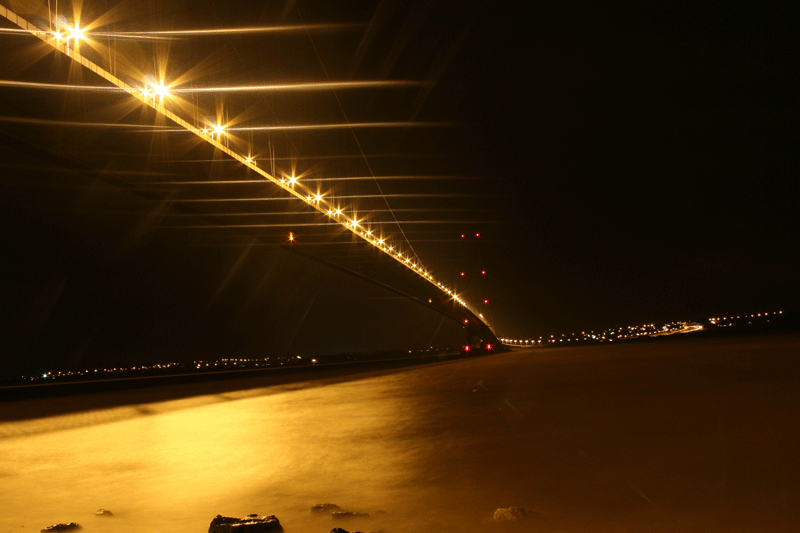
1st time doing a night shoot here and yes i know it is on a angle this was done purposly
 
I don't mean to be rude, but is the front element clean of grease?
It also looks like a very long exposure, which won't help.

You know people pay ~£80 for filters that can create that effect.
 
4129057642_0a32cd0e63_o.gif


hope this might help to resolve the issue

1st time doing a night shoot here and yes i know it is on a angle this was done purposly

Apart from the white balance I think most people would be more than happy with that result, the star effect add to the pic for me rather than detracting from it :thumbs:
 
Apart from the white balance I think most people would be more than happy with that result, the star effect add to the pic for me rather than detracting from it :thumbs:

thanks flash i do like it but wonder if it was going to be any better with out as muchg star burst

as for the white balance im sure it was on auto but will have a check
 
Would a shorter exposure time not minimise the startbusrt effect?
 
the exposure was set on manual and all i did was change the f no accordingly but it was on about F9 - F10 im sure F10
althoguh i know the auto is not always best i find it is on a night shoot

i persume it would because it would have less time to let the light in

but i think it would have to be aroun 10 - 15 seconds to notice a diffrence but it might be under exposed then
 
Back
Top