Flickr

Messages
3,769
Name
John
Edit My Images
Yes
This is probably a dumb question so be gentle with me.

When I see someone post a link to Flickr with a comment along the lines of - 'large version available at....', I do what I'm told (I'm like that) and use the link.

I'm taken to the Flickr page where I find the image(s).... which is either the same size as the one posted on TPR - or smaller. I can't find large versions. This is always happening to me.

Am I doing something wrong. :nono: Is there a secret handshake that has to be used :shrug:

:bang:
 
Have you got an example?
 
Click on the little + link top left of an image - where it says 'all sizes' then you get a choice of sizes to download - incl the original size. Sometimes, as you say it isn't any larger than on here! Depends what they upload I suppose!
 
Above the pic on Flikr, there is a button 'ALL SIZES' click on that to bigger image.
 
Is there a secret handshake that has to be used :shrug:

:bang:

Yeah, there is. You need to be logged into flickr to see large versions. Its worth signing up for that alone (even if you never post any photos there). My gf has a flickr account for this very reason. She never posts - just looks.
 
Yeah, there is. You need to be logged into flickr to see large versions. Its worth signing up for that alone (even if you never post any photos there). My gf has a flickr account for this very reason. She never posts - just looks.


Never knew that.:shrug: you live and learn.:D
 
Yes, signed up long time ago - and logged in.

Immediately above the photo are three links - Add to Favs, Add Note, Add to Gallery. No mention of image size anywhere.
 
Double click on the image first.
 
Above my own images there are lots of links - including 'All sizes'. But only on my own Flickr page.
 
Yeah, there is. You need to be logged into flickr to see large versions. Its worth signing up for that alone (even if you never post any photos there). My gf has a flickr account for this very reason. She never posts - just looks.

Are you sure? I don't have a flickr account but I've been able to enlarge photos.


How I hate everything touched by Yahoo :(

Trust me - you aren't the only one.
 
'All sizes' only works if the OP has that facility open to all viewers - on my page only Friends and Family can view - and download via right-click - all sizes...

This helps prevent a certain degree of theft - obviously anyone can still get the normal screen res. size...
 
Are you sure?

I wouldn't bet my house on it. But I recall people complaining that they couldn't see large sizes of shots I'd linked from flickr and signing in seemed to cure it. But that was a while back.

Of course, that assumes that a larger size has been uploaded in the first place. If there is no larger size, then you won't see the all sizes button.

Just tried this - I've signed out of flickr and the "all sizes" button on my shots has disappeared. Sign back in again and it re-appears.
 
I think it depends on how it's been linked.

I've just double checked a few of mine from my 52. They work fine even though I've signed out of flickr. The way I've linked to the large size doesn't give any flickr info just shows the photo in a seperate tab. That's with firefox though, I think internet explorer may resize to fit your screen.

Andy
 
Nah - full size not available to me - and I'm signed in. Matt needs to change some settings.
 
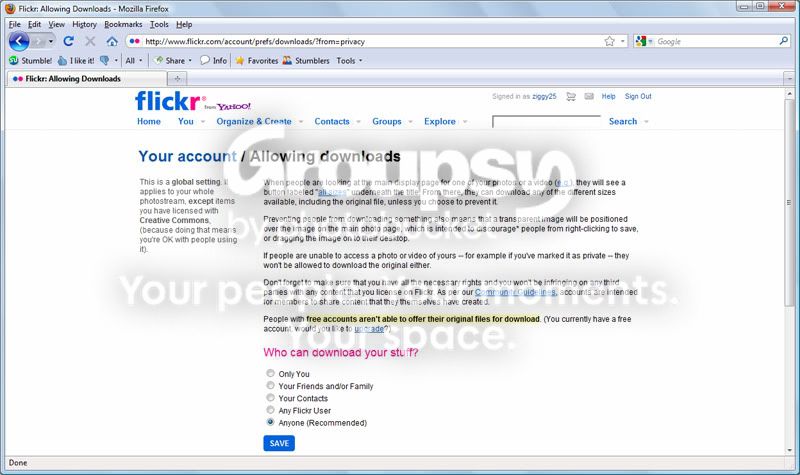
Ok, i have looked at the settings on my account and it appears that if you have a free account (Which is what i have) users wont be able to download large/original images.

See the highlighted text below
flickr.jpg


I always thought that people had the option to view the larger images.. :). I can see the "All sizes" option it just means that other people cant see it.

If i do provide a link to the larger image it does work. The image below here is the larger version (Link retrieved by clicking on "All sizes") of the link i posted previously

4565210061_18510033bc_o.jpg


So if the link you see is for a non-pro account there wont be an option to download the different sizes.. you learn something new everyday :)
 
Yes i can see the larger versions by changing the link to /m /l or /o but i think access to the larger versions on your account wont be restricted as you have a pro account.

As per the screen shot i posted above of the privacy settings page, if i have a free account there wont be an option to view the larger sizes on my account. Im not sure why you can see it. Maybe if you have a pro account you can see larger images even if the account is a free account (just a guess).
 
I think your largest size is probably smaller than the largest that flickr allows for a free a/c. I'm guessing here, but I'd imagine that if you uploaded a 4000 px image, flickr will downsize it and only make a (say) 800 px image available unless and until you upgrade to a paid account.
 
ziggy©;2598078 said:
I would guess that John (2blue4u) signed in using a free account that is why he cant see the "All sizes" option.

No - my gf has a free account and when signed in she can see all sizes - that's why she has one.
 
Assuming that the viewer has a flickr account (and is signed in), then the issue of seeing large sizes is not down to the status of the viewer's account. It doesn't matter if its a free account or a paid for account - she can see all sizes. The only restriction on seeing all sizes is if the uploader has (1) uploaded a small size or (2) restricted viewing larger sizes to contacts only (or F&F).

If the viewer doesn't have a flickr account, or is not signed in, then its standard size only.
 
Or that's max size because you don't have a pro account - not sure
 
Im using Flickr uploader and it is set to not resize. Maybe free accounts dont allow anything above 1024. I will upgrade to pro account tomorrow and see if it changes.

I think you are probably right in that the 'All sizes' option will always be available provided you are signed in and there is a larger version of the image. The highlighted text on the privacy page is probably refering to anything larger than 1024.

Here is quote from the flickr help pages

Are there limits on file sizes or file types for uploads?

With a free account, you can upload photos up to 10MB in size, or 2 videos per month- up to 150MB for each video. If you have a Pro account, you can upload photos up to 20MB and videos up to 500MB in size. For more on video files and types supported, please visit the Video FAQ

Flickr officially supports JPEGs, non-animated GIFs, and PNGs. You can also upload TIFFs and some other file types, but they will automatically be converted to and stored in JPEG format.

As you publish photos, they're compressed and resized by Flickr (if necessary) in the following sizes:

* 75x75 pixels
* 100 pixels (on the longest side)
* 240 pixels
* 500 pixels
* Large (which will be 1024 pixels if it exceeds that length)
* The original size (if you have a pro account)

To access all of these sizes for a photo, click the "All Sizes" link on the individual photo page.

If you have a pro account, we also store your high-resolution originals, which you can download at anytime as long as you remain Pro. Anyone can access public photos and download the high-resolution (original) size from a Pro account, unless you limit access to the downloadable image.
 
ziggy©;2598101 said:
The highlighted text on the privacy page is probably refering to anything larger than 1024.

Yeah, and its referring to downloading rather than the ability to view at larger sizes. Which is a whole different issue, that gets vented on flickr at regular intervals.

I've used flickr for a while and I'm pretty familiar with the way it works, but I've had a pro a/c for ages and I'm always logged in, so its tricky sometimes to help out with those that aren't so clued up.

/edit "clued up" - sounds a bit patronising - I don't mean it like that - its late and I'm off to bed - holler if you need any more assistance
 
Back
Top