Help With Canvas

Messages
1,309
Edit My Images
Yes
Help!!

I want to put this on a 40*60 Canvas on Jessops
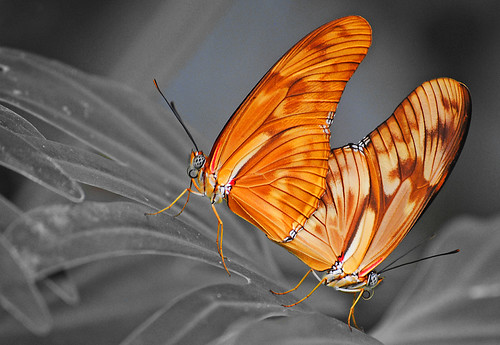


butterfly for movie maker by jomantha, on Flickr

But Im not sure how to go about getting the border right, I dont want to lose any of the image on the edges of the canvas.

Thanks
 
Last edited:
Link Editted thanks.

I have found a canvas with a frame, but it is cutting off top of wing and feet, I guess its the proportions of the image, and it needs a crop, but I dont know how to change pixel size to cm in photoshop elements
 
In preferences "Units & Rulers" you can change to cm and in Image> Resize you can change to cm\mm. I suspect you want rulers in cm at the very least.
 
I think you're going to struggle Sam. A 40x60 canvas is a 3:2 aspect ratio. You'd have to crop quite a lot to get your image to those proportions and I can't see you doing it without cutting bits of the butterfly off at top and bottom.

If your original shot is a crop you may be able to crop it to 3:2 if you start again?
 
Get a custom canvas made?

I use this place http://www.far-awayart.co.uk/ Local to me, run by an old mate - Terry. He'll do anything for you and he's done some huge custom canvases for me, handy with Photoshop if you need any tweaking. Decent prices I think :)
 
Thanks both, yes I am struggling I think the crop is too much.
I have tried loads of crops and nothing is working argh it took days of work to get it to look like that! I have a voucher code but I guess I will have to wait until I have the money to pay for a custom print.
 
Thanks both, yes I am struggling I think the crop is too much.
I have tried loads of crops and nothing is working argh it took days of work to get it to look like that! I have a voucher code but I guess I will have to wait until I have the money to pay for a custom print.

Don't spoil the ship for a ha'pth of tar ;)

Terry's prices (link above) look pretty competitive to me, but I guess if you've got a Jessops voucher...

Plan B, don't crop it, extend the right hand side a smidge in Photoshop to fit 3:2 format. If you're handy in Photoshop it's a two minute job. I'm sure someone on here would do it for you if you send them a file :)

Edit: you could clone it, or a mirror flip would be favourite for that - very quick and the join would be completely invisible.
 
Last edited:
Thanks both, yes I am struggling I think the crop is too much.
I have tried loads of crops and nothing is working argh it took days of work to get it to look like that! I have a voucher code but I guess I will have to wait until I have the money to pay for a custom print.

Here is one I quickly did.
I first of all used content aware scale in photoshop to stretch the image into the correct ratio without distorting the butterflys.

I then used perfect resize to add a gallery wrap to the image so that you retain all of the image on the front and nothing is lost by wrapping it around the canvas frame.

In this instance the wrap was set to stretch mode.

You would need to check with the printers if you could use a gallery wrap and if so what size of a wrap you would need to add.

There are of course some printers that will print on canvas without a wrap in that case all you need to do is content aware scale then crop.

I have indicated the edge of the wrap with a red line just for refrence, that of course would not normally be there.

tSr3r.jpg


EDIT just noticed you are using Elements so I'm guessing you do not have content aware scale. In that case I would do a canvas resize to the correct ratio and then fill in the background by cloning?
 
Last edited:
Thanks - I'm in a field with poor signal - will take a proper look when I get backq
 
thanks so much everyone, have just returned from camping - photoimaging I will run through the link tomorrow when I dont have 2 toddlers climbing all over me, thanks
 
Back
Top