how do I know if I'm...

If you specify which camera you are using someone might be able to help :)
 
Look at your file name, nikon will be .nef, not sure about cannon. Either way, it will not be jpeg and you'll have to do something with it to show it to others. You should have an option in the menu under picture settings to choose quality of image. Hope that helps
 
ziggy©;3716125 said:
If you specify which camera you are using someone might be able to help :)

:lol:

have a look under his user name
1000D

Real name : anthony
Location: birmingham
Posts: 229
Camera: Gripped canon eos 1000D
 
Last edited:
Your files will have a .CR2 suffix.
 
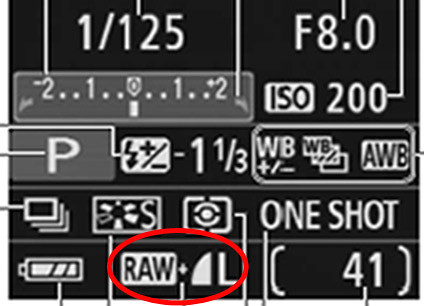
It will also say RAW on the LCD when it shows all your settings, or under the Quality setting in the menu :)
 
Just be aware that if the 1000D is similar to other Canon cameras, it won't shoot in Raw if you select one of the creative modes on the dial.
 
*Awaits next question, why wont my PC open my pictures*
:lol:
 
I'm guessing they won't open;

Use the free software that came with your camera - Canon Digital Photo Professional. Does everything you need to process Raw files and a few special Canon tricks that some other Raw software programmes don't. It's very good :thumbs:
 
HoppyUK said:
Use the free software that came with your camera - Canon Digital Photo Professional. Does everything you need to process Raw files and a few special Canon tricks that some other Raw software programmes don't. It's very good :thumbs:

I brought it off a friend and didn't have the software :-(
 
I think that DPP link is only for (free) upgrades. You need an original code first.

Though there are various hacks out there if you google it.
 
Back
Top