

How do you discover image "theft"

Messages
548
Name
Gary
Edit My Images
Yes
I've read several threads from members who has discovered that thier images have been on other websites without permission. How do you go about finding such infringements?

Google image search has been mentioned in the threads, but I dont know how this works. For example, say I post an image on Flickr with the filename "myImage.jpg". What if the offending site owner downloads the image and renames it as "somethingelse.jpg"?
 
i think it also searches images that are similar to the one your searching for so it would bring it up too even if renamed
 
I use Google image search

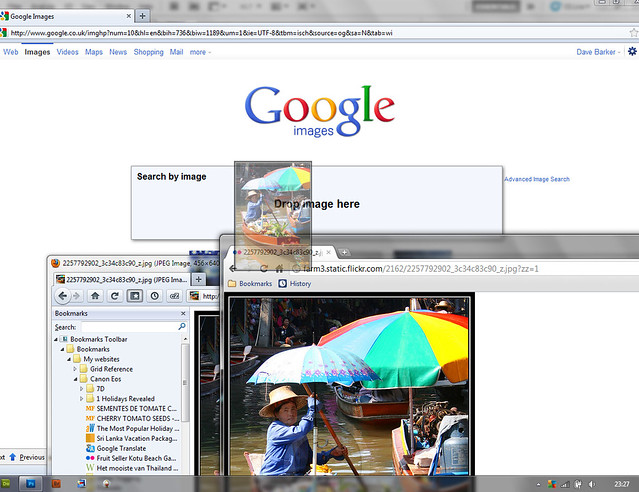
What I do is open the image by clicking my image then Action View all sizes in a new window the minimised the page on another page go to Google image, then click the minimised image window and drag the image into the search box or you can just get the url of the image and put that in, I did a screen shot somewhere Ill see if I can find it
 
Google image search and tineye look at elements of the photo to get a match, not just name so they are pretty good :) If the name was the same it would very easy to find with just plain old google.
You can get plugins for most internet browsers that let you right click on your images and perform google or tineye searches.

There was also a script mentioned in a thread that lets you search a page of images and bring up any google matches, which is quite handy.
 
Here you go

drop image here, you are on google image search

you should get like the image below just drop it and it starts the search

5867962074_ba86899e96_z.jpg
 
I checked a few of mine but it would be quite laborious to go through over 400 photo's on flickr, as clever as the software is i'd like it to do the whole account in one go.
 
Good old fashioned word searching can help as well. Often the assumption will be made that credit is its own reward, so if you're uploading images under the name Gullible Bumpkin a search for that term may turn up usages. It really helps if you have an unusual online identity name. If you're John Smith (or Will Smith) you're **** out of luck.
 
Good old fashioned word searching can help as well. Often the assumption will be made that credit is its own reward, so if you're uploading images under the name Gullible Bumpkin a search for that term may turn up usages. It really helps if you have an unusual online identity name. If you're John Smith (or Will Smith) you're **** out of luck.

thats OK but if they change the name of the image which they will you wont find it

Did I mention the name of the image anywhere? Searching for my name and username has worked for me when looking for images.

No single method will infallibly find every usage, you need to play around with several and mix-up the way you search from time-to-time. And keep an eye on your Flickr stats and referral links as well.
 
Thanks for the info guys....
Pretty cool stuff, the Google Images search, but I tried a couple of my flickr images and there were no matches. I would have thought that the search would return a match with flickr?
 
Thanks for the info guys....
Pretty cool stuff, the Google Images search, but I tried a couple of my flickr images and there were no matches. I would have thought that the search would return a match with flickr?

sometimes it does sometimes it doesn't it is odd like that, for example none of my photos on 500px ever show up even if searching from there (using the plugin) but if I search for my avatar on 500px it picks it up on various pages in 500px so it must have indexed it.

As said above nothing works on everything, which is a shame, but a combination of all of the above pretty much covers what is findable out there.
 
Thanks for the info guys....
Pretty cool stuff, the Google Images search, but I tried a couple of my flickr images and there were no matches. I would have thought that the search would return a match with flickr?

If Google hasn't indexed the page then Google image search wont find it. Google only finds the things it has indexed. It doesn't search the internet in real time.
 
You also need to get a feel for filtering out the chaff in the results, searching
"Gullible Bumpkin"​
Will probably yield most of your Flickstream
"Gullible Bumpkin" -flickr​
Might help weed down the list a bit, but you should follow this up with
"Gullible Bumpkin" "on Flikr"​
 
Any idea where that script is? I've done a search but couldn't find it.

Thanks.

I cant find the thread now, but basically if you bookmark
Code:
javascript:void((function(){var sir=document.createElement('script');sir.setAttribute('src','http://cdnjs.cloudflare.com/ajax/libs/require.js/0.26.0/require.min.js');sir.setAttribute('type','text/javascript');document.getElementsByTagName('head')[0].appendChild(sir);var sib=document.createElement('script');sib.setAttribute('src','http://jarred.github.com/src-img/js/app/bookmarklet.js?version=0.57');sib.setAttribute('type','text/javascript');document.getElementsByTagName('head')[0].appendChild(sib);})());
and then click on it when on a page with your photo(s) on it it does a background google images search and puts a little icon on any photos that get results. When you click on this it takes you to the results in a new tab.
 

OK Ive dragged it ot my book marke then I go to my when I click it it just goes to the page bookmarked then I click the ?¿ src-img says no images found but theres one of my pics on that page so I know its been nicked,what am I doing wrong,
 
Last edited:
You can get right click extensions to chrome and firefox as well so right click brings up a menu then "search with google images"

As for "not found" - it must have been indexed by google to be found so it might not have been. It also takes time for new stuff to get indexed even then.

FWIW ive found google images works very well for mine and finding images all over the place. TinEye on the other hand has never found a single image of mine anywhere.
 
Back
Top