How to start with IR

Messages
988
Edit My Images
Yes
I picked up an R72 filter for my UWA lens, but haven't got a clue where to start with it :D.

So far all I can get is red pictures. Very, very red.

If I convert them to B&W I just get reasonably contrasty B&W images. Nothing special.

So what do I do to get some funky IR effects?
 
I'm a fool, I mieant to say IR film :S

its a special sort of black and white film but develops in normal black and white chemistry

you can use digital but I don't know if it works out of the box as there is a conversion process.
 
The conversion process means you dont need an ir filter as far as i know, i believe you can just whack them on digital and they will work.
 
It's hard to say because I don't know what you're after. Can you post some examples of what you want as well as what you're getting? If I recall, bright sunny days were best, and lots of lush green vegetation. If everything's dull and the grass is brown and dead things won't look so good.
 
Should be entirely possible with digital. Check out the group digital infrared on flickr for examples of what can me done. The (B&W) infrared images in my photostream rarely had any major processing. Just levels/curves and desaturate. The problem might be the conditions. Everything can be a bit dead and lifeless this time of year.
 
How well IR works with a digital camera will depend on the strength of the internal IR filter, it seems that generally older models tend to work better than newer ones. The best way to deal with red images is to set a custom white balance - if you take a shot of something green (grass is good) with your IR filter on and then set the white balance from that it should help.
 
+1 for custom w/balance - set from a well lit patch of grass.

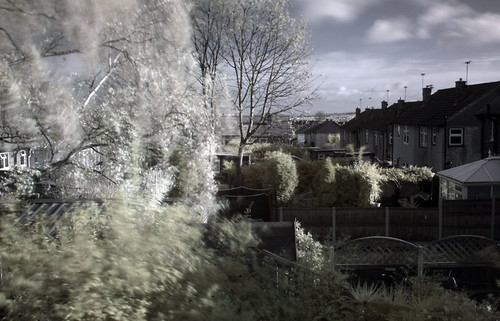
What I tend to do is pull the .jpg files into photoshop cs4, and add a channel mixer adjustment layer. Select the red output channel, and move the red slider over to 0%, and the blue channel to 100%. Then select the Blue channel and change the blue slider to 0% and red to 100%. This then gives a blue sky, fairly natural other colours, and white foliage...

That's a good starting point - from there, maybe play around with the "diffuse glow" ?

Here's a few shots to illustrate the steps... not really for critique :lol:

Test shot - out of back window - un-tweaked


Colour channels swapped


Converted to BnW ?
 
Back
Top