How to use a 10-stop filter?

Messages
482
Name
Matt Wright
Edit My Images
Yes
I bought a 10stop filter a few months ago (maybe even over a year ago!). I have used it a few times but always find it difficult in terms of focussing, composing the image exposure etc.

At the moment I try to compose image, focus it, measure the exposure, screw the filter on (then adjust my shutter time by 30 clicks) and take the shot.

However I find it severely annoying to then slightly recompose the image and/or focus as i have to unscrew the filter and start again.

Is there a better way to do all this?

Thanks

Matt
 
It is not that difficult. In daytime your exposures will be roughly close to 30s, and up to several minutes at dusk. If you are working back from a reference exposure w/o filter, well you have to make it 10x slower. There are some iphone/android apps that offer some help.
Once you work them out at several key settings and light levels it will become a second nature.
Don't forget that your camera has live view, and unless it is super dark, you will still have the image to help with the composition. Metering is much more accurate in LV (as long as it is under 30s), and it helps with MF. MF in itself should be very easy as you will stop down the lens to someting like f/11 or f/16 - making the DOF quite wide. If you know what a hyperfocal distance is there should be no trouble (again apps help you there).
I don't have LV in my main camera, and even then I can see things well enough through the viewfinder. I normally use f4 glass so really not that fast.

IMPORTANT: don't forget to mask your viewfinder when taking the exposure or using LV. Otherwise your settings will be off and you will see lots of flare due to the light leak.
 
I posted this in another thread, it might be helpful.


I use whatever filters I would have used for a shot without the Big Stopper, then put the big stopper in.

My workflow for a 10 stop shot is this;

1) Compose, get the shot looking right in the viewfinder, including what I want in the shot and, more often more importantly, excluding what I don't want in shot
2) Focus, then switch to manual focus
3) Meter, with both the camera's internal meter and an external spot meter
4) Expose for a standard shot
5) Apply filters as necessary to get the exposure right
6) Take a test shot at a short shutter speed
7) Examine the histogram on the short shot for blown highlights or blocked shadows
8) Adapt exposure according to step 7
9) Work out 10 stop shutter speed
10) Close viewfinder to stop light leaking in
11) Check AF on manual and IS turned off
12) Slide 10 stop filter into position checking it covers the entire lens
13) Set the exposure up, either on bulb or with manual setting
14) Check mirror lockup is switched on
15) Lock mirror up, give it a second for any vibrations to die out
16) Set shutter with cable release, either one shot if it is on manual (eg less than 30 second exposure) or lock it off if on bulb.
17) Check top plate exposure timer and also chronograph for exposure time
18) Walk about, try and keep warm for up to 32 minutes!
19) Unlock shutter release when exposure time reached.
20) Review shot and reshoot as necessary (if I am doing a long exposure at dawn or dusk the exposure time is a bit hit and miss as the EV of the scene changes during the exposure).

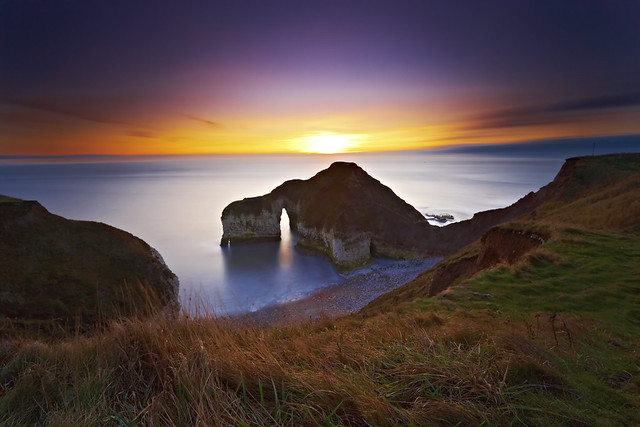
This shot for example was shot with a Big Stopper and a 3 stop reverse ND grad for 4 minutes.


Flamborough Long Exposure by mark_mullen, on Flickr

I hope you find this useful
 
I posted this in another thread, it might be helpful.

Just like to say how much I like what you achieved in that shot :clap: Makes me want to go grab a set of Lee filters and head on out to the East coast for sunrise!
 
(then adjust my shutter time by 30 clicks)

You might find that it's slightly faster to do the arithmetic for the shutter speed in your head - at 10 stop it's 1024x the original time - that is, if the original shutter speed is 1/100, then it's 1024/100, or ~10 seconds. You don't need to be utterly specific, since you're going to be either limited by the shutter speed choices, or by how accurate you can be counting/timing with a remote release. So you can simplify it to 1000x for 10-stop.

It also works for other filters, where you multiply the time period by 2^no_stops. Memorising the power table of 2 is easy enough, and most computer literate people know most of them anyway (2, 4, 8, 16, 32, 64, 128, 256, 512, 1024, ...). It means that you can easily work out the new shutter time for any stop filter, or combination of stacked filters.

I find doing it this way much faster than tediously counting clicks, and faster even than using an app on my iPad.
 
Back
Top