


- Messages
- 69
- Name
- Andreas
- Edit My Images
- No

Vienna is my almost daily photo motif.
I would be interested to know how you process your 35 mm color negatives hybrid (film - scanning - editing).
My workflow looks like this:
- Exposing Kodak color negative films with the Nikon F4E and various AF Nikkor lenses. Imprinting the shooting date on the gaps between the images with the Nikon MF-23 Multi Control Back.
- Developing the films in the C-41 color negative process by Bellini with the Filmomat processor.
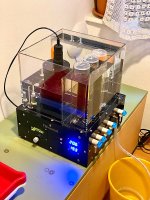
Filmomat in action
- VueScan: Scanning preview images for selection and archiving in low pixel count with two Super Nikon Coolscan 5000 ED.
- VueScan: Scanning selected pictures in high pixel count as RAW DNG.
- Converting with Negative Lab Pro as 16 Bit TIF files.
- Optimization in Photoshop: cropping, global tonal correction, partial editing with adjustment layers and masks, further corrections as required, retouching, slight sharpening, output as 16 bit TIF masterfiles without layers.
- Downsizing of files depending on use (for viewing on monitor or printing).
- Archiving all images with consecutive numbering and entry of metadata (film, title, development, lens, camera). Viewing with Adobe Bridge.
- Triple backup of files.
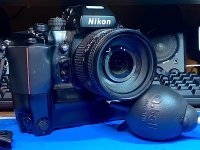
The mighty Nikon F4E, for me one of the most impressive SLRs ever built.
This workflow is particularly dictated by the shelf life of the C-41 process chemicals, which only have a certain lifetime.
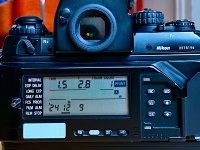
Nikon MF-23 Multi Control Back for imprinting data and automatically controlling the Nikon F4.
Before that, I used Canon fullframe DSLRs for a long time, but I got bored of working exclusively on the PC. One exception is my Canon PowerShot G5X, which delivers excellent image quality in a compact, lightweight design.
The Nikon F4E with 8 AA batteries and the associated AF lenses, especially the first generation, is heavy and therefore an ideal fitness device for my city walks
