

Image clarity

Messages
3,336
Name
Clarke Kent ;)
Edit My Images
Yes
It's been bugging me for a while to be honest and it's something that is beginning to spoil my enjoyment of photography a little, so I think it's about time I tapped the collective knowledge on here to try and work out what I'm doing wrong.

Lots of my photos, although as I intended, never quite seem sharp enough when compared to others taken on similar equipment. Is it something I'm doing, something I'm not doing, or am I seeing things that don't exsist?

For example, the follwoing were taken with the 400D, well known quality lenses, and where needed a good quality tripod:
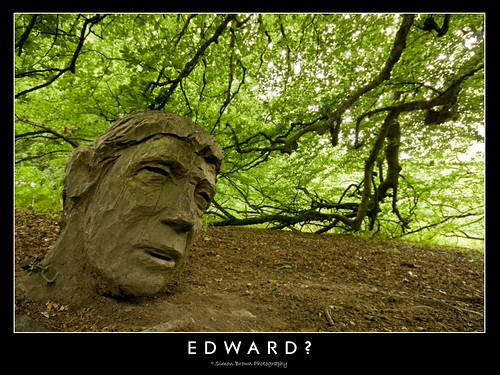
2691681065_08211b3621.jpg


Siggy 10-20mm @ 12mm, f8.0, 0.2sec, ISO200, tripod mounted. Full size

2724115335_bfa7361184.jpg


Canon Nifty, f1.8, 1/1600sec, ISO100, handheld. Full size
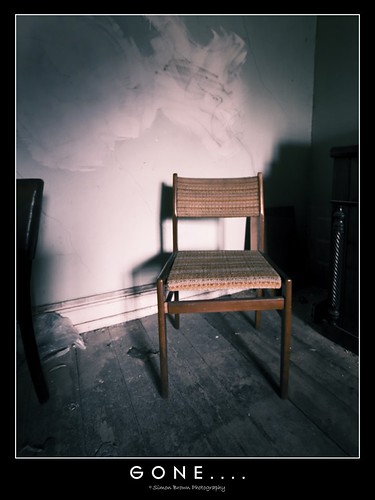
2725303988_0513f4a20e.jpg


Siggy 10-20mm @ 10mm, f4.0, 0.60sec, ISO100, handheld. Full size

Is it my processing that's causing the problems, or am I missing something blatantly obvious as to why they aren't as "clean" as other images I see on here using similar equipment? :shrug:

All thoughts gladly welcomed!
 
Is it my processing that's causing the problems, or am I missing something blatantly obvious as to why they aren't as "clean" as other images I see on here using similar equipment? :shrug:

All thoughts gladly welcomed!

Well for starts they are nice shots, I think maybe it could be something to do with your processing, in particular the out put sharpening, this can effect clarity a considerable amount.

But first, how do you process and image normally?
Tell me everything you do, from the birth of the raw file to upload.

T
 
Well for starts they are nice shots....

Thanks ;)

Tell me everything you do, from the birth of the raw file to upload.

Import images through Elements 6 Organiser in .CR2 format.
Small adjustments using ACR (exposure, white balance, clarity, etc.)
Open in to Elements 6
Levels, contrast, sharpening (USM), brightness, saturation, etc.
Save as .tiff file
Save as .jpg file
*Open edited image in 3rd party software to add to frame
*Export as .jpg file

* Having compared files, there seems to be very little difference in final quality whether these two steps are included or not.

Is it the shaprening that's letting me down do you think?

There was a thread on here I saw recently (which I can't find now) that had a whole raft of sample images with the same Sigma WA, and the majority of them were outstanding in terms of clarity and sharpness.
 
Import images through Elements 6 Organiser in .CR2 format.
Small adjustments using ACR (exposure, white balance, clarity, etc.)
Open in to Elements 6
Levels, contrast, sharpening (USM), brightness, saturation, etc.
Save as .tiff file
Save as .jpg file
*Open edited image in 3rd party software to add to frame
*Export as .jpg file

* Having compared files, there seems to be very little difference in final quality whether these two steps are included or not.

Is it the shaprening that's letting me down do you think?

Possibly the 3rd party software? having looked at your photo's again it does seem like a loss of detail through re-sizing.

This tip posted by Mohain is a good one to try:

Sharpness looks OK to me.

For resizing for the web I downsize in one go to whatever size I want to post (e.g. 800 pixels wide), convert to LAB and in the Lightness channel I use Smart Sharpen filter, gaussian blur, 300%, 0.3 pixels, more accurate box ticked.

To give it a touch more pop you can dupe your sharpened image to a new layer then smart sharpen it again using something like 30%, 20 pixels and set opacity around 20% - 50% ish. Flatten, convert back to RGB, convert profile to sRGB (if needed) and save.

I have it all set up as an action so when I'm happy with the high res I can save it and hit my 'resize/sharpen/pop/convert' action button :)

Alternatively I really recommend Lightroom 2. The features would make your whole work flow much more enjoyable and with superb results. Lightroom 2 has an output sharpening feature on export which is fantastic.

Hope this helps some.

T.
 
Well, if you want sharper images, why not sharpen them more? I tried that with your first one and it was noticeably better, even just using the "Auto Sharpen" function in PS Elements.

Here's a two-minute before-and-after workup with a bit more sharpness, a levels tweak and a bit of contrast enhancement.

Edward.jpg
 
Thanks for the thoughts Tomas, much appreciated.

As mentioned, there seems to be little quality drop off if I run it through the software to add the frame, so I'm inclined to think that this isn't the cause of my problems in the main (although I am conscious that it would have some degree of effect).

The sharpening method looks interesting, but I don't believe I have channels options through Elements sadly.

Do you think a change of processing software would make much difference ultimately? Of course, additional features would allow for greater flexibility, but surely there would be enough available in Elements to produce suitable results wouldn't there?

It's encouraging to see the problems appear to be mainly the processing rather than capture side of things though. At least the first part is being done right! :D
 
Well, if you want sharper images, why not sharpen them more? I tried that with your first one and it was noticeably better, even just using the "Auto Sharpen" function in PS Elements.

Hi Stewart, thanks for taking the time to have a look for me.

It's certainly sharper than my initial effort but, to me at least, it's still not as "clean" as other images I see taken with similar equipment in my eyes (possibly down to file degregation of saves on saves).

It's hard to describe, but it's almost as though my shots are taken at ISO800 compared to others' images. I know it's not a noise issue persee, but the edges don't seem as clean or crisp in comparison when I look at my shots.

Does that make sense?
 
It's certainly sharper than my initial effort but, to me at least, it's still not as "clean" as other images I see taken with similar equipment in my eyes (possibly down to file degregation of saves on saves).
I think file degradation may be playing a part. I had to compress it more than I wanted, in order to get it into the 200kB limit for images hosted on TP. Plus of course I was starting with a small JPEG which had been saved and re-opened (more than once?), and every time you do that the quality suffers.
 
Yeah, thought that may be playing a part in this particular instance.

There was a thread on here that I saw recently that had examples of pictures taken with the Siggy, but I can't find it now to try and visually demonstrate what I'm failing miserably to explain :shake:
 
Thanks for the thoughts Tomas, much appreciated.

No probs mate.

Do you think a change of processing software would make much difference ultimately? Of course, additional features would allow for greater flexibility, but surely there would be enough available in Elements to produce suitable results wouldn't there?

Yes, I think you would notice a huge difference. Greater flexibility would be apparent but with programs like Lightroom 2, also the gentle persuasion into a more efficient and successful work flow with much more consistent results.
Being as your taking decent photo's, I'd honour them with some more capable software. Elements is great for wetting the whistle and you can still use elements back to back with LR2 for editing with masks and layers for example.

I use a combination of LR2 and photoshop, it's all I need, form basic batch processing, archiving and arrangement to heavy layer composites and manipulations.

The sharpening method looks interesting, but I don't believe I have channels options through Elements sadly.

This kind of illustrates my point mate, it's time for you to move up, you've earned your stripes! :thumbs:

It's encouraging to see the problems appear to be mainly the processing rather than capture side of things though. At least the first part is being done right! :D

Exactly, the photo's you posted above are very nice images, the only thing that appears to be holding them back is post processing capability and technique.

T.
 
its best to sharpen after sizing, otherwise the resizing degrades sharpening, or if you're enlarging, creates nasty artifacts

..and so the learning continues!

So it should be levels, contrast, saturation etc. then resize for various formats, then sharpen as needed?
 
With raw you need to sharpen twice - once at the input stage which would be done by ACR and should be done to make the high res version look right. The 2nd pass is after re-sizing and how much depends on the image and output target. Re-sizing down to web size will soften the details quite a lot, sharpening will recover that loss.
 
With raw you need to sharpen twice - once at the input stage which would be done by ACR and should be done to make the high res version look right. The 2nd pass is after re-sizing and how much depends on the image and output target. Re-sizing down to web size will soften the details quite a lot, sharpening will recover that loss.
Which is kind of what I have been doing, but it seems my sharpening on the second pass was being done too soon.

Thanks :thumbs:
 
Back
Top