

- Messages
- 430
- Name
- iron
- Edit My Images
- Yes
i have just brought noiseware online to get rid of noise in photos,
but the serial code don't work,
what can i do
but the serial code don't work,
what can i do


iron maiden said:i have just brought noiseware online to get rid of noise in photos,
but the serial code don't work,
what can i do

Is it Imagenomic noiseware its a great program


Check to see if you have it right with the serial correct (upper/lower case spaces etc) if it's still wrong contact them and they should be able to send you a new code.

where did you bring it from?
nice one 
rub it in why dontcha


i have just brought noiseware online to get rid of noise in photos,
but the serial code don't work,
what can i do

Type on a forum where no-one can help, or contact the people you BOUGHT it from who will most lilkely fix it straight away..
Hmm tough choice :bonk:
Unless you bought a dodgy one off ebay of course.
fixed the problem,
thank you for all your help,
yea it is Imagenomic noiseware,
trying to get used to it
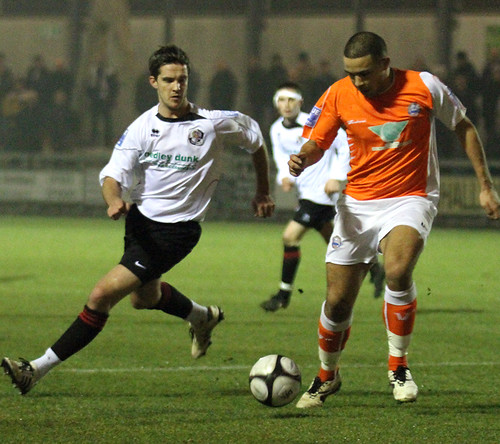
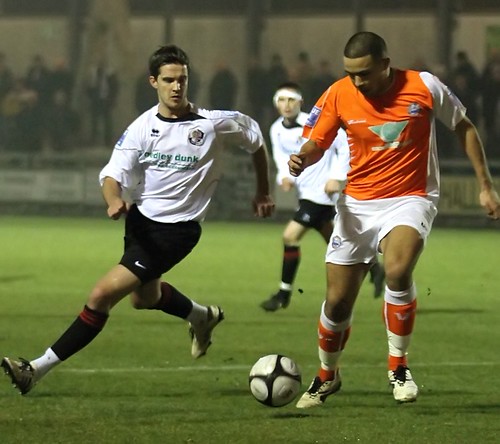


what where you doing wrong?
Apply the NR to a copy of the background layer, then use a black paintbrush on a layer mask to mask out the player(s), so that the NR only affects the parts of the image that you want. You can refine this by using a grey brush rather than a black one, to adjust the amount of NR.any advice on how you make the image look good i will be very greatful ...
the football player on the right looks to smooth,
quote
i have just started playing around with the software,
i will add two photos for you to look at,
before and after,
just would like to know what i am doing wrong,
when i opened the image i just pused default and it processed the image,
any advice on how you make the image look good i will be very greatful,
iron
the football player on the right looks to smooth,