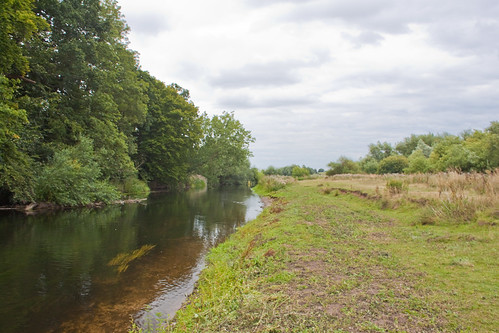
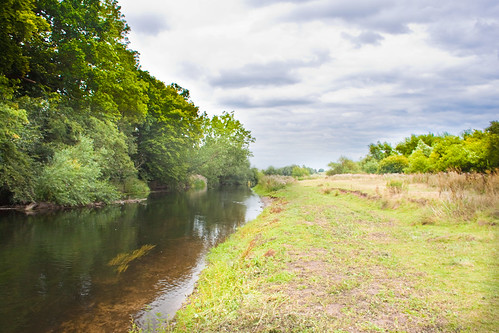
Landscapes, getting the sky and land to look properly exposed

Cris_L

Take That's Biggest Fan
Messages
1,923
Name
Cris
Edit My Images
Yes
Is it possible to get good detail in the sky without making the ground (or other subject) look too dark without the use of an ND grad filter?

Ive tried with my polarised filter and ND4 filter but still have the same problem of one being correct or the other.

I've read about people taking 2 exposures and then combining them in photoshop but I wouldnt have a clue how to do this.

Any tips?
 
Is it possible to get good detail in the sky without making the ground (or other subject) look too dark without the use of an ND grad filter?

Ive tried with my polarised filter and ND4 filter but still have the same problem of one being correct or the other.

I've read about people taking 2 exposures and then combining them in photoshop but I wouldnt have a clue how to do this.

Any tips?

Your current filters do not actually give a different exposure time to the sky and ground. The grad will do this so that is what you need :D
 
Not the only way, you can take several shots ie bracket it. This will give you the best overall exposure and also give you the image files for HDR or cutting along the horizon with PS between two images (ie 0EV and -3EV loaded into PS with the 0EV on top layer and -3EV on bottom layer then use the eraser to erase the sky above the horizon giving you a different exposure there. Using a fuzzy brush this will effectively do the same as an ND grad - but most people would prefer to get it in camera!)
 
No, you can do it in photoshop using layers and adjusting the levels for the sky and masking

Will look for a tutorial
 
There are some packages which actually have NDgrad filters in them such as light room 3. Here is an example (chosen because the original was either too dark in the foreground or too bright in the sky rather than for artistic merit)

Out of camera and not much you can do, if you get the land right the sky has no detail. If you get the sky right the land is too dark
ndgradex0.jpg


Darkened for the sky
ndgradex2.jpg


Using the NDgrad in LR3 (quick example - should have gone further with the land really)
ndgradex1.jpg
 
Last edited:
I need to spend more time with lightroom, its amazing.

This was the best I could do using the RAW editor:

4893423732_4178061fd0.jpg


and a quick 5 min play with LR3, produced this. i've gone OTT in places and don't claim it to be a great image but I was surprised what can be done (even by me!) Think I've over saturated the trees somewhat lol!

4892827711_f7b05c9cfd.jpg
 
I need to spend more time with lightroom, its amazing.

This was the best I could do using the RAW editor:

X

and a quick 5 min play with LR3, produced this. i've gone OTT in places and don't claim it to be a great image but I was surprised what can be done (even by me!) Think I've over saturated the trees somewhat lol!

4892827711_f7b05c9cfd.jpg

There is a band in the trees as your sky is a corner! You can rotate the grad horizon so it does not need to be straight but this would not help in this situation.
 
Last edited:
So I guess in this case instead of using the grad filter in LR would the adjustment brush be better to "paint" the correct exposure on the sky?
 
Not the only way, you can take several shots ie bracket it. This will give you the best overall exposure and also give you the image files for HDR or cutting along the horizon with PS between two images (ie 0EV and -3EV loaded into PS with the 0EV on top layer and -3EV on bottom layer then use the eraser to erase the sky above the horizon giving you a different exposure there. Using a fuzzy brush this will effectively do the same as an ND grad - but most people would prefer to get it in camera!)

I think pp is best with the ND Grad it is a straight line transition but with pp you can get it right.
How many landscapes have a level transition between the sky and ground?
I do not use grad filters on camera
 
I wonder how soon will it be when camera manufacturers have an in-built ND (NDG) feature that you can "pull down" which gives an ND grad effect to the sensor.

Imagine, on your cameras' LCD, a matrix of cells comes up; you select each cell from this matrix and the ND effect you want :thinking:. Pop, perfect for mountains in landscapes, buildings, etc.

I am sure we will see this pretty soon.
 
I wonder how soon will it be when camera manufacturers have an in-built ND (NDG) feature that you can "pull down" which gives an ND grad effect to the sensor.

Imagine, on your cameras' LCD, a matrix of cells comes up; you select each cell from this matrix and the ND effect you want :thinking:. Pop, perfect for mountains in landscapes, buildings, etc.

Quick I'm off to patent those ideas :)
 
I think pp is best with the ND Grad it is a straight line transition but with pp you can get it right.
How many landscapes have a level transition between the sky and ground?
I do not use grad filters on camera

You can have the horizon at an angle and change how quickly it changes. The ND grad filter is just one PP tool for me. I tend to use LR for the simple stuff and PS for anything heavier.

If you could actually BEND the ND grad line then that would help where you might have a building up to the top of the image and then sky in the corner.

I would use PS for that type of image and make a quick mask
 
Or you could do it in Lightroom using the Adjustment brush - Adjust basic exposure to suit the ground and trees, then use the adjustment brush set to a -ve exposure value, a large feathered brush size, and "paint back in" the exposure for the clouds... works nicely with raw files :)
 
Last edited:
Back
Top