Laptop screen to pc screen

Messages
232
Edit My Images
Yes
I have a laptop running vista and a pc running windows xp. I am told there is a way of linking these up so that the photo I see on the laptop screen can be moved to the pc screen. If it can be done, how do I do it. If you could explain the procees in clear and very simple terms that would be really appreciated.

Thanks in advance,
Mick.
 
there should be a blue socket on the back of the laptop, just plug a monitor in there and go to your display properties to enable the second monitor as an extended desktop
 
Dave, no blue socket. The only one that looks like it will do is a typical looking socket, narrow with angled sides and 3 rows of 5 holes. Would that work.

Mick.
 
does it say vga by it?
 
like this?

vga-skt.jpg
 
It dosn't say vga by it but it is the same as your blue one in the above pic. The only socket on the monitor is 3 rows of 7 holes. Thats where the other end goes, I guess.

Mick.
 
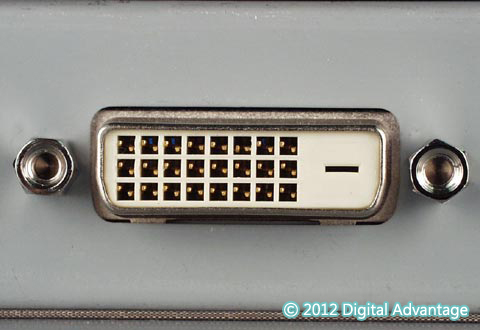
no you should have one exactly the same unles its dvi only, like this?

03dvi_d-box-l.jpg
 
Thats the one on the monitor (above)and it says DVI-D beside it. So I plug into the blue type one on the laptop and into this one on the pc monitor. Is that right.

Mick.
 
np :)
 
Back
Top