sk66
Advertiser
- Messages
- 9,858
- Name
- Steven
- Edit My Images
- Yes
Just as the Black on Black challenge was really about controlling/using falloff, this challenge is really about negative lighting. Whenever I think of "lighting" I'm really thinking of reflections; if it's not black that's because it is reflecting light back to the camera. And I'm thinking about shadows, because without shadows/contrast there is no detail... So I'm really thinking about everything else other than lighting. Negative lighting is creating a dark reflection in order to create a shadow and reveal shape/detail.
For this challenge our first task is to record a white background without blowing out the white subject. You might read elsewhere that in order to do that the background needs to be two stops overexposed, and that is correct in essence. But white meters as two stops over middle grey; it is not overexposed. And you do not need/want to blow out the background in most cases; that just causes additional issues like bloom, loss of contrast, etc. However, if the background has a texture (shadows) that is showing you will need to expose those as white and drive the rest into clipping. And similarly, you would need more flash power to drive a grey background into recording as white.
So how to light the background? We have quite a few options:
1. We can use a lack of falloff, and a lack of separation; the exact opposite of the last challenge. If your subject and the background are at essentially the same distance relative to the light, then a white background will expose as white when your subject is properly exposed... This is a one light solution. The problem with this approach is that your light source would need to be massive in order to not be hard. And if it is hard, then it's going to leave a hard shadow on the background... that's not always a negative, but it's not suitable for this challenge.
2. You can place your subject on a platform a good distance in front of the background and then light the background from below... this will create a gradient and uneven illumination which means that the nearer parts will be over illuminated/blown out; that's why you need the distance. You also need separate lighting for the subject.
.
3. You could place your subject on a platform a good distance in front of a softbox you are using as the background... this will typically have somewhat uneven illumination which means that the brighter parts will be over illuminated/blown out; that's why you need the distance. You also need separate lighting for the subject.
4. You can use two softboxes and feather them across the background from opposite sides. By pointing them at opposite sides the background nearer the softbox will be brightest and falloff across the background, and the opposing softbox fills it in creating even illumination at all points. Because this doesn't require excess power, it also doesn't require additional separation/distance from the subject. In my opinion this is probably the best option, especially for larger subjects. You also need separate lighting for the subject.
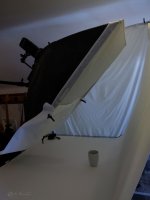
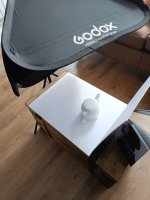
But I decided to get tricky and combine concepts in order to accomplish this with a single 3ft softbox. Here is my setup:
AD200 bare bulb boomed in close. The angle of the softbox is optimal for illuminating the background so that it reflects back to the camera. The angle to the coffee cup is such that much of the light from the softbox will be reflected away from the camera. And the angle to the surface is such that the light will primarily be reflected up into the front of the cup and into the background. So, all things combined, the background should reflect the most light back to the camera and record the brightest.
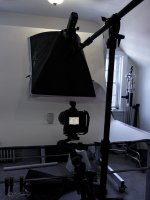
But because the background/surface is diffuse (textured) some light will be reflected in all directions. And because the softbox is a diffused source from close it will throw light at all angles. And because the softbox is so close to the cup, and with the cup being highly reflective, I knew this approach would likely cause overexposure of the cup. So in order to prevent that I placed diffusion paper in a strip across the lower 1/3 of the softbox in order to create a gradient. I didn't even try it without the paper in place. The fact that the two zones are both diffused prevents there being a hard dividing line in the result. There's just enough space for me to photograph under the softbox.
So to summarize, I'm using a relatively large softbox from very close to create soft lighting and fill in shadows; and I have created a gradient to counter falloff.
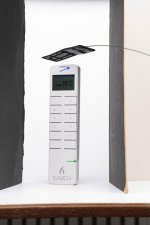
After playing with the power and placement I got this result. I ended up changing the angle of the softbox to be a little more vertical, and placement of the cup moved just a bit. I wound up at 1/2 power because I arbitrarily chose f/8, 1/60, ISO 64 in a rather dim room with no lighting on... but none of that really matters; it's not "a recipe" other than starting with a black image without the softbox enabled.
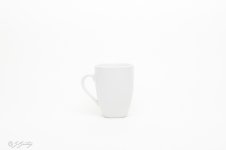
This is a perfectly good result as most things white don't actually measure or appear as pure white; but that's not the challenge.
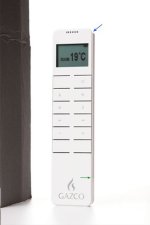
Increasing the exposure gets this after correcting the white balance (it measured a touch blue):

It's there and visible, but just barely. If your monitor is set too bright/uncalibrated you might not be able to see it hardly at all. So now we need to add the negative lighting. I used two small black v-flats made from craft board.
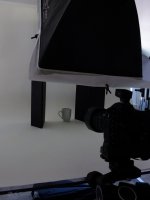
If the cup were a cylinder that may have been enough, but because the cup is curved at the bottom it's not quite right. And the flat on the right is too far forward; it's shadow/reflection doesn't go to the edge of the cup, making that side appear soft/blurry.
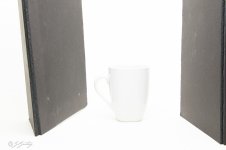
So I added triangles of black card to fill in the shadow to the bottom. It would have been better if I had more diffuse craft paper to use, but apparently I'm out. So I spray painted the back of some extra gold foiled cardstock I had (I don't use gold often). I considered just drawing the shape onto the paper directly with black marker... but I'd likely end up scrapping a lot of the roll. And I also changed the position of the v-flats so that the shadows/reflections are a little denser and all the way to the edge... little changes can make a big difference in the results!
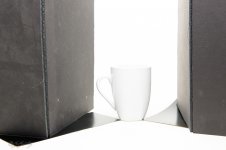
I do believe I have lost just a bit of the lip in the back. I might have been able to retain it if I moved the cup a little farther from the background, but probably not... the angles mean it is almost certainly reflecting the softbox; maybe if I had changed the angle a little more so that the gradient step fell in a little different location. I don't think I could accomplish it with negative lighting in a single image, but probably with compositing. EIther way, highlights/catchlights are supposed to be white.
And notice the reflection of the handle in the cup; technically it's the handle blocking the reflection of the v-flat... convex reflective surfaces are VERY challenging. To prevent that issue I would have needed to rotate the handle well towards the back, or maybe made the v-flat much larger to extend forwards more...I don't really know; I didn't notice it until posting this.
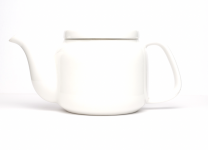
Overall I'm happy with the result as a single unedited image.
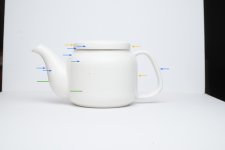
And here's what image review showed; the background overexposed but everything else is good. But histograms/blinkies lie and typically show overexposure if any channel reaches 250, so shooting tethered can help. It also would probably have saved me a few trips up and down the two flights of stairs.
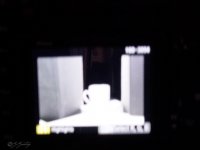
It just occurred to me that I could/should have taken an exposure of just the lighting at a reduced exposure, in order to see it's exact pattern/character and place it optimally. But I didn't; and my studio space is on the third floor...
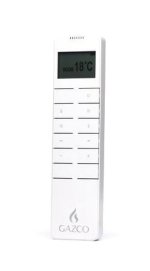
And here's a quick edit in Photoshop.
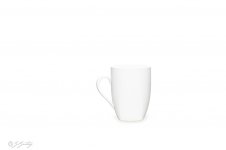
So, that's my attempt. Negative lighting works with anything that reflects light; and if the surface isn't completely black, it reflects light. I'm not particularly recommending the single light solution I used; I just wanted to challenge myself with a new idea/approach to the problem (new to me anyway).
EDIT:
I went back and took a picture of just the light pattern; because honestly, I was curious. It's pretty much exactly what, and where, I wanted.

For this challenge our first task is to record a white background without blowing out the white subject. You might read elsewhere that in order to do that the background needs to be two stops overexposed, and that is correct in essence. But white meters as two stops over middle grey; it is not overexposed. And you do not need/want to blow out the background in most cases; that just causes additional issues like bloom, loss of contrast, etc. However, if the background has a texture (shadows) that is showing you will need to expose those as white and drive the rest into clipping. And similarly, you would need more flash power to drive a grey background into recording as white.
So how to light the background? We have quite a few options:
1. We can use a lack of falloff, and a lack of separation; the exact opposite of the last challenge. If your subject and the background are at essentially the same distance relative to the light, then a white background will expose as white when your subject is properly exposed... This is a one light solution. The problem with this approach is that your light source would need to be massive in order to not be hard. And if it is hard, then it's going to leave a hard shadow on the background... that's not always a negative, but it's not suitable for this challenge.
2. You can place your subject on a platform a good distance in front of the background and then light the background from below... this will create a gradient and uneven illumination which means that the nearer parts will be over illuminated/blown out; that's why you need the distance. You also need separate lighting for the subject.
.
3. You could place your subject on a platform a good distance in front of a softbox you are using as the background... this will typically have somewhat uneven illumination which means that the brighter parts will be over illuminated/blown out; that's why you need the distance. You also need separate lighting for the subject.
4. You can use two softboxes and feather them across the background from opposite sides. By pointing them at opposite sides the background nearer the softbox will be brightest and falloff across the background, and the opposing softbox fills it in creating even illumination at all points. Because this doesn't require excess power, it also doesn't require additional separation/distance from the subject. In my opinion this is probably the best option, especially for larger subjects. You also need separate lighting for the subject.
But I decided to get tricky and combine concepts in order to accomplish this with a single 3ft softbox. Here is my setup:
AD200 bare bulb boomed in close. The angle of the softbox is optimal for illuminating the background so that it reflects back to the camera. The angle to the coffee cup is such that much of the light from the softbox will be reflected away from the camera. And the angle to the surface is such that the light will primarily be reflected up into the front of the cup and into the background. So, all things combined, the background should reflect the most light back to the camera and record the brightest.
But because the background/surface is diffuse (textured) some light will be reflected in all directions. And because the softbox is a diffused source from close it will throw light at all angles. And because the softbox is so close to the cup, and with the cup being highly reflective, I knew this approach would likely cause overexposure of the cup. So in order to prevent that I placed diffusion paper in a strip across the lower 1/3 of the softbox in order to create a gradient. I didn't even try it without the paper in place. The fact that the two zones are both diffused prevents there being a hard dividing line in the result. There's just enough space for me to photograph under the softbox.
So to summarize, I'm using a relatively large softbox from very close to create soft lighting and fill in shadows; and I have created a gradient to counter falloff.
After playing with the power and placement I got this result. I ended up changing the angle of the softbox to be a little more vertical, and placement of the cup moved just a bit. I wound up at 1/2 power because I arbitrarily chose f/8, 1/60, ISO 64 in a rather dim room with no lighting on... but none of that really matters; it's not "a recipe" other than starting with a black image without the softbox enabled.
This is a perfectly good result as most things white don't actually measure or appear as pure white; but that's not the challenge.
Increasing the exposure gets this after correcting the white balance (it measured a touch blue):
It's there and visible, but just barely. If your monitor is set too bright/uncalibrated you might not be able to see it hardly at all. So now we need to add the negative lighting. I used two small black v-flats made from craft board.
If the cup were a cylinder that may have been enough, but because the cup is curved at the bottom it's not quite right. And the flat on the right is too far forward; it's shadow/reflection doesn't go to the edge of the cup, making that side appear soft/blurry.
So I added triangles of black card to fill in the shadow to the bottom. It would have been better if I had more diffuse craft paper to use, but apparently I'm out. So I spray painted the back of some extra gold foiled cardstock I had (I don't use gold often). I considered just drawing the shape onto the paper directly with black marker... but I'd likely end up scrapping a lot of the roll. And I also changed the position of the v-flats so that the shadows/reflections are a little denser and all the way to the edge... little changes can make a big difference in the results!
I do believe I have lost just a bit of the lip in the back. I might have been able to retain it if I moved the cup a little farther from the background, but probably not... the angles mean it is almost certainly reflecting the softbox; maybe if I had changed the angle a little more so that the gradient step fell in a little different location. I don't think I could accomplish it with negative lighting in a single image, but probably with compositing. EIther way, highlights/catchlights are supposed to be white.
And notice the reflection of the handle in the cup; technically it's the handle blocking the reflection of the v-flat... convex reflective surfaces are VERY challenging. To prevent that issue I would have needed to rotate the handle well towards the back, or maybe made the v-flat much larger to extend forwards more...I don't really know; I didn't notice it until posting this.
Overall I'm happy with the result as a single unedited image.
And here's what image review showed; the background overexposed but everything else is good. But histograms/blinkies lie and typically show overexposure if any channel reaches 250, so shooting tethered can help. It also would probably have saved me a few trips up and down the two flights of stairs.
It just occurred to me that I could/should have taken an exposure of just the lighting at a reduced exposure, in order to see it's exact pattern/character and place it optimally. But I didn't; and my studio space is on the third floor...
And here's a quick edit in Photoshop.
So, that's my attempt. Negative lighting works with anything that reflects light; and if the surface isn't completely black, it reflects light. I'm not particularly recommending the single light solution I used; I just wanted to challenge myself with a new idea/approach to the problem (new to me anyway).
EDIT:
I went back and took a picture of just the light pattern; because honestly, I was curious. It's pretty much exactly what, and where, I wanted.
Last edited:


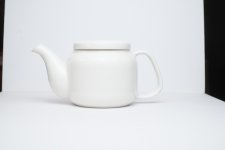
 ...)
...)