
Lightroom camera profiles

Messages
459
Edit My Images
No
So this is a bit of a convoluted question but I used to use capture one but I can’t justify the price so I have crawled back to Lightroom.
For all my black and white I use nik silver fx and for all my colour I use mastin labs Kodak pack. Unless it’s a landscape.

So when in capture one under the drop down where you can select the in camera profiles, for Fuji velvia, provia etc) it also had a neutral option. I forget what it was called, maybe it was called flat?) but essentially it’s the raw photo with no profile applied. They look terrible but they have the best base to use the Mastin land and silver fx.

On Lightroom this profile doesn’t seem to exist. It’s not the end of the world but it is a pain, but means I have to quite drastically reduce the contrast and vibrancy of every colour photo after the Mastin preset is applied. Black and white works well but can still be over contrasty.

Does anyone know if there is anything hidden in lightrooms settings that does the same thing? I may end up email Mastin labs but I’m surprised there isn’t this option in Lightroom
 
So this is a bit of a convoluted question but I used to use capture one but I can’t justify the price so I have crawled back to Lightroom.
For all my black and white I use nik silver fx and for all my colour I use mastin labs Kodak pack. Unless it’s a landscape.

So when in capture one under the drop down where you can select the in camera profiles, for Fuji velvia, provia etc) it also had a neutral option. I forget what it was called, maybe it was called flat?) but essentially it’s the raw photo with no profile applied. They look terrible but they have the best base to use the Mastin land and silver fx.

On Lightroom this profile doesn’t seem to exist. It’s not the end of the world but it is a pain, but means I have to quite drastically reduce the contrast and vibrancy of every colour photo after the Mastin preset is applied. Black and white works well but can still be over contrasty.

Does anyone know if there is anything hidden in Lightroom's settings that does the same thing? I may end up email Mastin labs but I’m surprised there isn’t this option in Lightroom
You should be seeing an Adobe Neutral in the profile drop-down list, but that still isn't all that flat. If you click on the four-square icon beside the profile field you should get a list of Creative profiles, which might have a flatter option.

I find all the Adobe options too contrasty and saturated, and I have added linear profiles to LR, but I would be surprised if Mastin Labs need this to work as intended. Maybe you have just got used to the results you have been getting from C1.

In Capture One, the film emulations "For Fuji only" are in the curve options and the files listed are the curves Fuji led the development on.

The non Fuji options in the list are:

Auto (this automatically selects the Fuji film emulation you used in the camera)

The following three are the options that C1 offered before they teamed up with Fuji, and developed entirely by C1.

Film extra shadow
Film standard
Linear

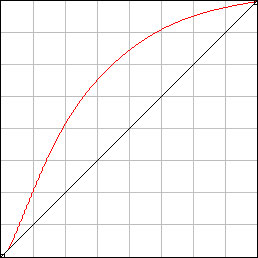
The linear is the flattest and is my starting point in C1, as I find it easier to add contrast than take it away. Not everyone likes to work that way

Lightroom doesn't offer a linear profile, and I created linear profiles for LR. However, you can download linear profiles for LR from here.


You need to go through the payment system as that is how Tony sends them out, but there is no charge.

Once you have them, you can tell LR to automatically load them when you open a file.

This might be worth a try, if you can't get the results you want from LR.
 
You should be seeing an Adobe Neutral in the profile drop-down list, but that still isn't all that flat. If you click on the four-square icon beside the profile field you should get a list of Creative profiles, which might have a flatter option.

I find all the Adobe options too contrasty and saturated, and I have added linear profiles to LR, but I would be surprised if Mastin Labs need this to work as intended. Maybe you have just got used to the results you have been getting from C1.

In Capture One, the film emulations "For Fuji only" are in the curve options and the files listed are the curves Fuji led the development on.

The non Fuji options in the list are:

Auto (this automatically selects the Fuji film emulation you used in the camera)

The following three are the options that C1 offered before they teamed up with Fuji, and developed entirely by C1.

Film extra shadow
Film standard
Linear

The linear is the flattest and is my starting point in C1, as I find it easier to add contrast than take it away. Not everyone likes to work that way

Lightroom doesn't offer a linear profile, and I created linear profiles for LR. However, you can download linear profiles for LR from here.


You need to go through the payment system as that is how Tony sends them out, but there is no charge.

Once you have them, you can tell LR to automatically load them when you open a file.

This might be worth a try, if you can't get the results you want from LR.
Linear that’s what it was called!
I think it might be a Fuji issue. I used to have the Sony a6000 and didn’t have this problem. It also has the Fuji “worm” issue unless you remove all sharpening within Lightroom. Unless I go back to capture 1 it’s making me think about going back to Sony to be honest.

Thanks, I’ll have a look. I already have one that removes all noise reduction and sharpening on import
 
Back
Top