So this is a bit of a convoluted question but I used to use capture one but I can’t justify the price so I have crawled back to Lightroom.
For all my black and white I use nik silver fx and for all my colour I use mastin labs Kodak pack. Unless it’s a landscape.
So when in capture one under the drop down where you can select the in camera profiles, for Fuji velvia, provia etc) it also had a neutral option. I forget what it was called, maybe it was called flat?) but essentially it’s the raw photo with no profile applied. They look terrible but they have the best base to use the Mastin land and silver fx.
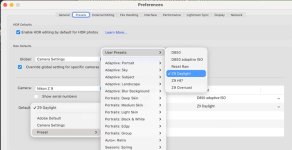
On Lightroom this profile doesn’t seem to exist. It’s not the end of the world but it is a pain, but means I have to quite drastically reduce the contrast and vibrancy of every colour photo after the Mastin preset is applied. Black and white works well but can still be over contrasty.
Does anyone know if there is anything hidden in lightrooms settings that does the same thing? I may end up email Mastin labs but I’m surprised there isn’t this option in Lightroom
For all my black and white I use nik silver fx and for all my colour I use mastin labs Kodak pack. Unless it’s a landscape.
So when in capture one under the drop down where you can select the in camera profiles, for Fuji velvia, provia etc) it also had a neutral option. I forget what it was called, maybe it was called flat?) but essentially it’s the raw photo with no profile applied. They look terrible but they have the best base to use the Mastin land and silver fx.
On Lightroom this profile doesn’t seem to exist. It’s not the end of the world but it is a pain, but means I have to quite drastically reduce the contrast and vibrancy of every colour photo after the Mastin preset is applied. Black and white works well but can still be over contrasty.
Does anyone know if there is anything hidden in lightrooms settings that does the same thing? I may end up email Mastin labs but I’m surprised there isn’t this option in Lightroom