

You are using an out of date browser. It may not display this or other websites correctly.
You should upgrade or use an alternative browser.
You should upgrade or use an alternative browser.
Liquid cooling can be addictive
- Thread starter Rob 80386
- Start date


OP

- Messages
- 6,385
- Name
- Emily
- Edit My Images
- No
I've considered water cooling a few times but not sure it's worth it for the money when all I'm looking for is a quieter pc.
it's worth it, if you do it right.
my system is very quiet, in fact the hard drive makes more noise than the fans and the pumps


- Messages
- 30,364
- Name
- Neil
- Edit My Images
- No
Water .......electricity........
you can get non-conductive fluid these days

- Messages
- 2,921
- Name
- Chris
- Edit My Images
- Yes
Mine started to leak after a year - the block on the CPU for some reason began to seep. Took a lot of work to repair it - getting the right sized connectors was a pain... I also note now that the inside of my lovely fluoro green pipes is beginning to get coated with some nasty gunk... As though there's some kind of biological matter growing in there... Time to change the anti-freeze I think!

OP
- Messages
- 6,385
- Name
- Emily
- Edit My Images
- No
There will be stuff growing in it you need to put an additive into the water when you first fill it.
When I first filled that system, I used a bowl of distilled water with algea growth inhibitor added to it, then placed a piece of gauze over the open end of the tube that was in the water to filter the water entering the loop, when all the air had escaped I then took of the gauze and reconnected the return hose to the block completely sealing it.
did the same for both loops

cowasaki
TPer Emeritus
- Messages
- 19,708
- Name
- Darren
- Edit My Images
- Yes
I did it a few years ago but the industry was not very mature back then and the bits did not work well together and the pump was a fish tank pump which was noisy. It all worked and was so efficient and yes I would do it again but I don't have any plans to replace my PC at the moment. I run a dual 2.66 pentium 4 overclocked to 3.66 with an efficient cooler!
I really like the look of liquid cooling which is ultimately cool.
I really like the look of liquid cooling which is ultimately cool.
- Messages
- 2,921
- Name
- Chris
- Edit My Images
- Yes
There will be stuff growing in it you need to put an additive into the water when you first fill it.
It's supposed to have the additive built into the coolant according to the bottle
cowasaki
TPer Emeritus
- Messages
- 19,708
- Name
- Darren
- Edit My Images
- Yes
PC users !!!!
Get yourself a mac and a water pistol (if you want to play)
Or a water cooled G5 mac pro - Now that is a computer with serious cooling issues
- Messages
- 30,364
- Name
- Neil
- Edit My Images
- No
Or a water cooled G5 mac pro - Now that is a computer with serious cooling issues

i thought there was something seriously wrong when i first came across a G5. but i was quickly told the heat coming out of it was normal lol
cowasaki
TPer Emeritus
- Messages
- 19,708
- Name
- Darren
- Edit My Images
- Yes
i thought there was something seriously wrong when i first came across a G5. but i was quickly told the heat coming out of it was normal lol
I have only used one, it was in an office and it gave off more heat than the fan heater!!! It is absolutely no wonder that Apple had to switch to Intel processors the Gx range was going nowhere if they couldn't fix the heat issues (which they couldn't!)
OP
- Messages
- 6,385
- Name
- Emily
- Edit My Images
- No
Or a water cooled G5 mac pro - Now that is a computer with serious cooling issues
The Liquid cooled G5's had a problem with leaking and blowing up the power supply / logic board.
The problem from what i've read was down to 2 things....
1. Wrong type of coolant, ethylene glycol (which is abrasive and attacks the rubber O rings)
2. Mixed Metals, Aluminum CPU waterblock with a copper Rad (causes galvanic corrosion)
Apple have now, changed the design of their heat exchanger so it now has less chance of leaking

- Messages
- 1,147
- Name
- Adam
- Edit My Images
- No
i think there were 2 liquid cooled G5's
the 2.7 twin processor from early 2005 & the 2.5 Quad core from late 2005
as was mentioned earlier the liquid cooling wasn't without its problems back then & even a slight leak ruined processors logic boards & power supplys
i can remember seeing a video on youtube showing the 5 different cooloing zones with some having intake & exhaust fans
the noisiest fan on mine is the one on the geforce 7800GT graphics card i'm running
you get a quick look onthis short clip i found http://www.youtube.com/watch?v=oTR40MOJJV4
lovely looking machine though & if you get one of the late ones still very capable. the last true macs before they went intel. that must grant them classis status
i need to get a decent monitor for mine & i'll start using it again
the 2.7 twin processor from early 2005 & the 2.5 Quad core from late 2005
as was mentioned earlier the liquid cooling wasn't without its problems back then & even a slight leak ruined processors logic boards & power supplys
i can remember seeing a video on youtube showing the 5 different cooloing zones with some having intake & exhaust fans
the noisiest fan on mine is the one on the geforce 7800GT graphics card i'm running
you get a quick look onthis short clip i found http://www.youtube.com/watch?v=oTR40MOJJV4
lovely looking machine though & if you get one of the late ones still very capable. the last true macs before they went intel. that must grant them classis status
i need to get a decent monitor for mine & i'll start using it again
OP
- Messages
- 6,385
- Name
- Emily
- Edit My Images
- No
what case is that Rob?
The case i'm using is a Coolermaster Cosmos S
That reminds me, I must sort out the cable management

dod
TPer Emeritus
- Messages
- 16,680
- Name
- Ebenezer McScrooge III
- Edit My Images
- Yes
The case i'm using is a Coolermaster Cosmos S
Thanks, like that, plenty of space
OP
- Messages
- 6,385
- Name
- Emily
- Edit My Images
- No
Thanks, like that, plenty of space
I have some hi res images of my install, really shows how big the case is


- Messages
- 5,000
- Edit My Images
- Yes
I can't see what all the fuss is about watercooling a computer - it ruined one of mine when I put it in the bath - and fused all the lights!
- Messages
- 766
- Name
- The Rock Star Formally Known As Dawson
- Edit My Images
- Yes
God thats a beauty! havent kitted a pc up like that since I left college
Only niggle, the PSU is at the bottom, I hope your running on a non conductive coolant or the slightest leak and you are going to get one big bang!
Only niggle, the PSU is at the bottom, I hope your running on a non conductive coolant or the slightest leak and you are going to get one big bang!

- Messages
- 214
- Edit My Images
- No
Great to see some water cooling! This is a pic of mine back in 2005

I'm a mac man these days but have been tempted to get some i7 4ghz overclocked goodness!!
I'm a mac man these days but have been tempted to get some i7 4ghz overclocked goodness!!
Hi Rob, what spec is the PC and what CPU temp does it end up running with watercooling? I am overclocked on mine but running air cooled and wondering if water will give me a temp benefit or is it just noise? My PC is very silent anyway. thanks
Will give you both although it really depends on the rest of your components and whether they are up to the task.
Good watercooling can drop most CPU temps by 10c easily sometimes more.

- Messages
- 2,671
- Edit My Images
- Yes
Will give you both although it really depends on the rest of your components and whether they are up to the task.
Good watercooling can drop most CPU temps by 10c easily sometimes more.
Thanks mate, that sounds good, been into computers for years and built this one, spent a fortune lol. Currently running a Coolermaster 832 case, Core2Duo 8500 o/c to 4.2ghz, 4gb Corsair dominator ram o/c'd and a Nvidia 280GTX. CPU currently sits at about 35 degrees idle up to about 45max load on air cooling. PC is very quiet due to high cfm, lo noise fans.
dod
TPer Emeritus
- Messages
- 16,680
- Name
- Ebenezer McScrooge III
- Edit My Images
- Yes
I can't see what all the fuss is about watercooling a computer - it ruined one of mine when I put it in the bath - and fused all the lights!
there's a huge thread on a forum somewhere which starts off along those lines
I'll see if I can find it
- Messages
- 214
- Edit My Images
- No
The water cooling will keep the temps low even when overclocking. If your running stable with those temps its probably not worth upgrading unless you just fancy it 
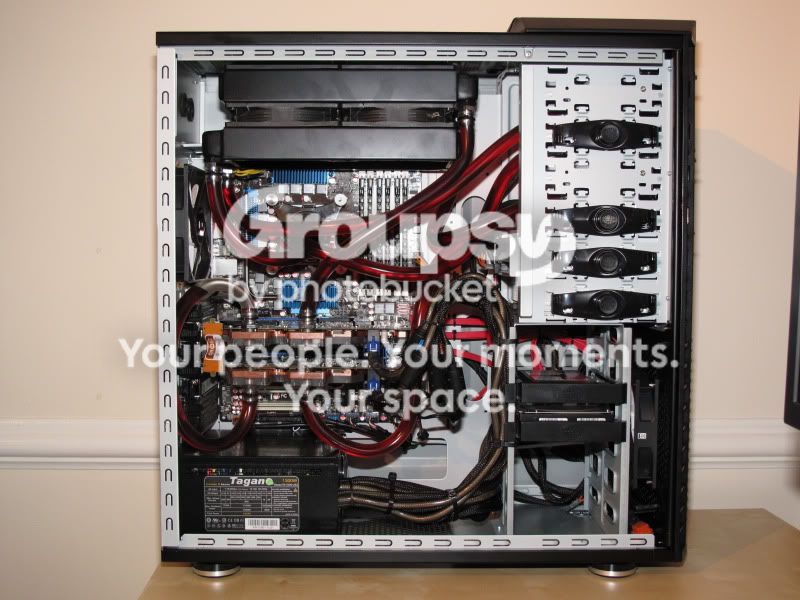

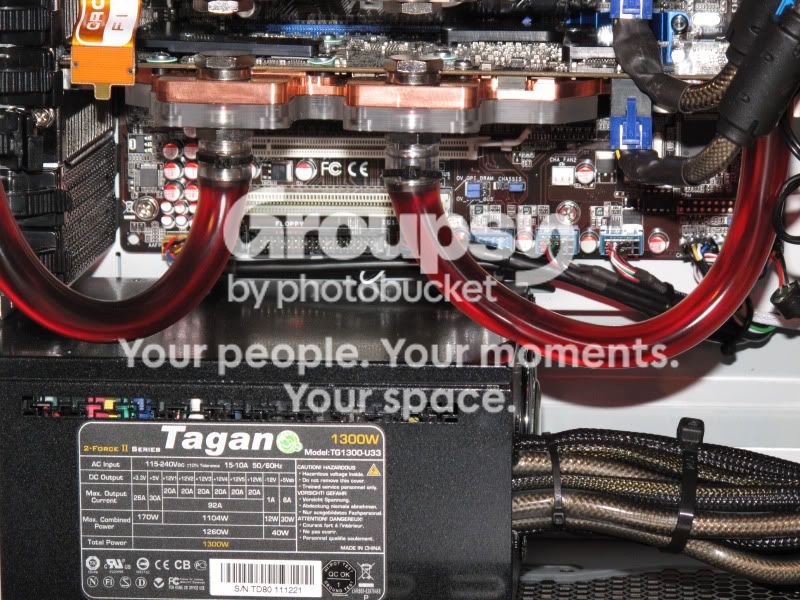

The case i'm using is a Coolermaster Cosmos S
That reminds me, I must sort out the cable management
Fantastic choice of case sir! My monster is housed in one of those and I love it.
I am running the NZXT fan sentry in mine and it keeps the fans even quieter when running normally and using most apps, then starts ramping up the fan speed when the temp starts rising, eg, playing games, not that I get much time for that anymore
I also definately recommend Cyberpower, I found the service great.
What spec did you go for? i7?
John.
Does that really need a 1300W PSU? Even with two of the highest draw GPU's it's unlikely to need anywhere near 1000Ws let alone 1300.
The price difference between the 1000 and 1300 isn't a great deal and when you start overclocking the CPU, RAM and Graphics cards the power required increases, also gives you the ability to add more drives etc.
I figured better to be safe than sorry when I was asking myself the safe question, then opted for the 1300W :nuts:

- Messages
- 2,859
- Edit My Images
- Yes
The price difference between the 1000 and 1300 isn't a great deal and when you start overclocking the CPU, RAM and Graphics cards the power required increases, also gives you the ability to add more drives etc.
I figured better to be safe than sorry when I was asking myself the safe question, then opted for the 1300W :nuts:
True, but having looked into how much a high spec loaded PC actually uses I've come to the conclusion that companies are just trying to "one up" each other (similar to the pixel race), instead of actually making things people need.
If it was a dual Xeon workstation with 13 drives then I would think differently.
OP
- Messages
- 6,385
- Name
- Emily
- Edit My Images
- No
Fantastic choice of case sir! My monster is housed in one of those and I love it.
I am running the NZXT fan sentry in mine and it keeps the fans even quieter when running normally and using most apps, then starts ramping up the fan speed when the temp starts rising, eg, playing games, not that I get much time for that anymore
I also definately recommend Cyberpower, I found the service great.
What spec did you go for? i7?
John.
Some fantastic builds there, thanks for sharing,
My system specs are as follows......
Motherboard: Asus Rampage Extreme
CPU: Core2 Duo E8400 @ 3.00GHz
Memory: 2GB DDR3 PC8500 1066MHz (soon to be upgraded)
Graphics Cards: ATI 4890 Powercolour series
PCI Cards: Peak Dual Tuner DVB-T card
Sound: PCI-e riser card onboard Creative X-Fi
HDD: 1TB Hitachi 7200RPM
Optical drive: Sony DVD-RW DL
Power supply: CoolerMaster Real Power M850 850W
Operating System: Windows 7 Professional 64 Bit
The CPU temperatures are.......
22 C Idle
25 - 26 C Moderate load
28 - 30 C Heavy load (Thrashing it, ie prime95)
Last edited:

- Messages
- 87
- Name
- Neil
- Edit My Images
- Yes
The basic spec if i remember is i975 @3.33 liquid cooled
Ati Radeon HD4870 x2 liquid cooled
12Gb PC 1600 DDR3 1800Mhz
1300W Tagan power supply
Hitachi 750Gb drive
Kingston 128Gb Solid state drive
Blu ray burner
The photo below show the comp in situ with my NEC multisync 26 inch monitor

Ati Radeon HD4870 x2 liquid cooled
12Gb PC 1600 DDR3 1800Mhz
1300W Tagan power supply
Hitachi 750Gb drive
Kingston 128Gb Solid state drive
Blu ray burner
The photo below show the comp in situ with my NEC multisync 26 inch monitor
- Messages
- 214
- Edit My Images
- No
Neilmac50 that is a sexual system! I love it
I've been out of the overclocking game since that pic in 2005 because of apple but I really would like a system like yours again. Who is the company that made yours then? What was the cost if you don't mind me asking?
With the PSU people commonly underestimate how important this part of the system is. When you start overclocking everything you need a rock solid PSU the will give a constant stable voltage without fluctuating. Its definitely makes sense to get the best you can afford!
I've been out of the overclocking game since that pic in 2005 because of apple but I really would like a system like yours again. Who is the company that made yours then? What was the cost if you don't mind me asking?
With the PSU people commonly underestimate how important this part of the system is. When you start overclocking everything you need a rock solid PSU the will give a constant stable voltage without fluctuating. Its definitely makes sense to get the best you can afford!
- Messages
- 87
- Name
- Neil
- Edit My Images
- Yes
Hello ElegantSpoon the company is;
http://www.cyberpowersystem.co.uk/
I specced the system from them and they recommended certain changes over the phone most helpful,chap called Luke.The system without monitor which I wanted to choose myself from elsewhere was approx £3300.The monitor was a further £800 I think.Neil
http://www.cyberpowersystem.co.uk/
I specced the system from them and they recommended certain changes over the phone most helpful,chap called Luke.The system without monitor which I wanted to choose myself from elsewhere was approx £3300.The monitor was a further £800 I think.Neil
- Messages
- 214
- Edit My Images
- No
Thanx I will check them out!